− 90 −
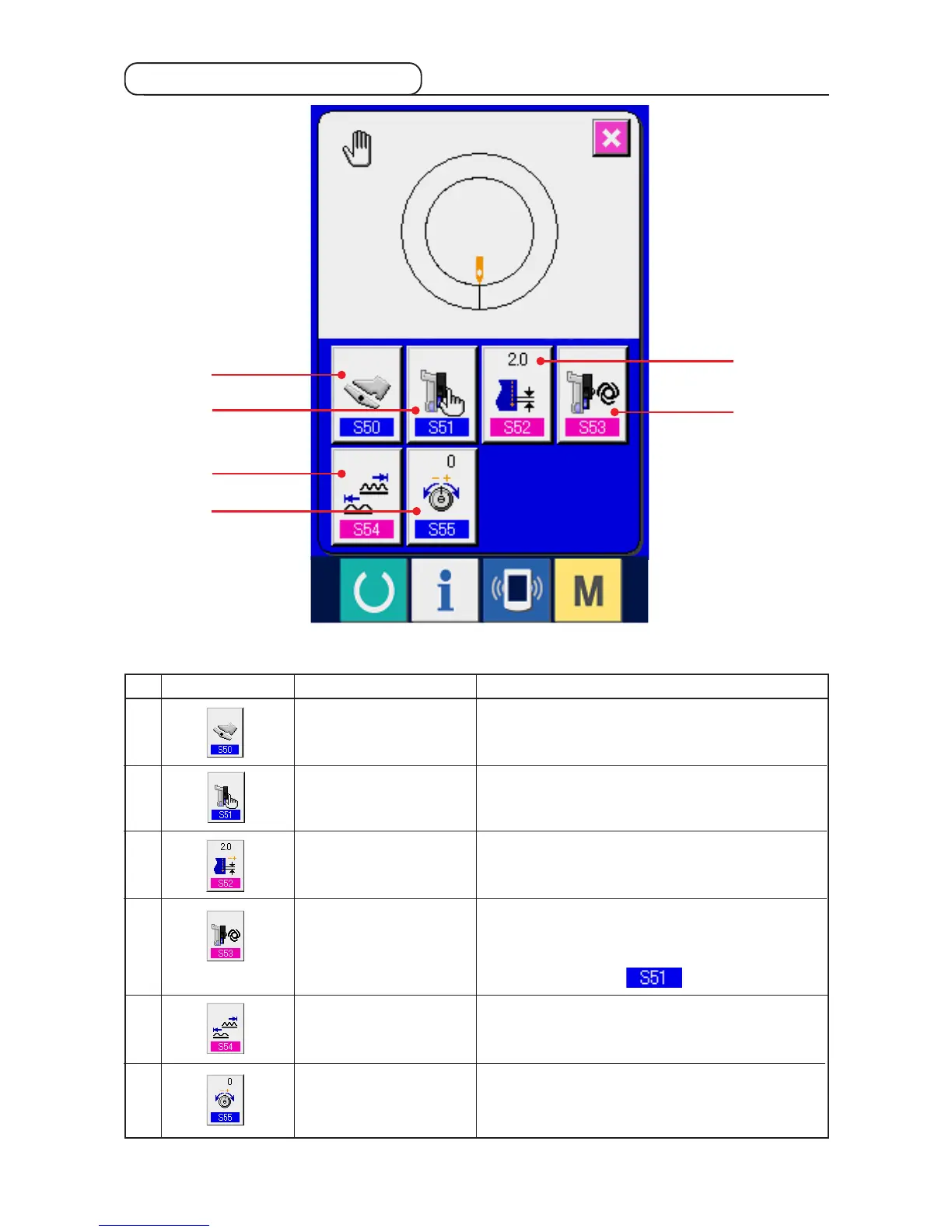
9-3 Details data input screen
1
3
4
2
5
6
AUXILIARY PEDAL
OPERATION MODE
SELECTION button
AUXILIARY FEED MODE
SELECTION button
BASE PITCH SETTING
button
AUXILIARY FEED
INTERLOCK MODE
SETTING button
SHIRRING AMOUNT
RANGE SETTING button
COMPENSATION THREAD
TENSION CHANGE button
1
2
3
4
5
6
When the button is pressed, auxiliary pedal operation mode
selection screen is displayed.
When the button is pressed, auxiliary feed operation mode
selection screen is displayed.
When the button is pressed, base pitch setting screen is
displayed.
When the button is pressed, auxiliary feed interlock mode
setting screen is displayed.
* 1 Display/Non display is changed over according to the
contents of setting of .
When the button is pressed, shirring amount range setting
screen is displayed.
When the button is pressed, compensation thread tension
setting screen is displayed.
No. Button Name of button Description
* 1



 To Next Page