NOTE: Inch and Millimeter modes are independent of each other.
Setting the millimeter mode value will not make the machine cut the
inch equivalent in inch mode. Each mode must be programmed
separately.
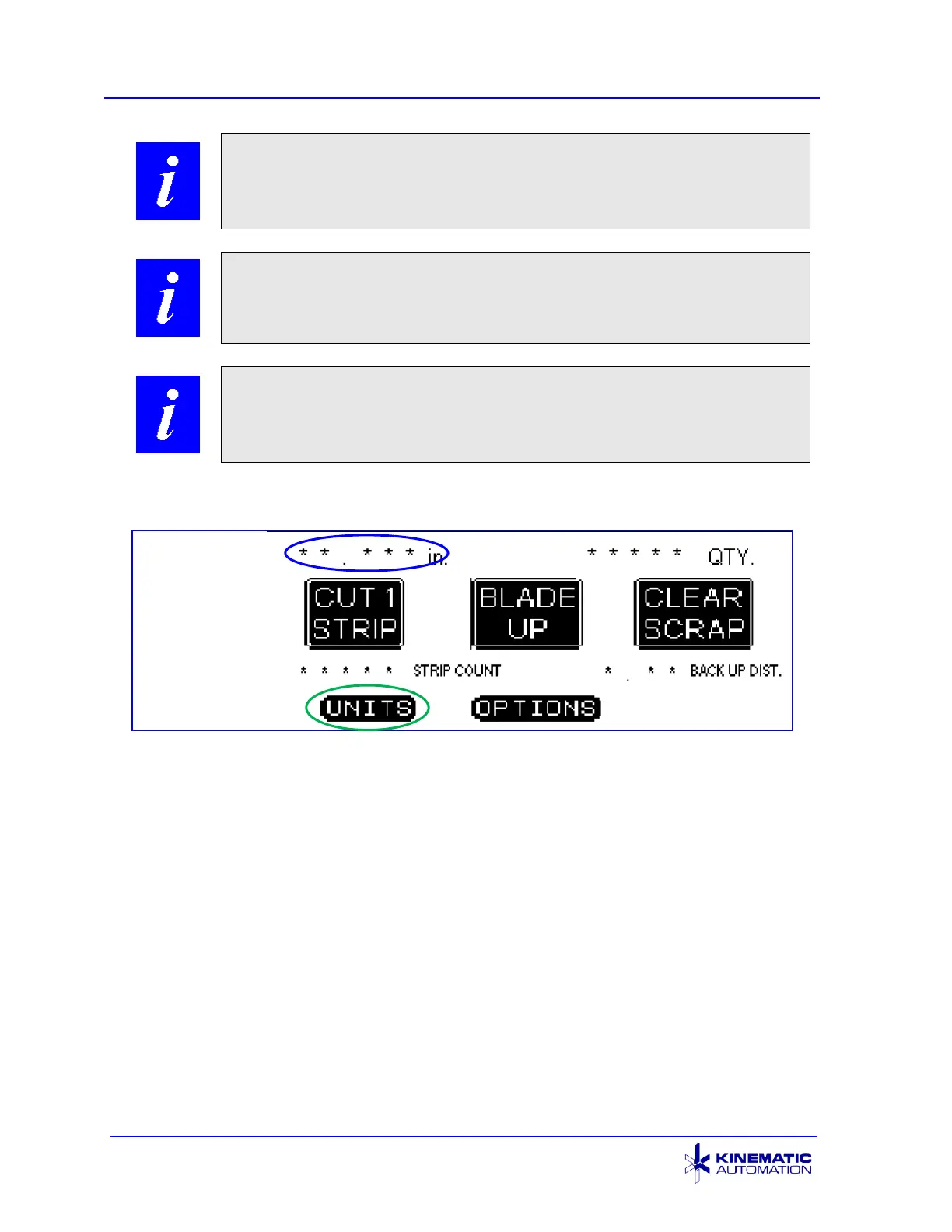
NOTE: The following illustrations use asterisks (*) to indicate the
position of value fields. The equipment will display the values
programmed or derived during operation.
NOTE: The screens are shown as they appear when the machine is
in operation, or ready for operation or maintenance, as required.
The screens appear ‘GRAY-on-GREEN, -AMBER, or -RED’ on the
equipment, but are represented as black and white in this manual.
5.3.2 Main Control Screen
The Main Control Screen appears when the machine has been turned on (the ON
pushbutton is pressed) and all sub-systems have initialized successfully. The
asterisks (*) shown in the value locations are displayed as correct values during
machine operation.
The field in the upper left corner shows the size (in inches or millimeters) of the strip
to be cut. To change the units from inches to millimeters and back, touch this field.
The field in the upper right corner shows the quantity of strips to be cut. Both of
these values are set at the Set Units screen (section 5.3.3). Touch the UNITS
button at the bottom of this screen to open the Set Units screen.
The STRIP COUNT field displays the total of all strips cut in automatic mode (i.e.
strips cut when the CYCLE pushbutton is pressed.) This counter is reset to zero
only when the RESET button on the Options Screen is pressed. See Section 5.3.4.



 To Next Page