Matrix 2360 Programmable Shear User Manual - Section 5
12-092600 A 29
location during an actual run. The asterisks (*) in the value locations are displayed
as numeric values on the equipment while in operation.
When a cycle is interrupted using the CYCLE pushbutton, the internal strip counter
will reset to zero. Pressing CYCLE the next time starts a new run. The new run
starts the strip count at zero and cuts the originally programmed number of strips.
5.3.7 Alert Screens
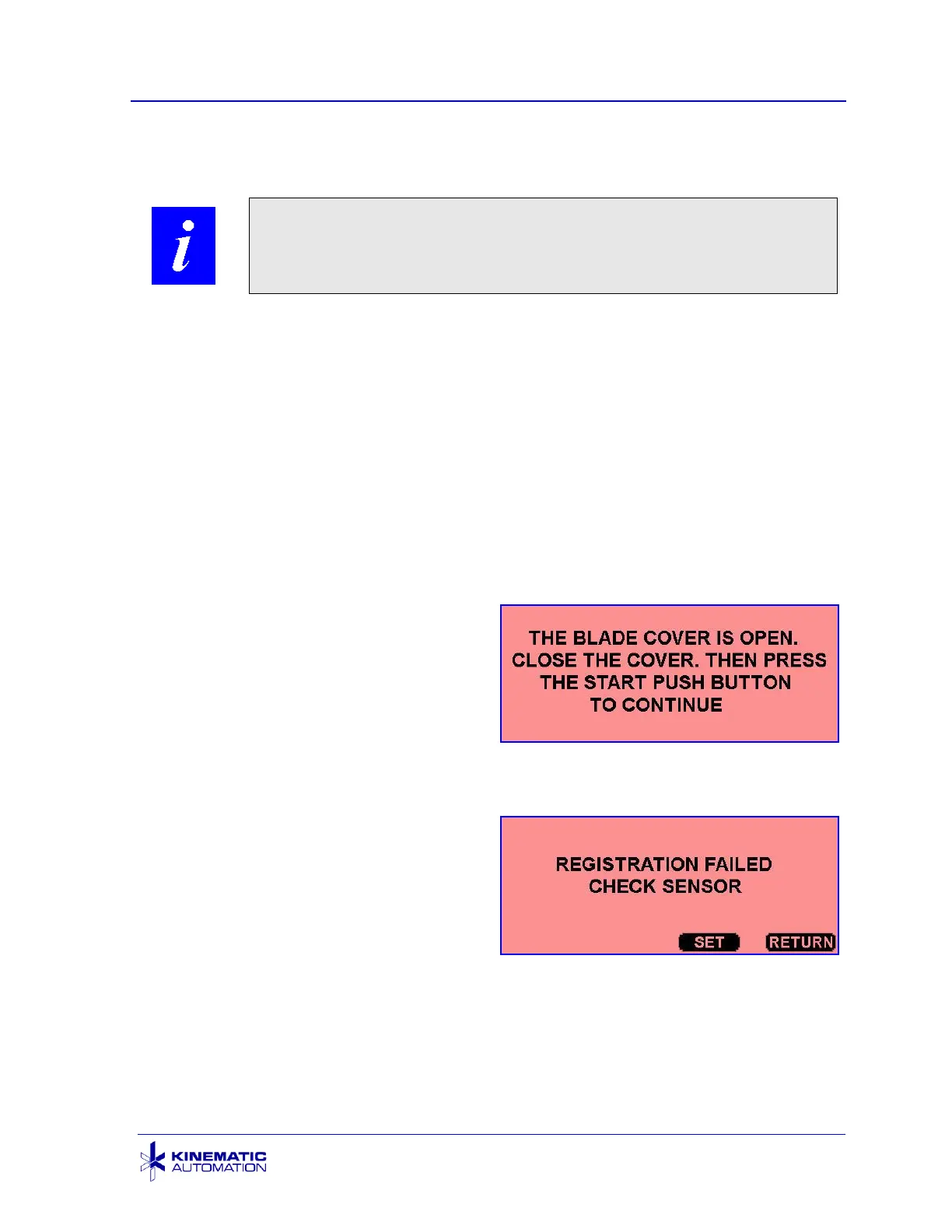
Three alert screens can appear during operation or setup of the machine. The first
two alert screens appear with a red background. The reset alert screen is displayed
with an orange background.
5.3.7.1 ALERT SCREEN: BLADE COVER OPEN
The machine will not initialize or run with
the blade cover open.
5.3.7.2 ALERT SCREEN: REGISTRATION FAILED
This message alerts the operator that the
(optional) Feature Registration Sensor
has failed to detect a feature. This may
be due to a sensor failure, blockage,
incorrect setup, a card feature that is
difficult to detect, incorrect amplifier
setting (see Section 6.3.2), or a damaged
fiber optic.
Touch the SET button to open the SET REGISTRATION SENSOR screen. (See
Section 6.3.2.) This would be done to check and adjust the registration settings for
the material used.



 To Next Page