Matrix 2360 Programmable Shear User Manual - Section 6
52 12-092600 A
6.3.4 Leading Edge Alignment Pointer
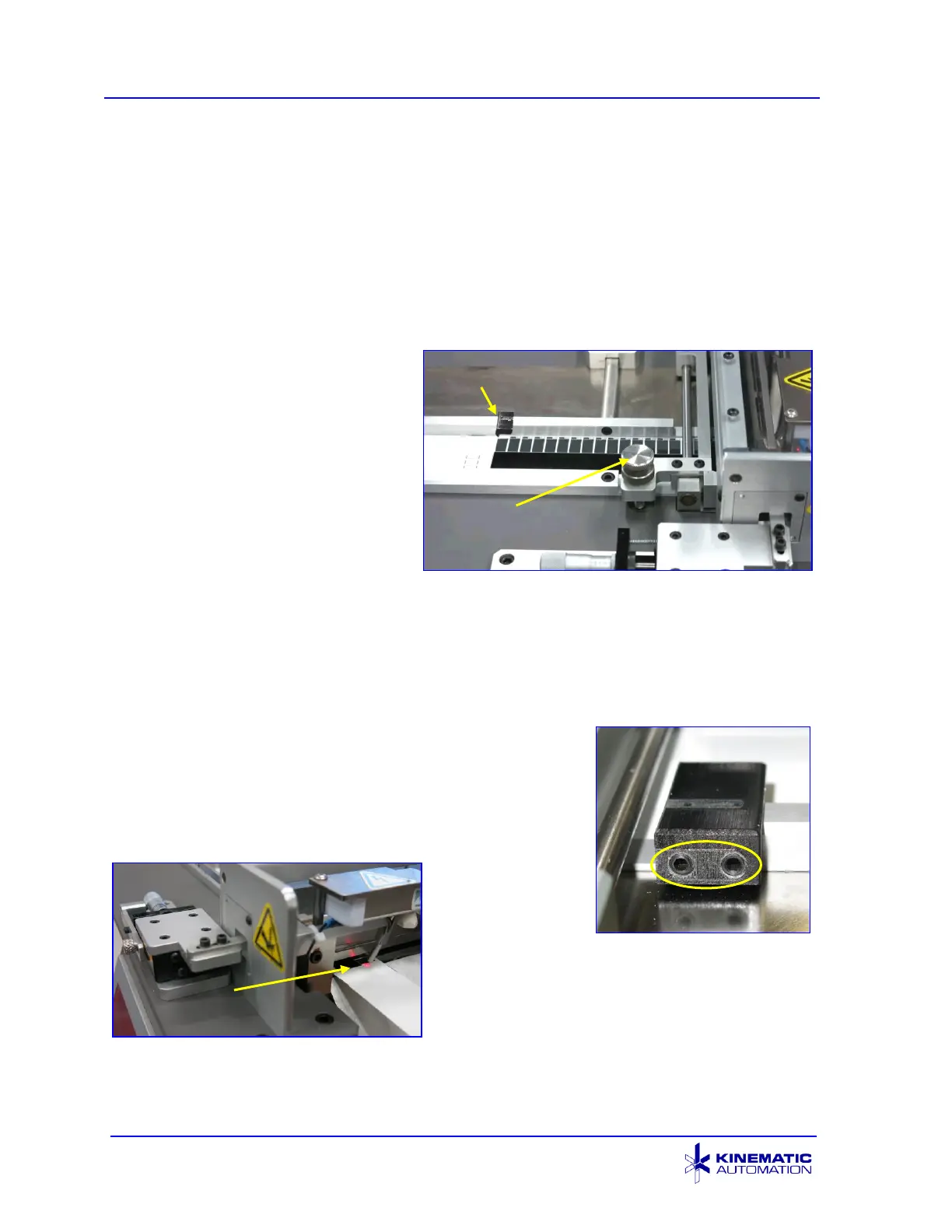
The pointer supplied on the guide rail is used to simplify aligning the card for the first
cut that cuts off the leading edge scrap. Use of this aid places the card in the correct
location for the automatic detection of the remaining registration features even when
the leading edge of the material with the same features varies from card to card. It
has been factory-adjusted to align with a feature on the product supplied to
Kinematic.
To use the pointer, follow these
steps:
1) Press down the tension
adjustment knob to pass the
card between the rollers and
slide the card forward to
visually align the pointer with
the feature on the card used
at factory testing.
2) Press the CUT 1 STRIP
button on the HMI screen to cut off the leading edge of the card. Discard this
piece.
3) Then press the CYCLE button or footswitch to cut the remaining strips.
4) Finally press the CLEAR SCRAP button to eject the trailing edge of the card.
6.3.4.1 Adjusting the Pointer
The pointer is adjustable for various products by
loosening the set screws at the rear of the guide rail.
The tip of the pointer must be above the card, otherwise
it can damage the card as it moves along the track.
Align it so that it
points at a
feature with the
card far enough
forward so that the leading edge registration
feature is within a strip width of the sensor
beam.



 To Next Page