Matrix 2360 Programmable Shear User Manual - Section 7
82 12-092600 A
7.16 Control Panel Switch Replacement
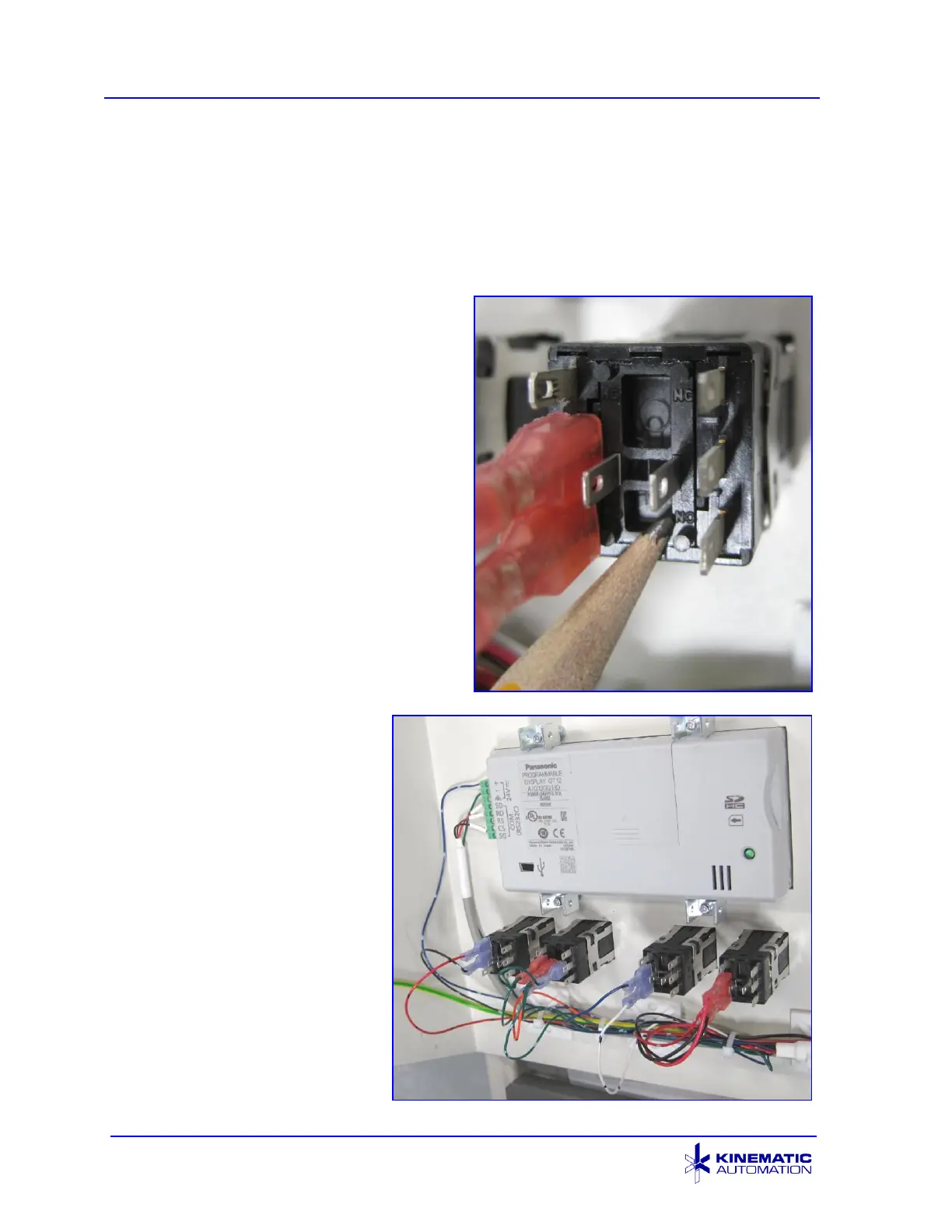
When replacing one of the pushbutton switches on the control panel, it is very
important to mount the switch in the correct orientation so that it will be connected
correctly. These types of switches can be connected for either the “Normally Open”
or “Normally Closed” operation. The system may appear to work if a switch is
connected to the wrong terminals, but it will not function correctly.
The Normally Closed side of the switch is
identified by the letters “NC”. Normally
Open is identified with “NO”. In this
image the pencil tip is pointing at the
Normally Open side of the switch.
It is strongly recommended to install any
replacement switches in the orientation
shown below with the Normally Closed
side closest to the HMI component.
Connect the terminals as shown below.
Refer to the electrical schematic for
details.



 To Next Page