Matrix 2360 Programmable Shear User Manual - Section 6
12-092600 A 49
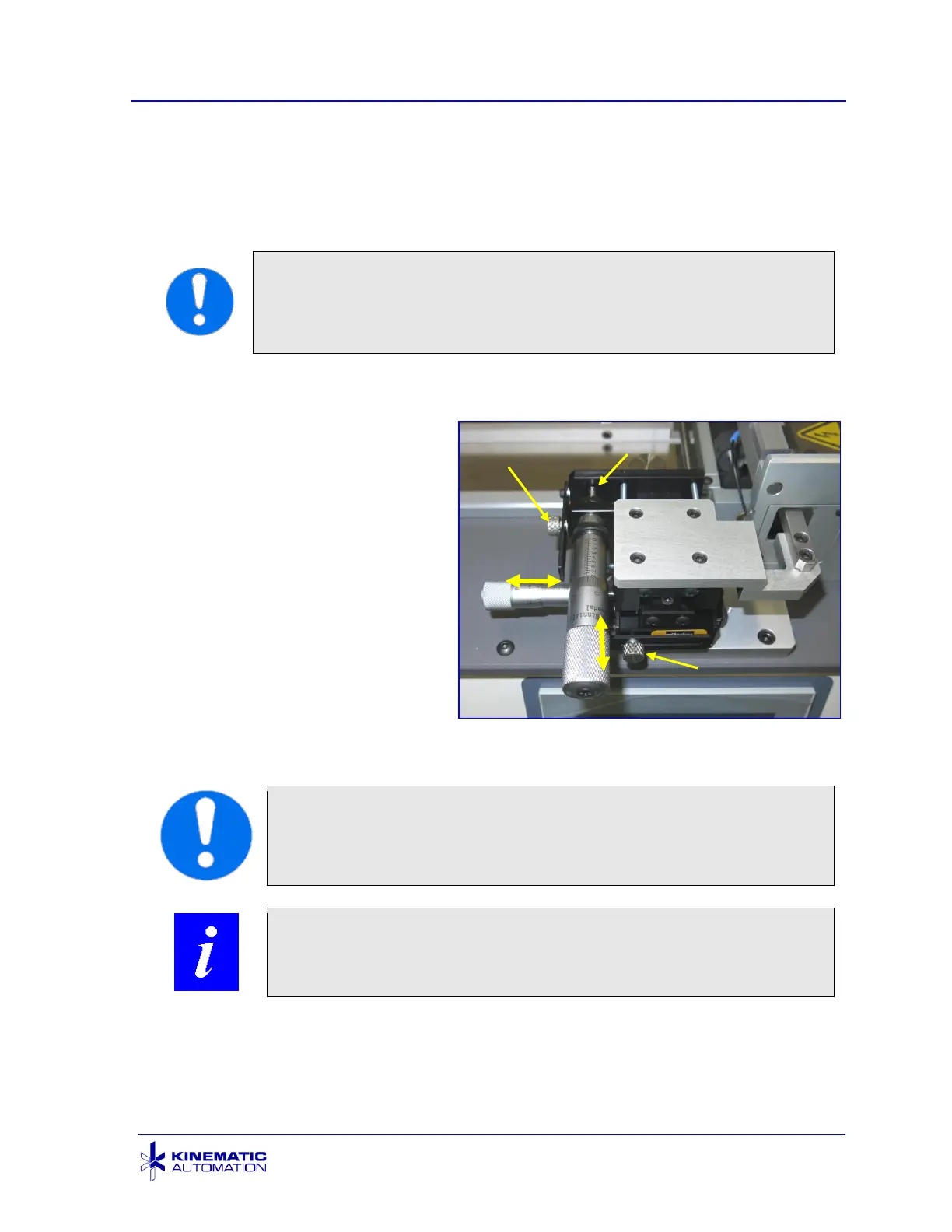
If there are 2 micrometers, the Y-axis movement positions the sensor at a selected
point across the width of the card. It is controlled by adjusting the Y-axis micrometer.
This micrometer has been carefully factory-adjusted for the materials provided. If
the y-axis distance from the registration feature to the edge of the card varies
somewhat, adjust it to be in the middle of the range.
IMPORTANT: Be careful when adjusting the micrometers. Make
sure that the sensor bracket does not interfere with the die block,
the blade, or the pinch roller. It may be preferable to make either
the X or the Y adjustment first depending on clearance.
See the C2360 Feature Registration / Micrometer Settings sheet shipped with the
unit for the factory settings.
1) Make sure that the
micrometer tip is in contact
with its mating surface, before
releasing the knurled knob
lock.
2) Unlock the micrometer using
the knurled knob.
3) Rotate the micrometer to
change the distance.
4) Relock using the knob.
5) Test the registration setting
by cutting strips.
6) Record the setting for future
reference.
IMPORTANT: Always unlock the micrometer with the knurled
knob before adjustment. Secure the lock and record the new
setting after the adjustment is tested.
NOTE: Refer to Section 7.14 for sensor replacement details.



 To Next Page