MDC-7000/7900 Series Chapter 6 Map operation
0093169010-10
6.7 EVENT MKR
EVENT MKR function displays various marks on the designated place, and can utilize it for sign, such
as a destination, a fishery and a caution area. EVENT MKR set can be done by input of Lat/Lon
information or by cursor and ENT key.
There are 10 blocks that can store 100 marks in each block.
Below procedure is to operate [EVENT MKR] menu.
1 Press MENU key to display “Menu”.
Select [MAP] => [EVENT MKR] =>
EVENT MKR: Select the number of the event mark to display. (ALL, 1 to 10, OFF)
EDIT: Input event mark. (CURSOR, BLOCK NUMBER)
MOVE: Revise position of an event mark. (CURSOR, BLOCK NUMBER)
ADD: Add an event mark. (CURSOR, BLOCK NUMBER)
DELETE: Function to delete event mark using cursor and ENT key or BLOCK NUMBER.
CLEAR: Clear all event marks in a given memory block.
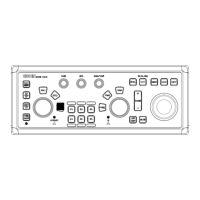
User can designate function key such as [F1] - [F6] to [EVENT CURSOR] or [EVENT OWN] for quick
shortcut to input [EVENT MKR].
Refer to 2.21 Function key usage.
When set [EVENT MKR] by using function key operation, this radar can output Lat/Lon data of EVENT
MKR to external device.
It is necessary to set the output port to output [EVENT MKR] data to external device, following
[MAINTENANCE] menu must be set.
1 Press MENU key to display “Menu”.
Select [MAINTENANCE] => [I/O] => [OUTPUT] => [TLL OUT] => [MARK], and press ENT key.
2 Select [MAINTENANCE] => [I/O] => [OUTPUT] =>
Select [OUTPUT PORT from J3, J5, J6, OP1 and OP2] that is connected to external device.
3 Select [TLL] => set time to [0.1 to 10.0 sec (except 0.0 sec)], and press ENT key.
When pressing function key (EVENT CURSOR or EVENT OWN), this radar outputs the Lat/Lon
data of EVENT by $RATLL sentence.



 To Next Page