Chapter 2 Radar Basic Operation MDC-7000/7900 Series
0093169010-10
2.27 Noise rejection
This radar is equipped with a function that is capable to remove various signals picked up by the radar
such as white noise, and display clean picture.
1 Press MENU key to display “Menu”.
Select [ECHO] => [NOISE REJ] => select [OFF], [1] or [2], and press ENT key.
Noise rejection of [2] setting works more effective than [1].
2.28 Echo color rejection
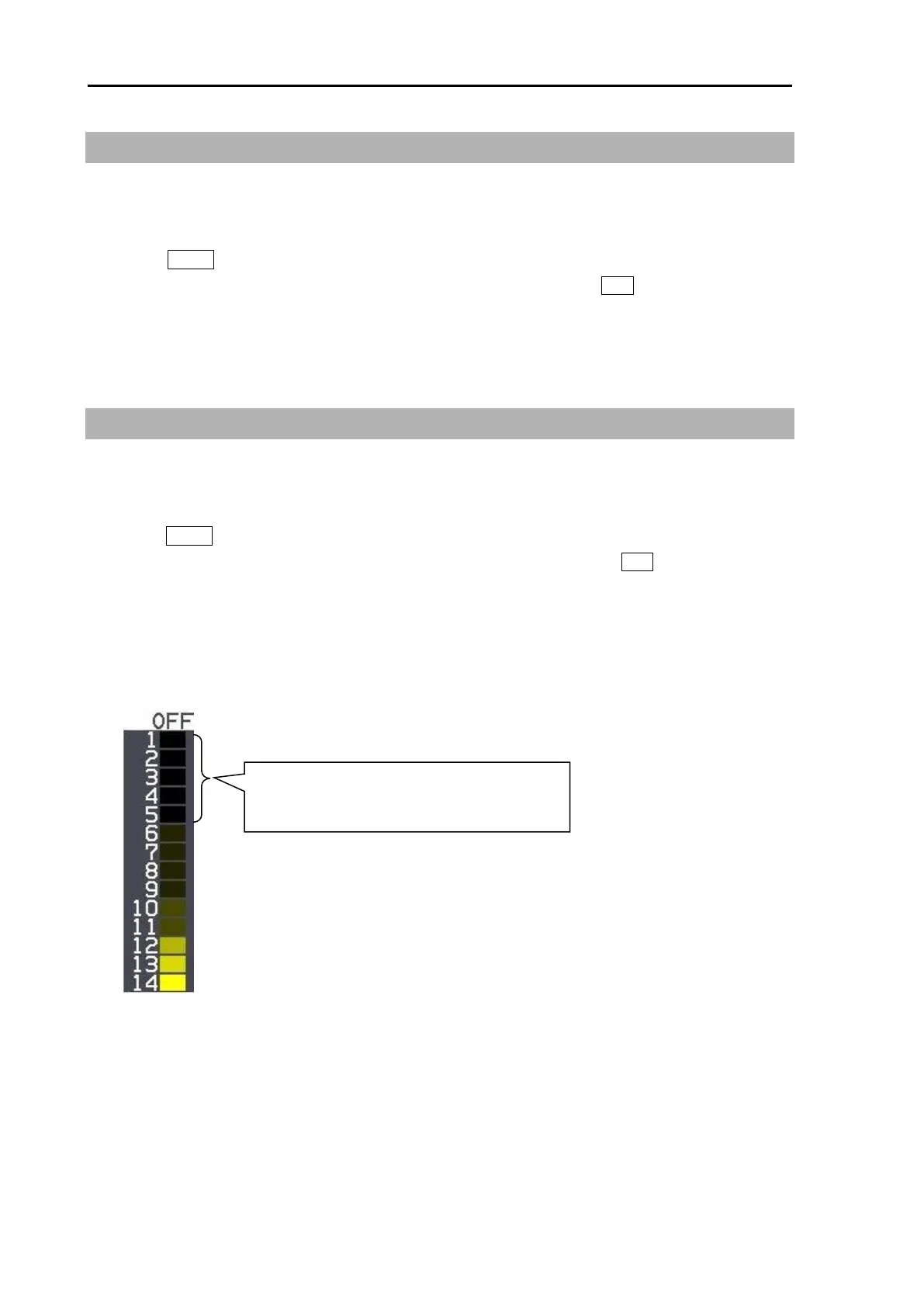
This radar has a function to remove a color selected by menu operation.
This effect is to show the strong signal image clearly and to delete the unwanted signal such as noise.
1 Press MENU key to display “Menu”.
Select [ECHO] => [COLOR REJ] => select [OFF] or [1 to 14], and press ENT key.
Selection value 1: Lowest signal level color
Selection value 14: Highest signal level color
If set at 5, echo colors from 1 to 5 will not be
displayed.



 To Next Page