MDC-7000/7900 Series Chapter 3 Alarm
0093169010-10
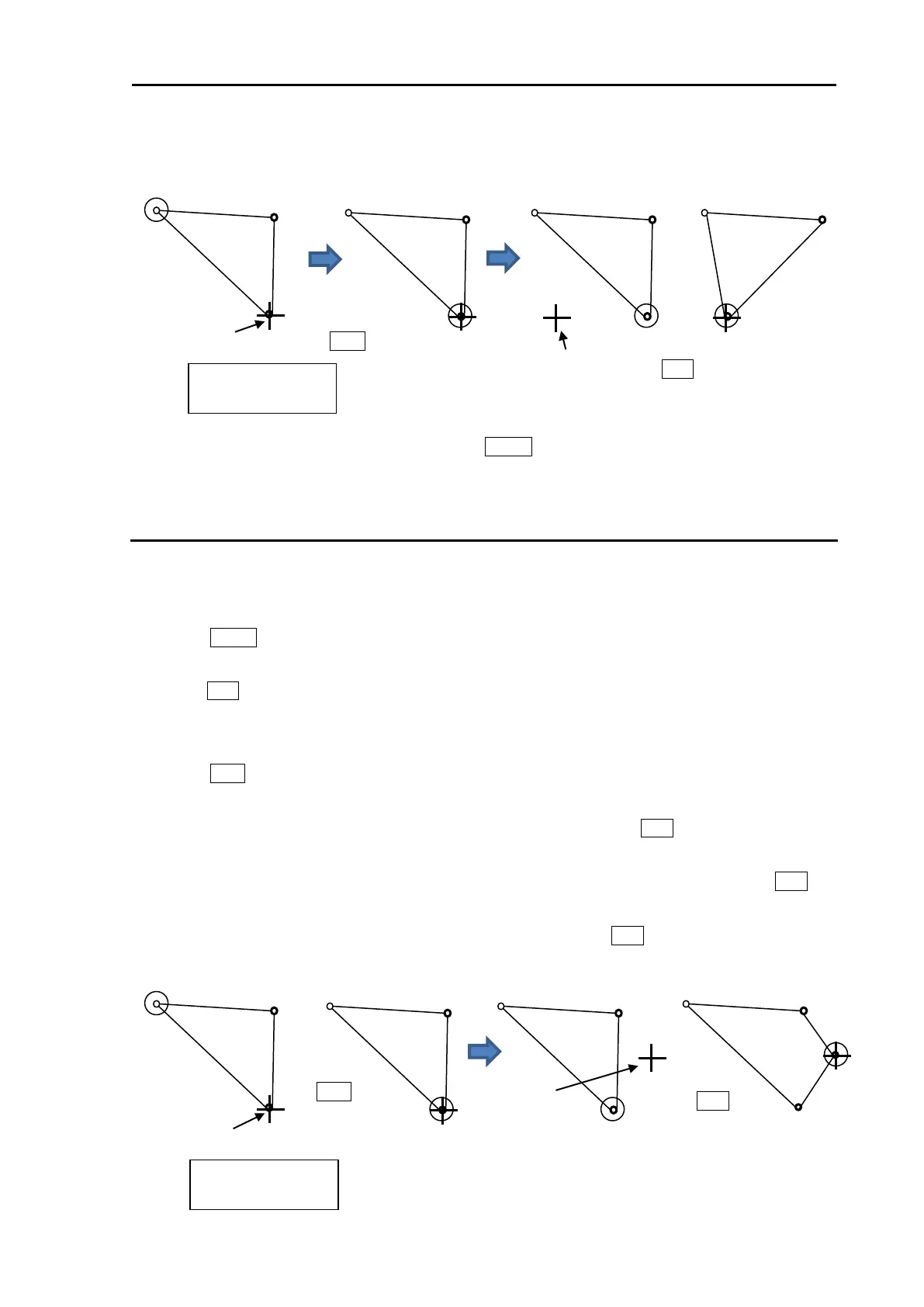
5 Repeat operation of clause 2 to 4 mentioned previously.
6 When move operation is completed, press MENU key, numerical marks on the display will
disappear, and map area alarm function will be active.
How to add data to map area
There are two methods to add map area alarm position. First method is to use cursor, second is to input
latitude/longitude via the menu.
Example: Cursor method
1 Press MENU key to display “Menu”.
Select [ALARM] => [MAP AREA ALARM] => [ADD] => [CURSOR] => select [1 to 10] => [GO], and
press ENT key.
2 Move cursor on the map area mark before which you want to insert new mark, then change color
or delete position data.
3 Press ACQ key, middle circle mark will appear on the selected mark position, and numerical data
information is displayed in the “AREA INFO” at right side on the display.
4 Move cursor to new position where you want to add point, then press ENT key. New position point
will be inserted on the display.
Selected latitude and longitude position data can be changed directly by using cursor and ENT key
by “AREA INFO”. Line color can change directly using cursor by “AREA INFO”. If you want to
delete selected data, move cursor to word “DELETE”, then press ENT key.
x: Block number
(1 to 10)
x: Block number
(1 to 10)








 To Next Page