MDC-7000/7900 Series Chapter 3 Alarm
0093169010-10
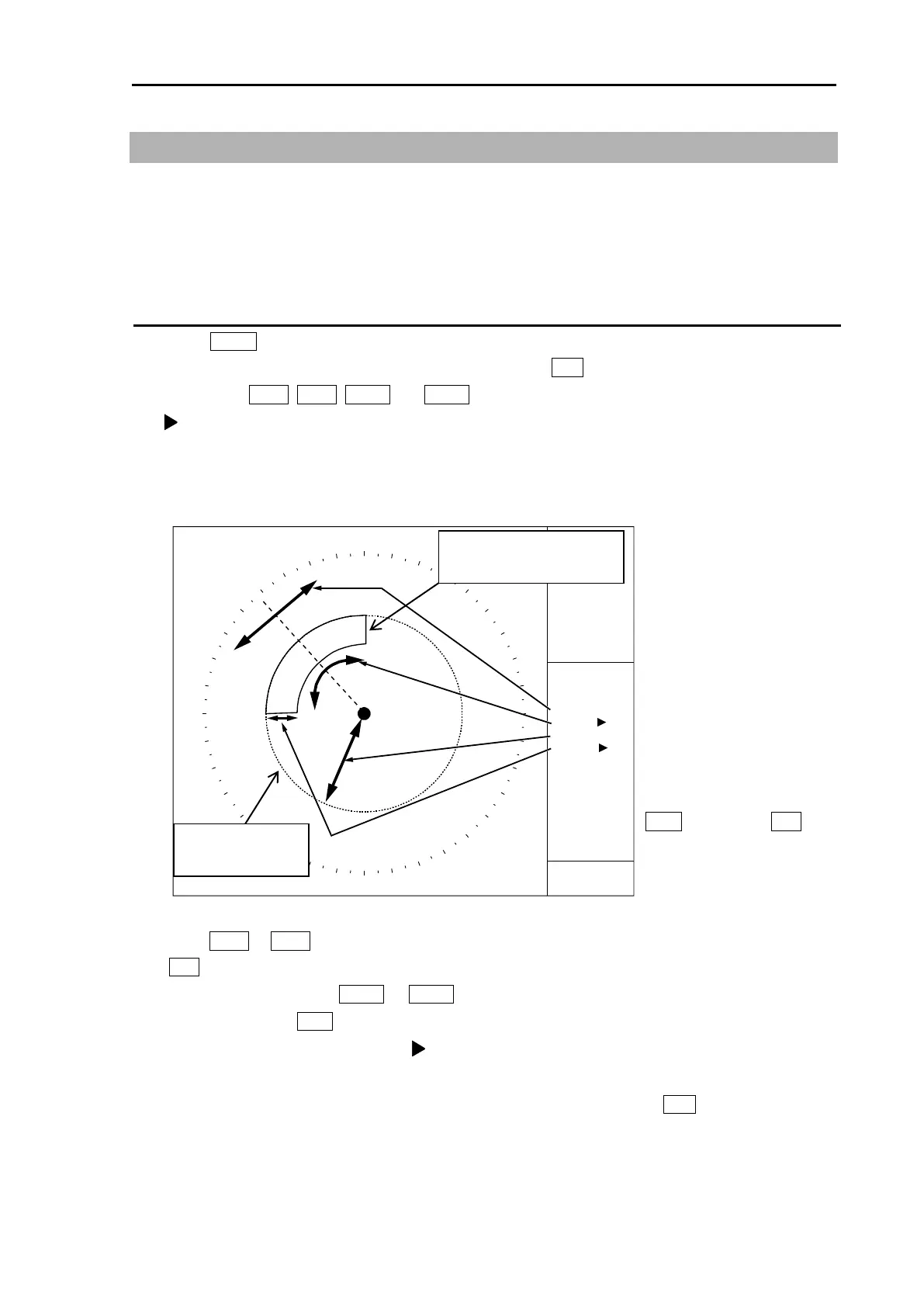
3.3 Guard zone alarm
Guard zone alarm is an alarm system using TT (ARPA) tracked target or an AIS active target signal.
If a TT (ARPA) tracked target or an AIS active target enters a guard zone, then a large, red symbol is
displayed and [ALARM] is generated.
If a TT (ARPA) un-tracked target or an AIS sleeping target enters there, then no alarm is generated.
How to set guard zone alarm
1 Press MENU key to display “Menu”.
Select [ALARM] => [GUARD ZONE] => [ON], and press ENT key.
The color of EBL1, EBL2, VRM1 and VRM2 key’s light turns red.
symbol will be shown at the left of numerical indication of [BRG REL] or [WIDTH] and [RNG] or
[DEPTH] menu.
Blue dashed line of guard zone alarm area and orange dashed circle line will be displayed on the
display.
2 Press EBL1 or EBL2 key, and Select an item to be set between [BRG REL] and [WIDTH] by using
EBL knob.
In the same way, press VRM1 or VRM2 key, and select an item to be set between [RNG] and
[DEPTH] by using VRM knob.
The selected item is shown with a symbol at the left of numerical indication at the guard zone
alarm in the menu display.
2 When the setting of the guard zone alarm area is completed, then press ENT key, orange dashed
circle line will disappear, and guard zone area alarm will be activated.
Note: If the guard zone alarm area is set in the whole circumference, [WIDTH] needs to be set the 0.0˚
or 360.0˚.
BRG
ECHO ALARM
DEPTH
WIDTH
RNG
118°
2NM
45°
6NM
VRM knob and EBL
knob are used for
setup.
Blue dashed line of
guard zone alarm area
Orange dashed
circle line








 To Next Page