Chapter 2 Radar Basic Operation MDC-7000/7900 Series
0093169010-10
[TIME]: This is to set up the time of the trail to be displayed.
Initial set up time: OFF, 30sec, 1min, 3min, 6min, 12min, 30min, 60min, PERM
Time setting can be changed by [MAINTENANCE] => [STARTUP] => [TIMES ENABLE] menu
operation
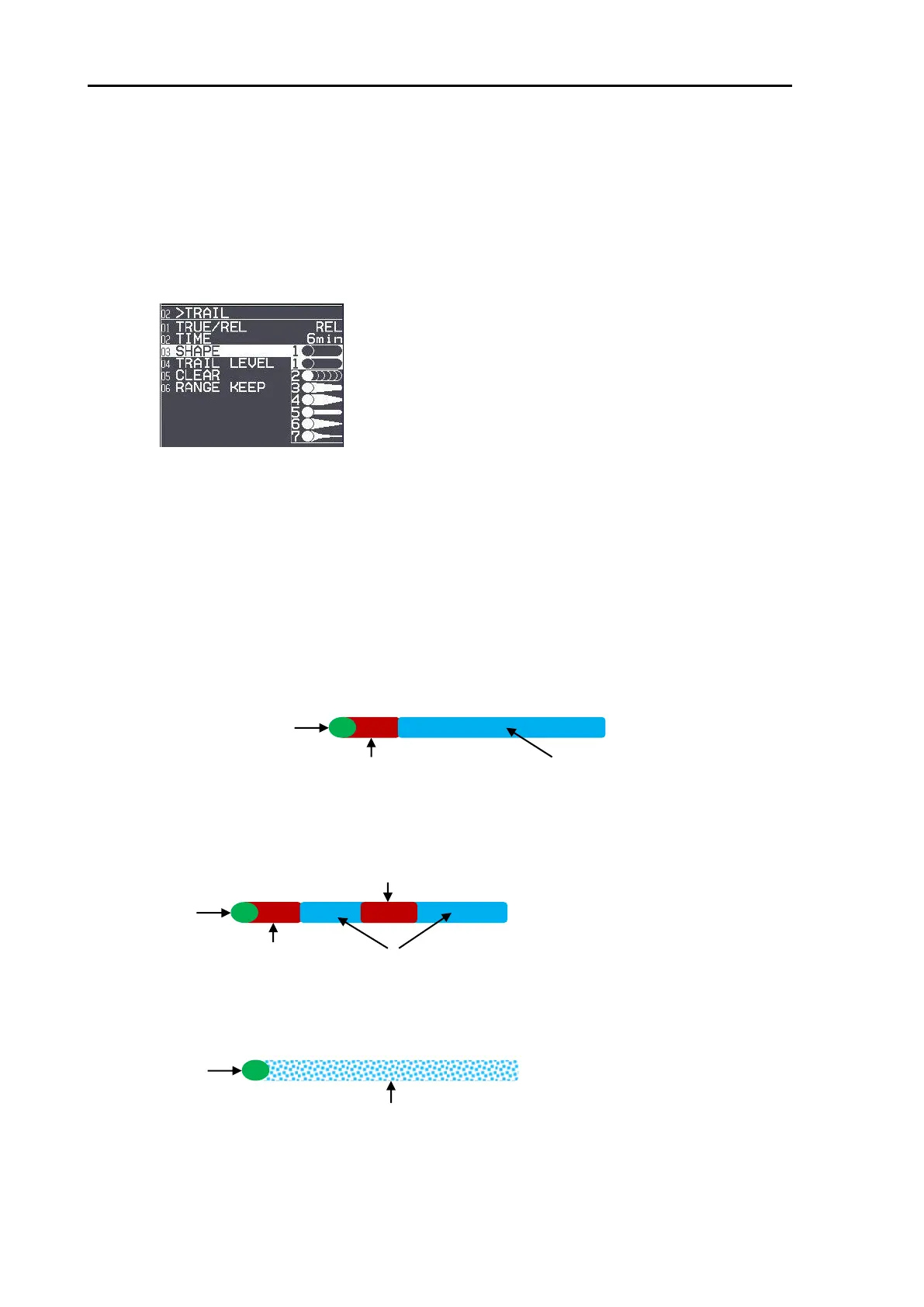
[SHAPE]: Seven types of trail shapes available, as shown below.
[TRAIL LEVEL]: This is to set up echo level of trail to be recorded.
“1” records all signal levels returned as a trail.
“15” records only the strongest signal levels as a trail.
[CLEAR]: This is to delete all current trails and restart new trails.
[RANGE KEEP]: “OFF” deletes trails when changing range.
“ON” does not delete trails when changing range.
[FIRST IMPRESSION]: The trail is displayed by dark red color during the setting time, afterwards, will
be blue color.
Setting time: OFF, 30sec, 1min, 3min, 6min, 12min, 30min, 60min
[MARK]: After setting time, the trail color will change to dark red while 1minute.
Setting time: 0 to 1440 min
[DITHER]: The trail echo is displayed with mesh form.
First impression (dark red)
First impression (dark red)








 To Next Page