Machine Configuration (continued)
2-7
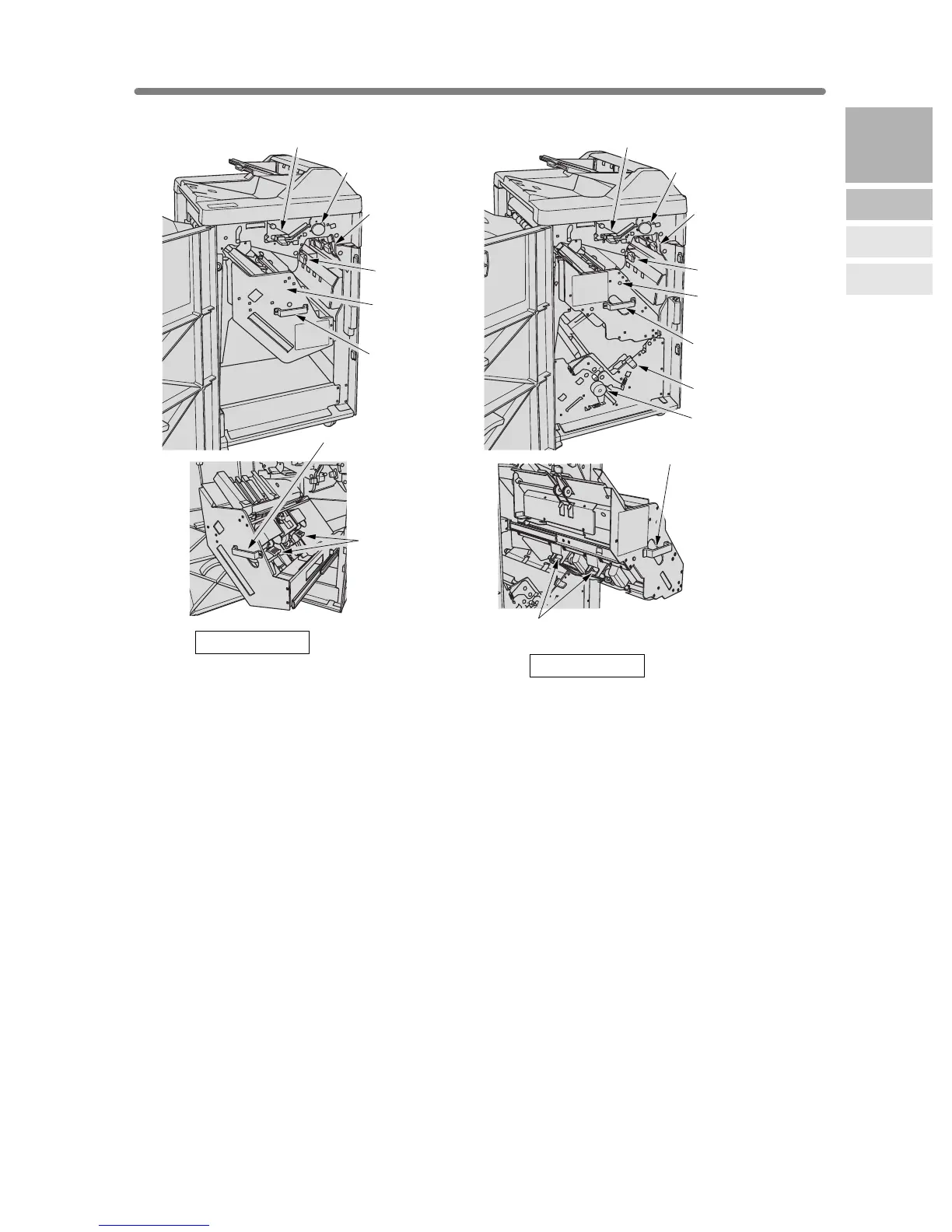
1 Upper lever opens upward to remove mishandled paper.
2 Upper knob can be turned to ease removal of mishandled paper.
3 Right lever opens to remove mishandled paper.
4 Left lever opens to remove mishandled paper.
5 Stacker unit holds stapler, and also holds the device to provide Fold and Stitch &
Fold mode in FS-211.
6 Stacker unit handle withdraws unit to allow removal of mishandled paper and
replacement of staple cartridge.
7 Lower lever opens to remove mishandled paper.
8 Knob can be turned to ease removal of mishandled paper.
9 Cartridge housing holds staple cartridge and is to be replaced when supplying
staples.
3 Right lever
4 Left lever
5 Stacker unit
6 Stacker unit
handle
6 Stacker unit handle
6 Stacker unit handle
9 Cartridge housing
2 Upper knob
1 Upper lever
3 Right lever
4 Left lever
5 Stacker unit
6 Stacker unit
handle
9 Cartridge housing
2 Upper knob
1 Upper lever
8 Knob
7 Lower lever
FS-211 Finisher
FS-111 Finisher
2
Machine
Information
Machine
Configuration
Turn On/Off
the Power
Loading
Paper










 To Next Page