3-40
Output Mode for Machine without Finisher
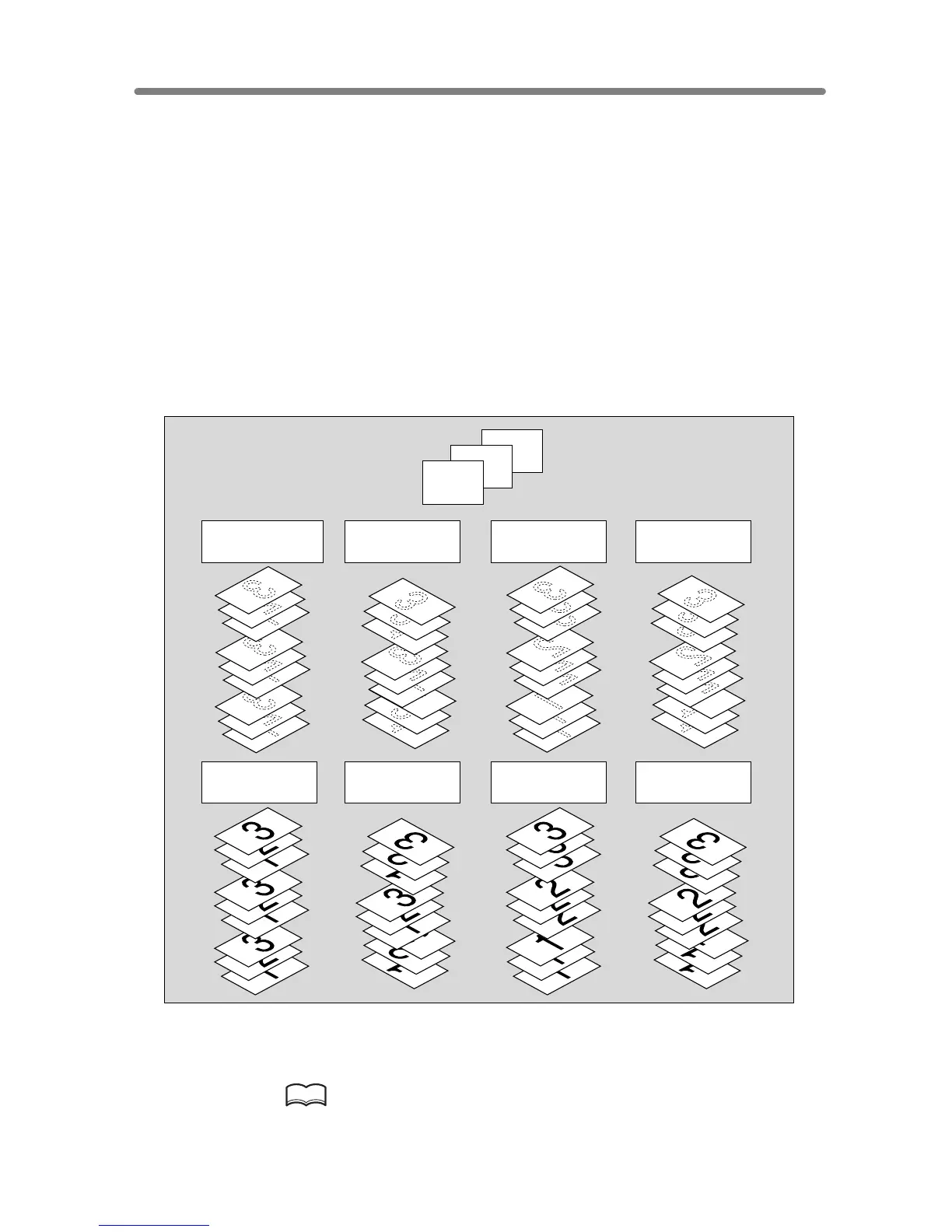
This section describes the output modes for a copier without the Finisher.
The Non-sort mode is initially selected.
1 Non-sort mode copies the original set in amounts determined by the print quantity
setting, then outputs sorted sets normally.
2
Rotation sort mode rotates every other sorted sets by 90° upon exit, provided the same
paper size is loaded in two trays, one tray with paper loaded in portrait orientation and
the other tray with paper loaded in landscape orientation, e.g., A4 and A4R.
3 Group mode copies each original page in amounts determined by the print quantity
setting, then outputs grouped sets normally.
4
Rotation group mode rotates every other grouped set by 90° upon exit, provided the
same paper size is loaded in two trays, one tray with paper loaded in portrait orientation
and the other tray with paper loaded in landscape orientation, e.g., A4 and A4R.
Using Face Up mode in combination with the above four modes, simplex copies and
odd numbered duplex copies exit face up on the exit tray.
1. When using Rotation sort or Rotation group mode, load the same
paper size into two trays in different orientation.
HINT
Non-sort mode is initially selected. Key Operator can change the initial
output mode. See p. 13-10.
3
2
1
Originals
Face down
rotation sort
Face down
group
Face down
rotation group
Face down
non-sort (default)
Face up
rotation sort
Face up
group
Face up
rotation group
Face up
non-sort
Example:
3-set copies










 To Next Page