[9] Weekly Timer (continued)
13-28
How to Access the Weekly Timer Setting Mode
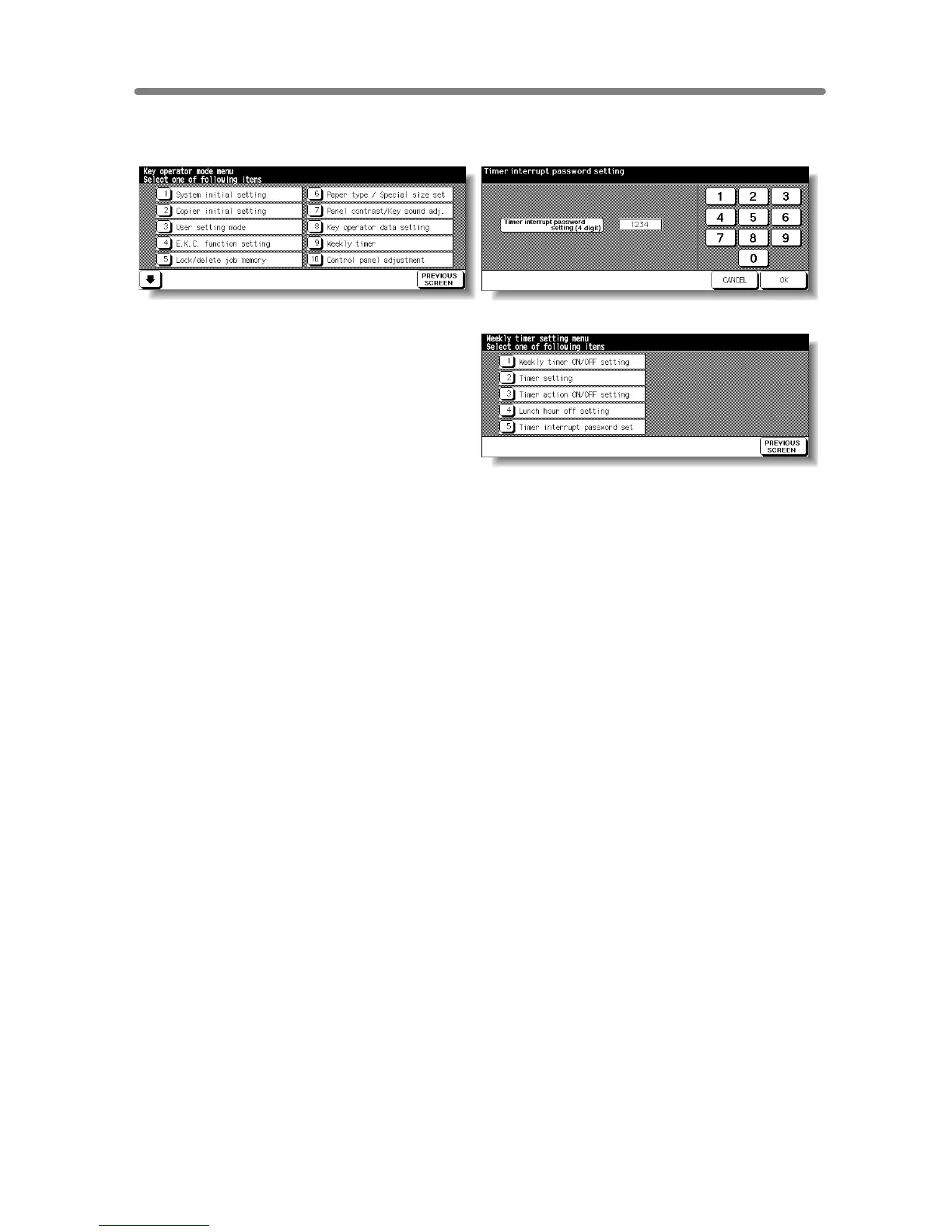
Key Operator Mode Screen Weekly Timer Master Key Code Screen
Weekly Timer Setting Menu Screen
Procedure
1 Touch [9] Weekly timer on the Key Operator Mode Screen.
The Weekly Timer Master Key Code Screen displays when the 4-digit Weekly Timer
master key code is set by service.
Otherwise, the Weekly Timer Setting Menu Screen displays without the code
requirement.
2 If the Weekly Timer Master Key Code Screen is displayed, use the keypad on the touch
screen to enter your 4-digit Weekly Timer master key code, then touch OK to display the
Weekly Timer Setting Menu Screen.
NOTE:
If an invalid Weekly Timer master key code is entered, continue by entering
the valid 4-digit code.
3 Select the desired Weekly Timer function, and make settings, as required.
4 To exit the Weekly Timer mode, touch PREVIOUS SCREEN on the Weekly Timer
Setting Menu Screen.
5 To exit the Key Operator mode, touch PREVIOUS SCREEN on the Key Operator Mode
Screen to restore the Basic Screen.










 To Next Page