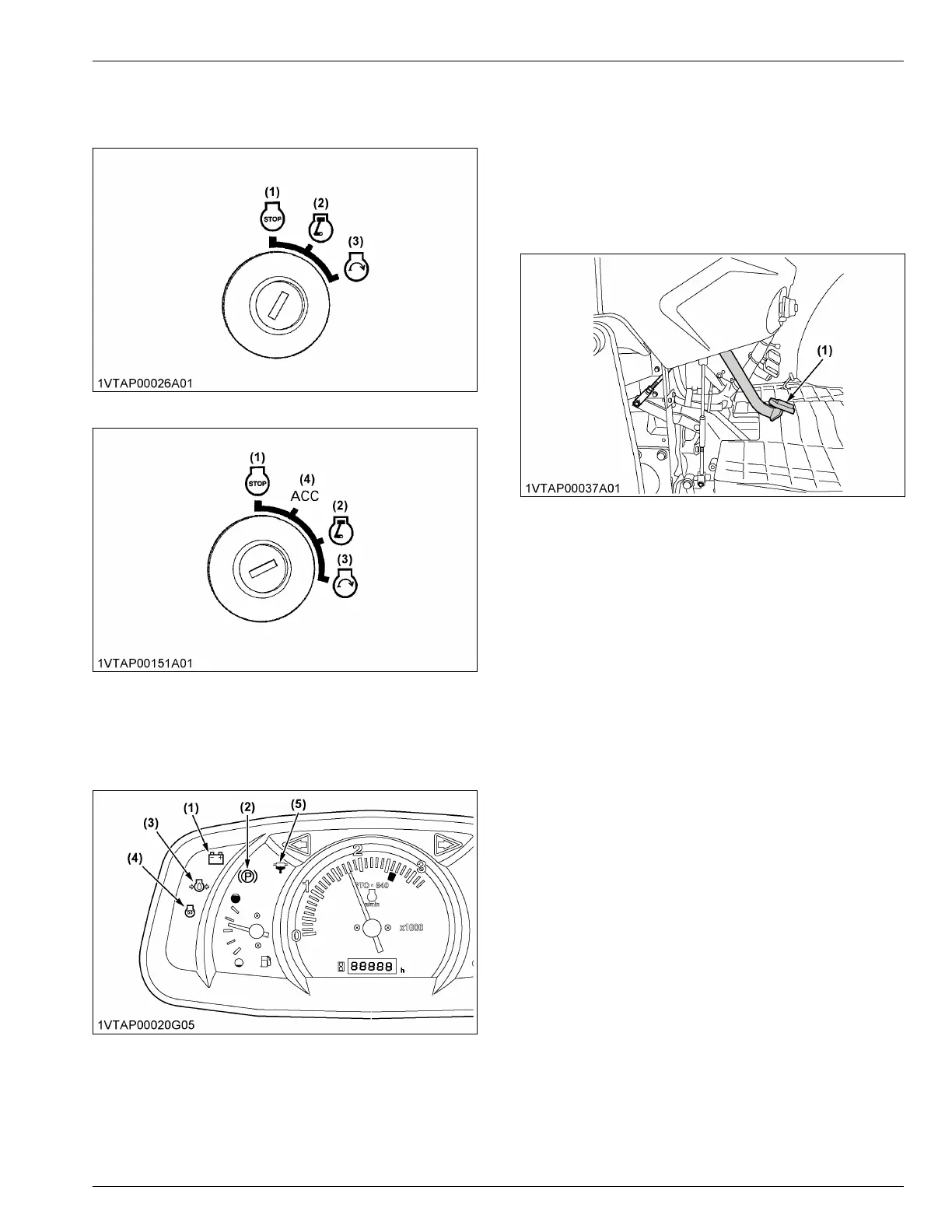
7. Insert the starter key into the key switch and turn it
“ON”.
[ROPS type]
[CAB type]
(1) Off
(2) On
(3) Start
(4) ACC
8. Check the Easy Checker
™
lamps.
(See Easy Checker
™
lamps on page 36)
(1) Electrical charge indicator
(2) Parking brake indicator
(3) Engine oil pressure warning
indicator
(4) Glow plug indicator
(5) Water separator filter indica-
tor
NOTE :
• Some of the Easy Checker
™
lamps may light
up depending on the positions of the levers
and switches.
• Turn on the key switch, and some of the
indicators on the instrument panel stay on
about 1 second.
9. Fully depress the clutch pedal.
(1) Clutch pedal
10. Turn the starter key to the “START” position and
release it when the engine starts.
IMPORTANT :
• Because of the safety devices, the engine
will not start except the following
conditions:
– PTO-clutch-control-switch is placed in
the “OFF” position.
– Synchro-shuttle shift lever is placed in
the “NEUTRAL” position.
11. Check to see that all the lamps on the Easy
Checker
™
are “OFF”.
If the lamps on the Easy Checker
™
is still on,
immediately stop the engine and determine the
cause.
12. Release the clutch pedal.
OPERATING THE ENGINE



 To Next Page