EasyManua.ls Logo

Learjet 60 - Page 130

Default Icon
408 pages
Print Icon
To Next Page IconTo Next Page
To Previous Page IconTo Previous Page
Loading...
Learjet
60
Pilot's
Manual
PM-12s
Change
4
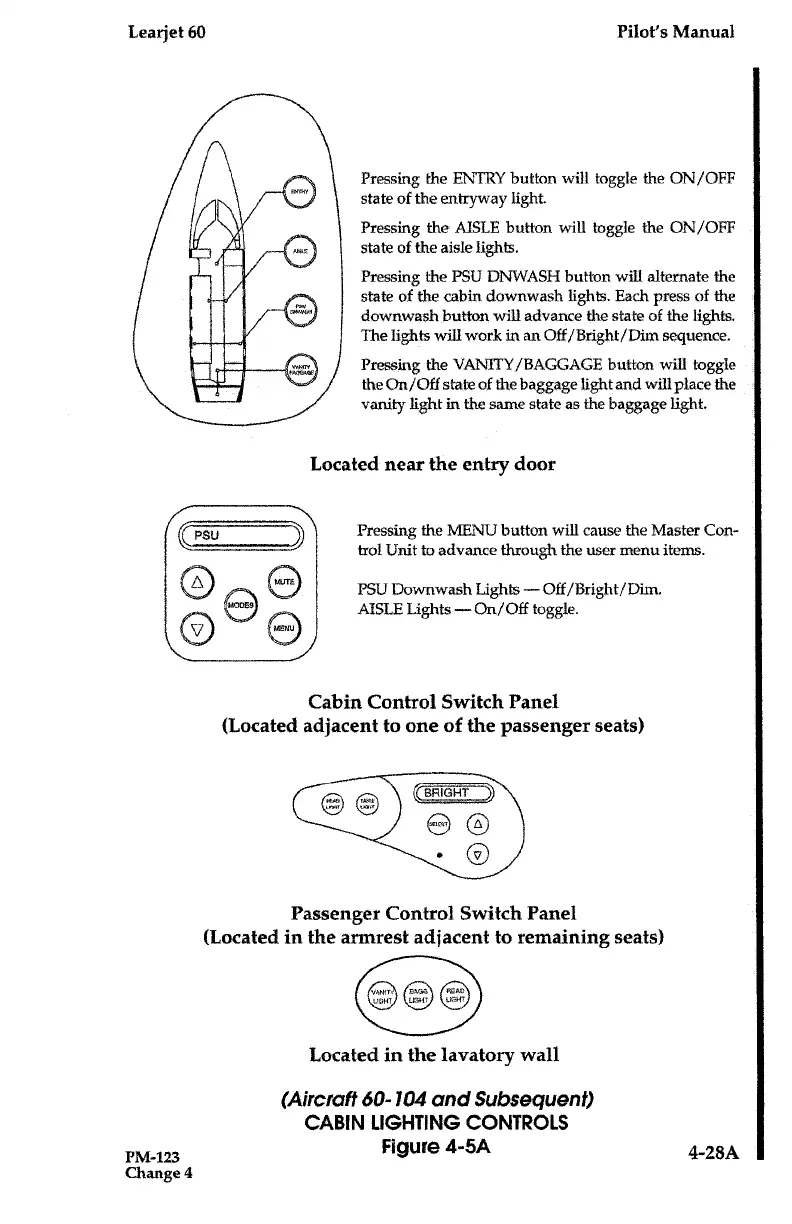
Pressing
the
ENTRY
button
will toggle
the
ON/OFF
state
of
the
entryway
light
.
Pressing
the
AISLE
button
will
toggle
the
ON/OFF
state
of
the
aisle
lights
.
Pressing
the
PSU
DNWASH
button
will
alternate
the
state
of
the
cabin
downwash
lights
.
Each
press
of
the
downwash
button
will
advance
the
state
of
the
lights
.
The
lights
will
work
in
an
Off/Bright/Dim
sequence
.
Pressing
the
VANITY/BAGGAGE
button
will
toggle
the
On/Off
state
of
the
baggage
light
and
will
place
the
vanity
light in
the
same
state
as
the
baggage
light
.
Located
near
the
entry
door
Pressing
the
MENU
button
will
cause
the
Master
Con-
trol
Unit
to
advance
through
the
user
menu
items
.
PSLJ
Downwash
Lights-Off/Bright/Dim
.
AISLE
Lights-On/Off
toggle
.
Cabin
Control
Switch
Panel
(Located adjacent
to
one
of
the
passenger
seats)
Passenger Control
Switch
Panel
(Located
in
the
armrest
adjacent
to
remaining
seats)
Located
in
the
lavatory
wall
(Aircraft
60-104
and
Subsequent)
CABIN
LIGHTING
CONTROLS
Figure
4-5A
4-28A

Table of Contents

Related product manuals