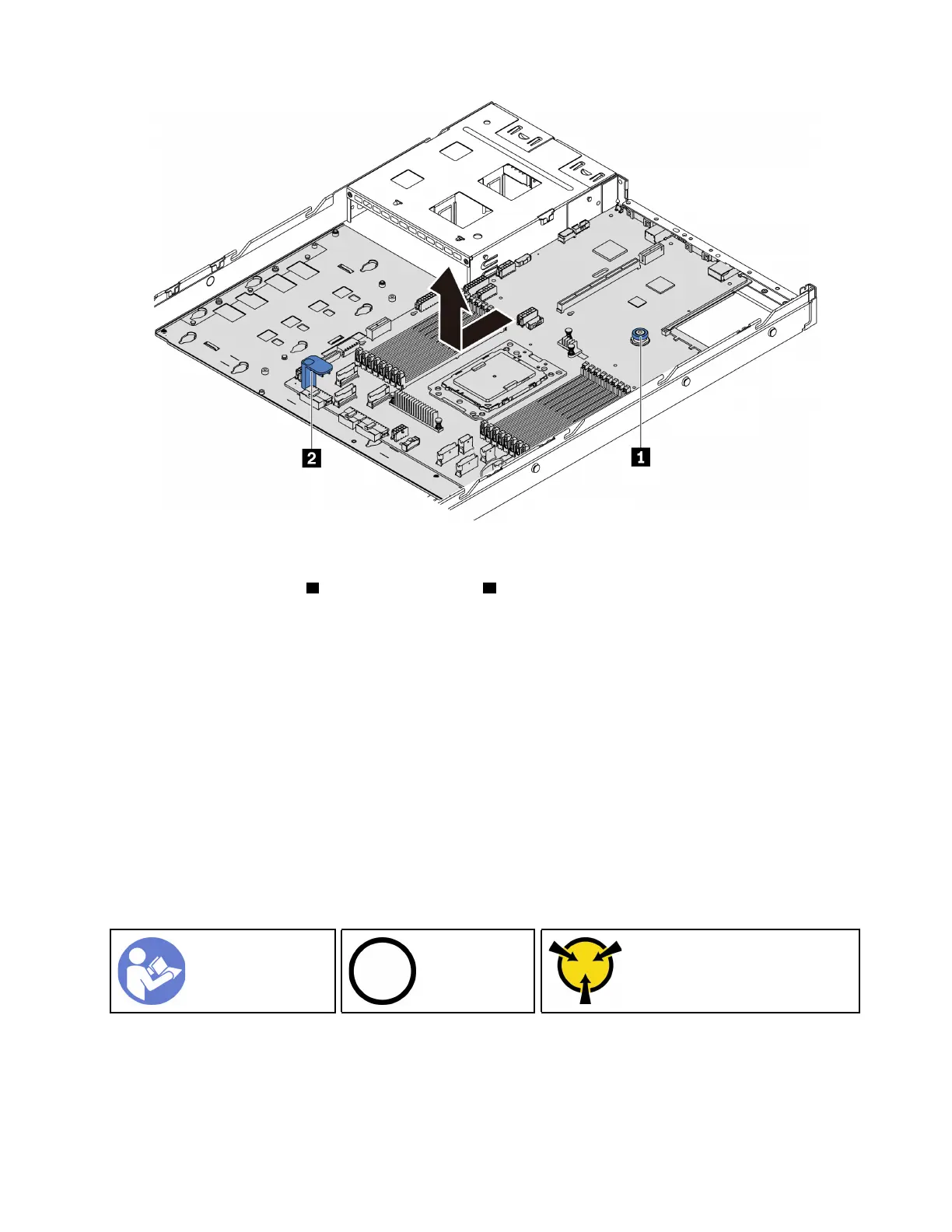
Figure 178. System board removal
Step 1. Lift the release pin
1 and hold the lift handle 2 at the same time and slide the system board toward
the front of the server.
Step 2. Lift the system board out of the chassis.
If you are instructed to return the old system board, follow all packaging instructions and use any packaging
materials that are provided.
Important: Before you return the system board, make sure that CPU socket is covered. There is a CPU
external cap covering the CPU socket on the new system board. Slide the CPU external cap out from the
CPU socket on the new system board, and install the external cap on the CPU socket on the removed
system board.
If you are planning to recycle the system board, follow the instructions in “Disassembling the system board
for recycle” on page 223 for compliance with local regulations.
Install the system board
Use this information to install the system board.
“Read the
installation
Guidelines” on
page 79
“Power off
the server for
this task” on
page 11
“ATTENTION:
Static Sensitive Device
Ground package before opening”
on page 82
Before installing the system board, touch the static-protective package that contains the new system board
to any unpainted surface on the outside of the server. Then, take the new system board out of the package
and place it on a static-protective surface.
To install the system board, complete the following steps:
Chapter 3. Hardware replacement procedures 195












 To Next Page