Operation 4
Standard equipment
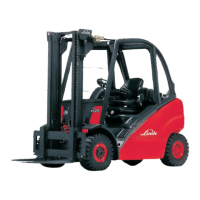
Horizontal adjustment
1
2
d3921352
¾ Lift lever (2) up and pull it.
¾ Move the driver’s seat on the sli
de rails
backwards or forwards to give th
edriver
the best position in relation to
the steering
wheel and the accelerator pedal
s.
¾ Re-engage the lever.
Backrest adjustment
¾ Push up and hold the backrest adjuster (1).
¾ Move the backrest forward and bac
k until a
comfortable sitting position fo
r the driver is
found.
¾ Release the backrest adjuster (1).
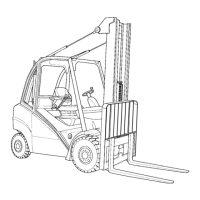
Adjusting the lumbar support (option)
d3921353
3
4
5
6
¾ Turn knob (3) until a comfortable sitting
position is achieved.
Turning the knob anticlockwise makes the
backrest arch outwards.
Turning the knob clockwise returns the back-
rest to its original position.
Adjusting for the operator’s weight
¾ Turn the adjusting handwheel (5) to set the
cushioning to the weight of the driver.
The adjustment range from 50 kg to 130 kg is
visible at the weight range indicator (4).
To reduce the weight, turn the handwheel
anticlockwise.
To increase the weight, turn the handwheel
clockwise.
Operating Instructions – 393 807 1001 EN – 08/2008 27



 To Next Page