94
Mobile Apps: Accessing your DVR Using a Mobile Device
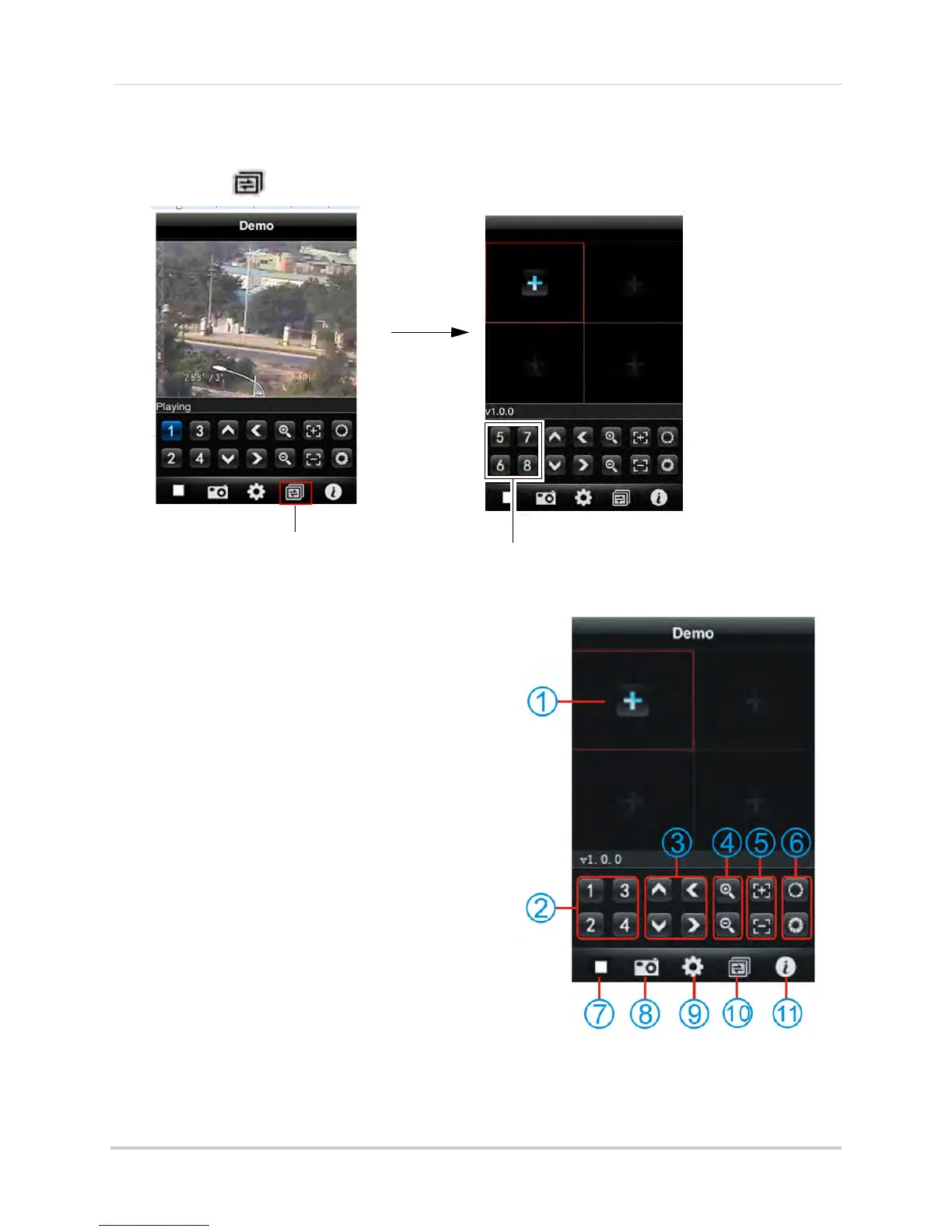
Changing Channels
• Touch the button repeatedly to display channel 1~4, 5~8, 9~12, 13~16.
Interface Overview
1 Add Device: Touch to add a DVR channel.
2 Channel List: Touch to view channel in full
screen.
3 Pa
n & Tilt camera (PTZ only).
4 Zoom in/out (PTZ
only).
5 Fo
cus (PTZ only).
6 Iris (P
TZ only).
7 Di
sconnect: Disconnects channel.
8 Snapshot: T
akes an image of the channel.
9 Setup:
Touch to enter the setup menu.
10 Ch
annel button: Touch to change the quad
channel numbers (Ch 1~4, 5~8, 9~16).
11 Sys
tem info: Display system information.
Touch here to change quad view
channels
Channel 5~8





 To Next Page