Appendix B. Driver and Software Installation
328 3ware SATA+SAS RAID Controller Card Software User Guide, Version 10.2
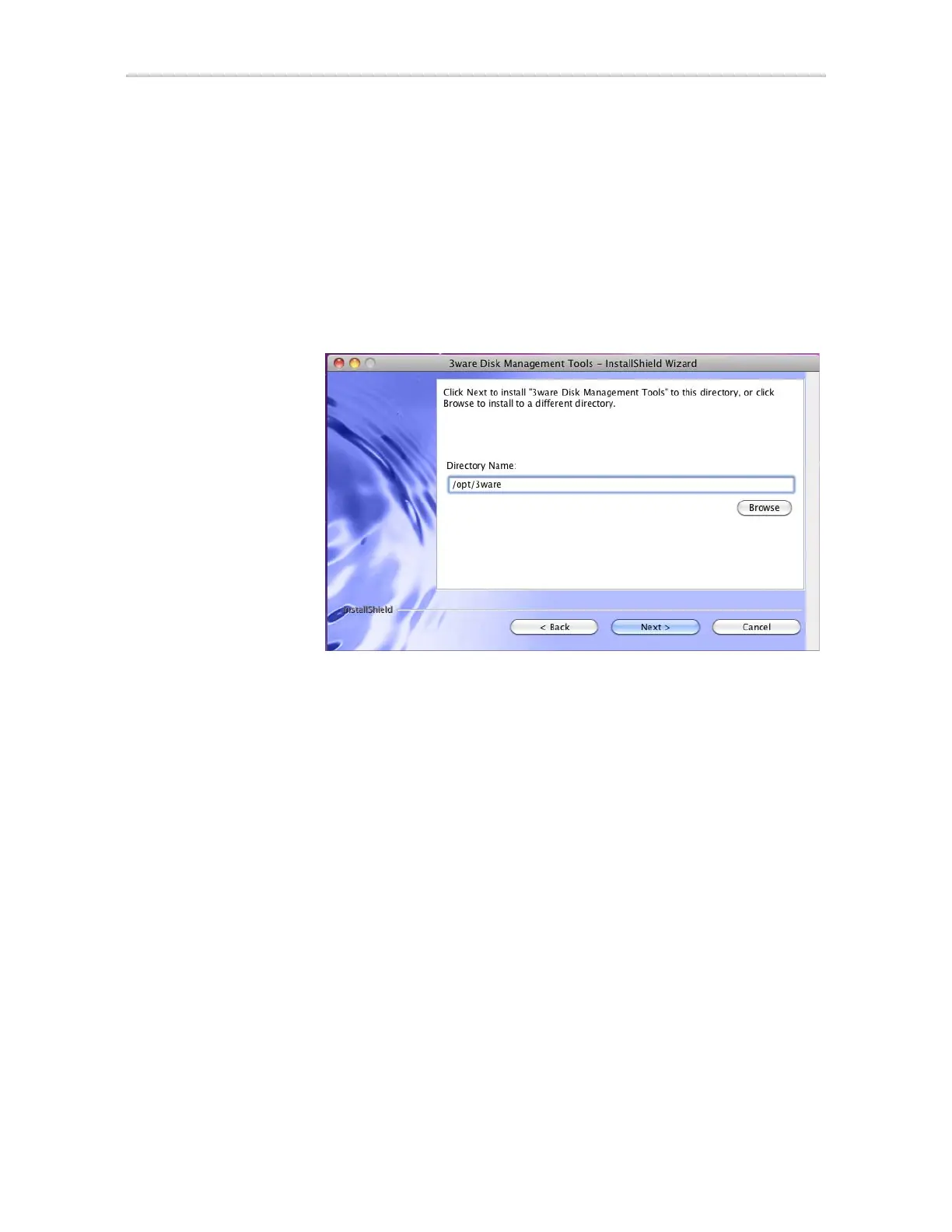
6 If you want to change where the 3ware Disk Management tools 3DM2
and CLI will be installed, you can change the path and directory.
Default install location for Mac OS X 10.6.0 is:
/opt/3ware
Default install location for Mac OS X 10.5.0 is:
/Applications/3ware
When you are ready, click Next.
Figure 115. Specify Directory Path Screen
7 Select what components you want to install.
3DM2 and CLI are applications that let you set up and manage RAID
units.
If you unselect Enable Web Interface, the 3DM2 web interface will not
be enabled. In this case, an additional screen will display, that allows you
to enable email notification. (If you do enable the web interface, you can
enable this feature later, after 3DM2 has been installed.)
Refer to the “3DM2 Reference” on page 189, for details about 3DM2 and
setting preferences, including email notification.



 To Next Page