214658 79 Revision A
6.1.3 Case IH 5130/6130/7130 and 5140/6140/7140 Midrange Combines
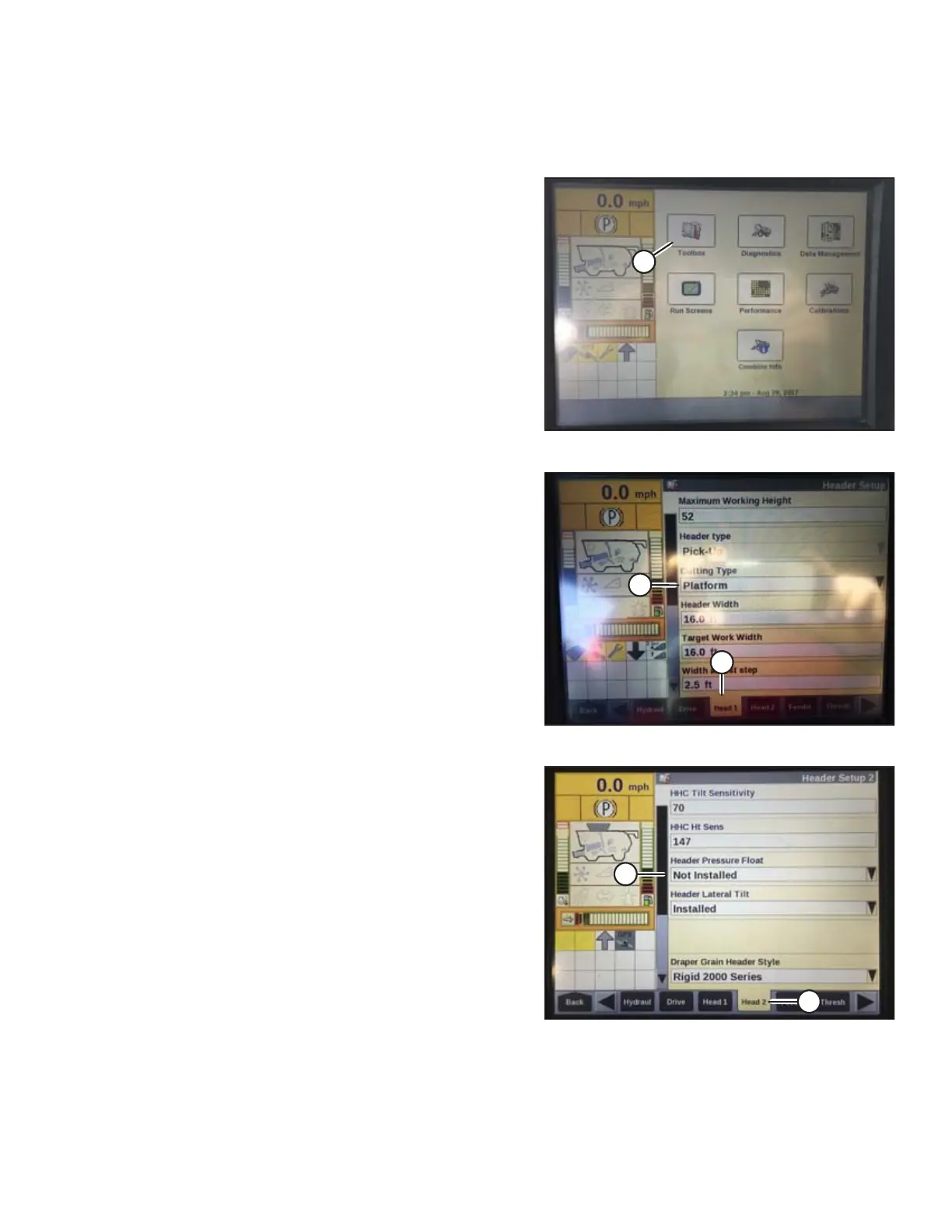
Setting up the Header on the Combine Display (Case IH 5130/6130/7130; 5140/6140/7140)
Figure 6.11: Case IH Combine Display
1. On the main page of the combine display, select
TOOLBOX (A).
Figure 6.12: Case IH Combine Display
2. Select the HEAD 1 tab (A). The HEADER SETUP page
displays.
3. From the CUTTING TYPE menu (B), select
PLATFORM.
Figure 6.13: Case IH Combine Display
4. Select the HEAD 2 tab (A). The HEADER SETUP 2
page displays.
5. From the HEADER PRESSURE FLOAT menu (B),
select NOT INSTALLED.
PREDELIVERY INSPECTION



 To Next Page