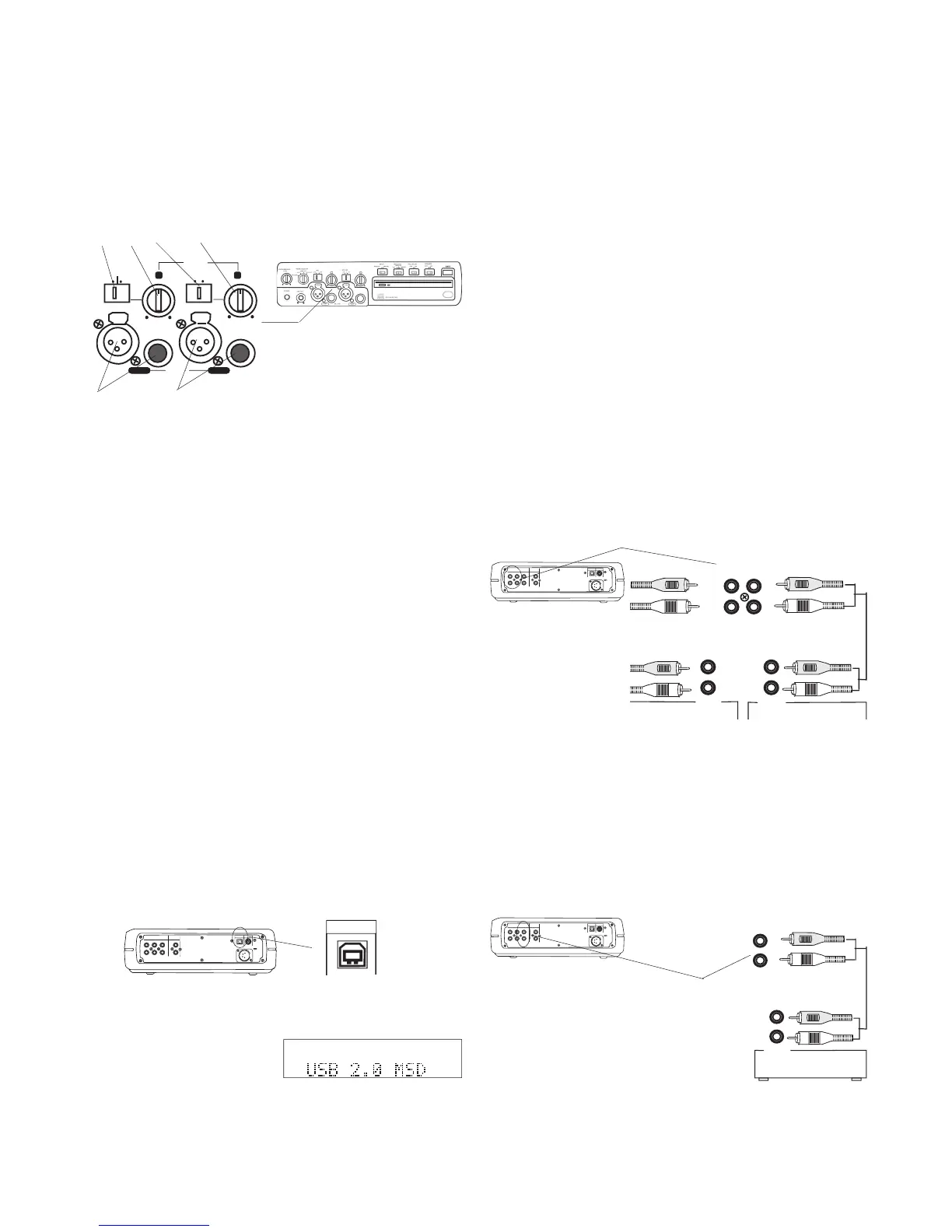
*Except for power, all input and output connections are optional.
Connect Microphones or Instruments
L R
L + R
L/R
MIC/LINE
PUSH
MIC/LINE RIGHT
PUSH
LEFT
INT
LINE
MIC
Left and Right microphones or instruments via phone
or XLR plugs are input via the MIC/LINE jacks.
1. Plug microphone or instrument to be recorded on
the LEFT channel into the LEFT jack.
2. Plug microphone or instrument to be recorded on
the RIGHT channel into the RIGHT jack.
Set the LINE MIC INT switch to LINE for line level input(s)
or MIC for microphone level input(s).
• For microphone(s) requiring Phantom power, press the
PHANTOM button on the top of the CDR420.
• To mix two microphones from the front inputs with a stereo
line input, use the AUX input jacks on the rear for the stereo
Set the L/R L+R switch to L/R for stereo recording. Set to
L+R to record both left and right inputs to both channels.
level controls to adjust left and/or
Plug the supplied I/O cable in here and connect the
other end to your computer (PC or MAC).
IN
OUT
DIGITAL
MIX LINE
AUX
R
L
R
L
INOUT
OUT
DC IN
KEYB
I / 0
If the CDR420 is on, slide and release the POWER
switch to connect to your computer.
IN
OUT
DIGITAL
MIX LINE
AUX
R
L
R
L
INOUT
OUT
DC IN
KEYB
I / 0
L
R
INPUT
Amp, Mixer/Pre-Amp, CD-R, etc.
LINE
OUT
MIX
OUT
R
L
L
R
INPUT
Amp, Mixer/Pre-Amp, CD-R, etc.
AUX
IN
L
R
OUTPUT
Amp, Mixer/Pre-Amp, CD-R, etc.
R
L
The connection makes it easy to copy audio fi les
between the CDR420 HD and your computer's hard
drive. The I/O connection can only be made active
when the CDR420 is off (neither recording or during
To disconnect, put the CDR420 hard drive away* on
your computer, then disconnect the I/O cable.
*It is a common and safe practice to "stop" or "eject" an external
hard drive before disconnecting it from your computer. Failure to
do this could damage fi les on the CDR420 or the HD itself. Refer
to your computer's operating system "help" section for instructions
on using the "Safely Remove Hardware" tool (PC).
Connect CD/HD output to analog equipment for play-
Connect Right and Left RCA audio cables to
MIX OUT and/or LINE OUT and then connect to the
input of an amplifi er, preamplifi er, receiver or other
Use this connection for record-
ing or to mix line level input with
microphone or instrument inputs
will automatically connect.
USB 2.0 MSD is displayed on the CDR420
and the CDR420 HD appears as a volume on your
LINE OUT signal is available only while playing or
MIX OUT signal is available while playing or re-
cording and passes input signals through while the
CDR420 is not playing or recording.
Connect Right and Left RCA audio cables to
AUX IN and then connect to the line level output of an
amplifi er, mixer, receiver or other audio device.
IN
OUT
DIGITAL
MIX LINE
AUX
R
L
R
L
INOUT
OUT
DC IN
KEYB
I / 0



 To Next Page