EasyManua.ls Logo

Marantz CDR420 - Reset Defaults Setting

Marantz CDR420
66 pages
Print Icon
To Next Page IconTo Next Page
To Previous Page IconTo Previous Page
Loading...
- 51 -
HD
MENU
UTILITY
HD
MENU
UTILIT
Y
HD
MENU
UTILITY
HD
MENU
UTILITY
HD
MENU
UTILITY
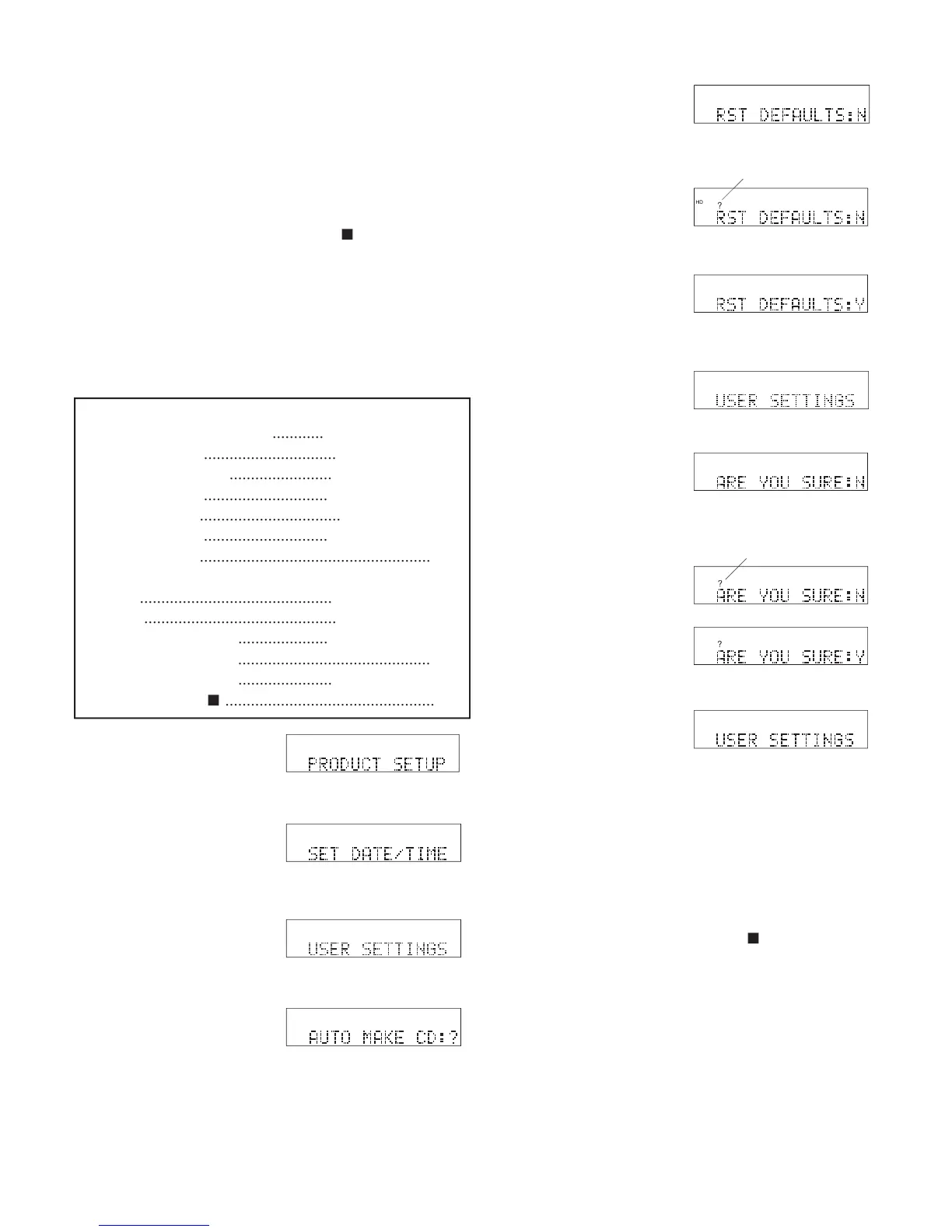
1 From Idle Mode, press
and release the UTIL-
ITY MENU button
three times. PRODUCT SETUP is displayed.
2 While PRODUCT
SETUP is displayed,
press and release the
Jog Wheel. SET DATE/TIME is displayed.
3 While SET DATE/
TIME is displayed,
turn the Jog Wheel
until USER SETTINGS is displayed.
4 While USER SET-
TINGS is displayed,
press and release the
Jog Wheel. AUTO MAKE CD is displayed.
5 While AUTO MAKE
CD is displayed, turn
the Jog Wheel until
RST DEFAULTS is displayed.
6 While RST DE-
FAULTS is displayed,
press and release the
Jog Wheel. ? appears.
7 Turn the Jog Wheel to
toggle between Y and
N. When correct, press
?
HD
MENU
UTILIT
Y
and release the Jog Wheel.
?
HD
MENU
UTILITY
8a If N the display switch-
es to USER SET-
TINGS.
8b If Y, and if REQ. CON-
FIRM is set to Y, ARE
YOU SURE
HD
MENU
UTILITY
HD
MENU
UTILITY
You can:
Press and release the Jog Wheel to review or reset
RST. DEFAULTS.
Turn the Jog Wheel to tab through the User Setting
choices.
Press and release the UTILITY MENU button to
return to RECORD SETTING.
Press and release the Stop button
to exit the Util-
ity Menu.
Do nothing. After one minute the CDR420 returns
to Idle Mode with your changes, if any, saved.
RST DEFAULTS
(N, Y)
When set to Y the CDR420 resets all USER SET-
TINGS to their system defaults.
Quick instructions:
Press UTILITY MENU 3x
............
PRODUCT SETUP
Press Jog Wheel
...............................
SET DATE/TIME
Turn Jog Wheel until
........................
USER SETTINGS
Press Jog Wheel
.............................
AUTO MAKE CD
Turn Jog Wheel
.................................
RST DEFAULTS
Press Jog Wheel
.............................
? RST DEFAULTS
Turn Jog Wheel
......................................................
Y, N
Press Jog Wheel
if N
.............................................
USER SETTINGS
if Y
.............................................
ARE YOU SURE
Press Jog Wheel
.....................
? ARE YOU SURE
Turn Jog Wheel
.............................................
Y, N
Press Jog Wheel
......................
USER SETTINGS
Press Stop button
.................................................
exit
Press and release the
Jog Wheel so ? ap-
pears.
Turn the Jog Wheel so
Y is displayed. Go to
8c.
8c Press and release the
Jog Wheel to reset all
USER SETTINGS to
system defaults. The
?
HD
MENU
UTILITY
?
HD
MENU
UTILITY
display switches to USER SETTINGS.
You can:
Turn the Jog Wheel to tab through the User Setting
choices.
Press and release the UTILITY MENU button to
return to RECORD SETTING.
Press and release the Stop button
to exit the Util-
ity Menu.
Do nothing. After one minute the CDR420 returns
to Idle Mode with your changes, if any, saved.
HD
MENU
UTILITY
appears. If REQ. CONFIRM is set to N go to 8c.

?
?

Table of Contents

Related product manuals