EasyManua.ls Logo

Marantz CDR420 - Auto Track Increment CD Setting; Auto Track Increment Time Setting

Marantz CDR420
66 pages
Print Icon
To Next Page IconTo Next Page
To Previous Page IconTo Previous Page
Loading...
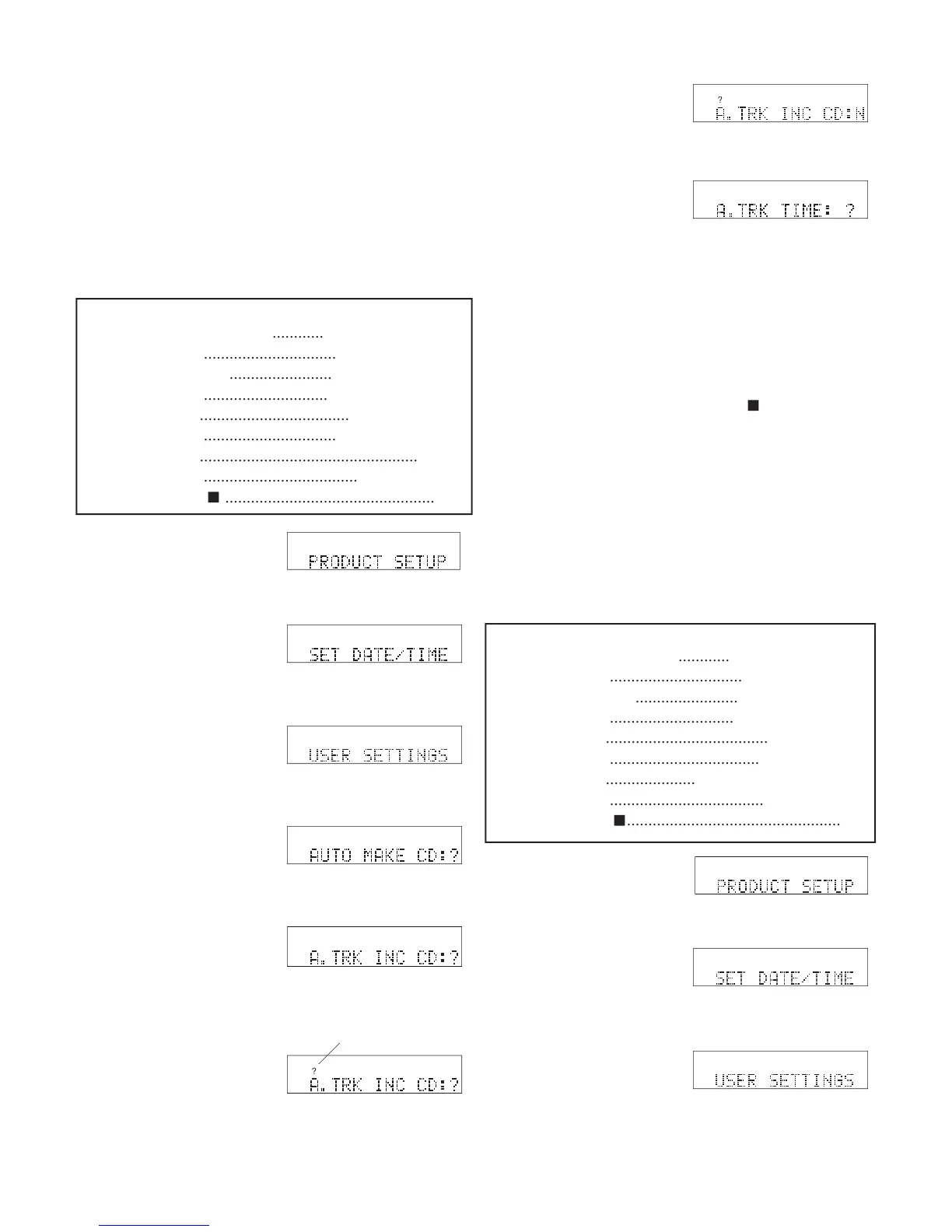
A. TRK INC CD
(?, Y, N)
As a CD is burned, Auto Track Incrementing breaks
the CD recording into multiple tracks of specifi ed
length. See page 29 for an introduction to track in-
crementing and how to alternatively use Auto Track
Incrementing HD. If Y is chosen, auto track incre-
menting is always on. If N is chosen, auto track incre-
menting is always off. If ? is chosen, the user is asked
during each New CD Project if auto track increment-
ing is desired. System default N
HD
MENU
UTILITY
HD
MENU
UTILIT
Y
HD
MENU
UTILITY
HD
MENU
UTILITY
1 From Idle Mode, press
and release the UTILI-
TY MENU button three
times. PRODUCT SETUP is displayed.
2 While PRODUCT
SETUP is displayed,
press and release the
Jog Wheel. SET DATE/TIME is displayed.
3 While SET DATE/
TIME is displayed, turn
the Jog Wheel until
USER SETTINGS is displayed.
4 While USER SET-
TINGS is displayed,
press and release the
Jog Wheel. AUTO MAKE CD is displayed.
HD
MENU
UTILITY
5 While AUTO MAKE
CD is displayed, turn
the Jog Wheel until
A.TRK INC CD is displayed.
6 While A.TRK INC CD
is displayed, press and
release the Jog Wheel.
? appears.
?
HD
MENU
UTILIT
Y
?
HD
MENU
UTILIT
Y
correct, press and release the Jog Wheel.
8 The display switches to
the next User Setting:
A.TRK TIME.
A. TRK TIME
(01, 02, 05, 10M)
As a CD is burned, Auto Track Incrementing breaks
the CD recording into multiple tracks of 1, 2, 5 or 10
minutes. See page 29 for an explanation of the useful-
ness of multiple or minute tracks.
Quick instructions:
Press UTILITY MENU 3x
............
PRODUCT SETUP
Press Jog Wheel
...............................
SET DATE/TIME
Turn Jog Wheel until
........................
USER SETTINGS
Press Jog Wheel
.............................
AUTO MAKE CD
Turn Jog Wheel
......................................
A.TRK TIME
Press Jog Wheel
...................................
? A.TRK TIME
Turn Jog Wheel
.....................
?, 01M, 02M, 05M, 10M
Press Jog Wheel
....................................
confi rm setting
Press Stop button
..................................................
exit
- 45 -
You can:
Press and release the Jog Wheel to review or reset
the A.TRK TIME.
Turn the Jog Wheel to tab through the User Setting
choices.
Press and release the UTILITY MENU button to
return to RECORD SETTING.
Press and release the Stop button
to exit the Util-
ity Menu.
Do nothing. After one minute the CDR420 returns
to Idle Mode with your changes, if any, saved.
7 Turn the Jog Wheel to
tab through the ?, Y
and N choices. When
Quick instructions:
Press UTILITY MENU 3x
............
PRODUCT SETUP
Press Jog Wheel
...............................
SET DATE/TIME
Turn Jog Wheel until
........................
USER SETTINGS
Press Jog Wheel
.............................
AUTO MAKE CD
Turn Jog Wheel
...................................
A.TRK INC CD
Press Jog Wheel
...............................
? A.TRK INC CD
Turn Jog Wheel
...................................................
?/Y/N
Press Jog Wheel
....................................
confi rm setting
Press Stop button
.................................................
exit
HD
MENU
UTILITY
1 From Idle Mode, press
and release the UTILI-
TY MENU button three
HD
MENU
UTILITY
HD
MENU
UTILIT
Y
HD
MENU
UTILITY
times. PRODUCT SETUP is displayed.
2 While PRODUCT
SETUP is displayed,
press and release the Jog Wheel. SET DATE/
TIME is displayed.
3 While SET DATE/
TIME is displayed, turn
the Jog Wheel until
USER SETTINGS is displayed.
?

Table of Contents

Related product manuals