EasyManua.ls Logo

Marantz CDR420 - Editing Track Tags; Naming Tracks During Recording

Marantz CDR420
66 pages
Print Icon
To Next Page IconTo Next Page
To Previous Page IconTo Previous Page
Loading...
If you press and release
the Jog Wheel while
DISCARD EDITS is
0
-4
-8
-1
2
-1
6
-2
2
-3
0
dB -5
0
R
L
HD
MENU
EDI
T
displayed all edits you made are discarded and the
CDR420 returns to Idle Mode.
- 57 -
How to EDIT TAGS
Tags are editable information that the CDR420 're-
members' about each track.
NOTE:
Track tags have similar names and purposes but are not the same as
'CD Text' in that they are not recorded with a track so they can be
read and displayed in a CD player that is CD Text capable.
The date and time the track was recorded and the track
type (.wav or .mp3) are automatically created by the
CDR420 and are not editable.
The editable tags are TRACK NAME, ARTIST
NAME, GENRE, and COMMENTS.
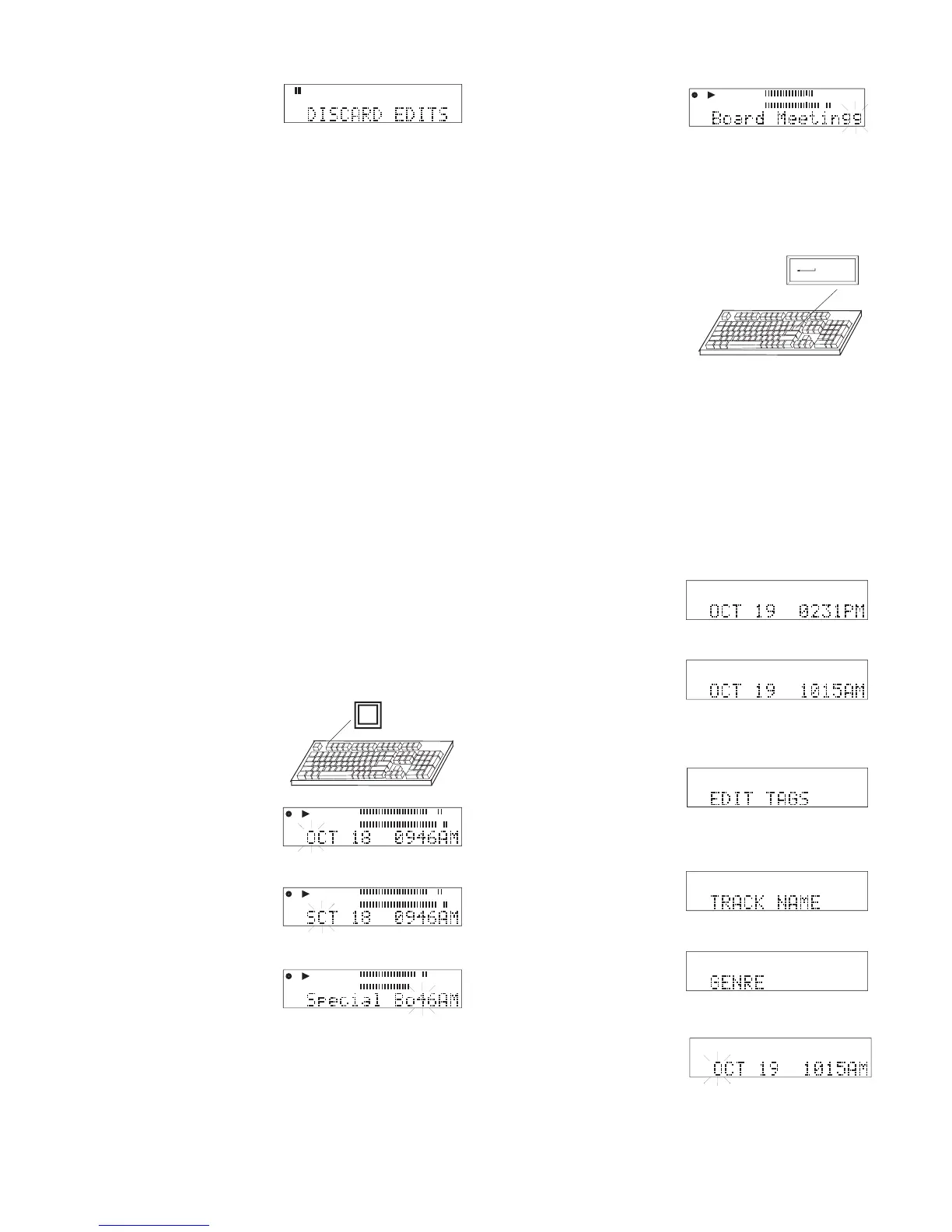
How to enter a track name while recording:
By default, a track is named with the date and time the
recording was begun.
With an attached keyboard, you can edit the track
name while the track is being recorded.
1 While recording with
an attached keyboard,
press and release F1.
2 The fi rst character of
the track name fl ashes
in the display.
3 Type the name using
the keyboard.
As you type the typed
letters replace the
ashing letter and
advance.
F1
0
-4
-8
-1
2
-1
6
-2
2
-3
0
dB -5
0
R
L
Elapsed
REC
REC
PCM
HD
Example display
0
-4
-8
-1
2
-1
6
-2
2
-3
0
dB -5
0
R
L
Elapsed
REC
PCM
PCM
HD
Example display
0
-4
-8
-1
2
-1
6
-2
2
-3
0
dB -5
0
R
L
Elapsed
REC
PCM
HD
Example display
Elapsed
REC
0
-4
-8
-1
2
-1
6
-2
2
-3
0
dB -5
0
R
L
PCM
HD
Example display
play the name scrolls. If/when you replace all the
characters in the original name the 'next character'
ashing is the same as the last character typed.
The name length is not
limited. If/when you
exceed the 14 charac-
ters shown in the dis-
When the name is
complete type enter on
the keyboard to save the
name and exit naming
the track.
Enter
NOTE:
After the F1 key is pressed to enter naming the track, the Jog
Wheel can also be used to enter characters or save the name.
See below
The extension .wav, or .mp3, is automatically added at the end
of the track name.
Press and release the Stop button on the CDR420 to exit nam-
ing the track without saving.
How to edit a tag
1 From Idle mode press
and release the FILE
DIR button.
2 Turn the Jog Wheel
until the track you
want to edit is dis-
played.
3 Press and release the
EDIT MENU button
two times so EDIT
TAGS is displayed.
4 Press and release the
Jog Wheel. TRACK
NAME is displayed.
5 Turn the Jog Wheel
to tab through the
tag choices: TRACK
MENU
FILES
MP3
Select
HD
HD
Example display
Example display
HD
MENU
EDI
T
HD
MENU
EDI
T
EDI
T
MENU
HD
Example display
Example display
NAME, ARTIST, GENRE and COMMENTS.
6 Press and release the
Jog Wheel to accept
the selected tag.
The current tag is displayed with the fi rst charac-
ter fl ashing (example is a TRACK NAME).

HD
MENU
EDI
T

Table of Contents

Related product manuals