4.4 Imager Interfaces for TIM and TIM 40 Camera
4.4.1 General
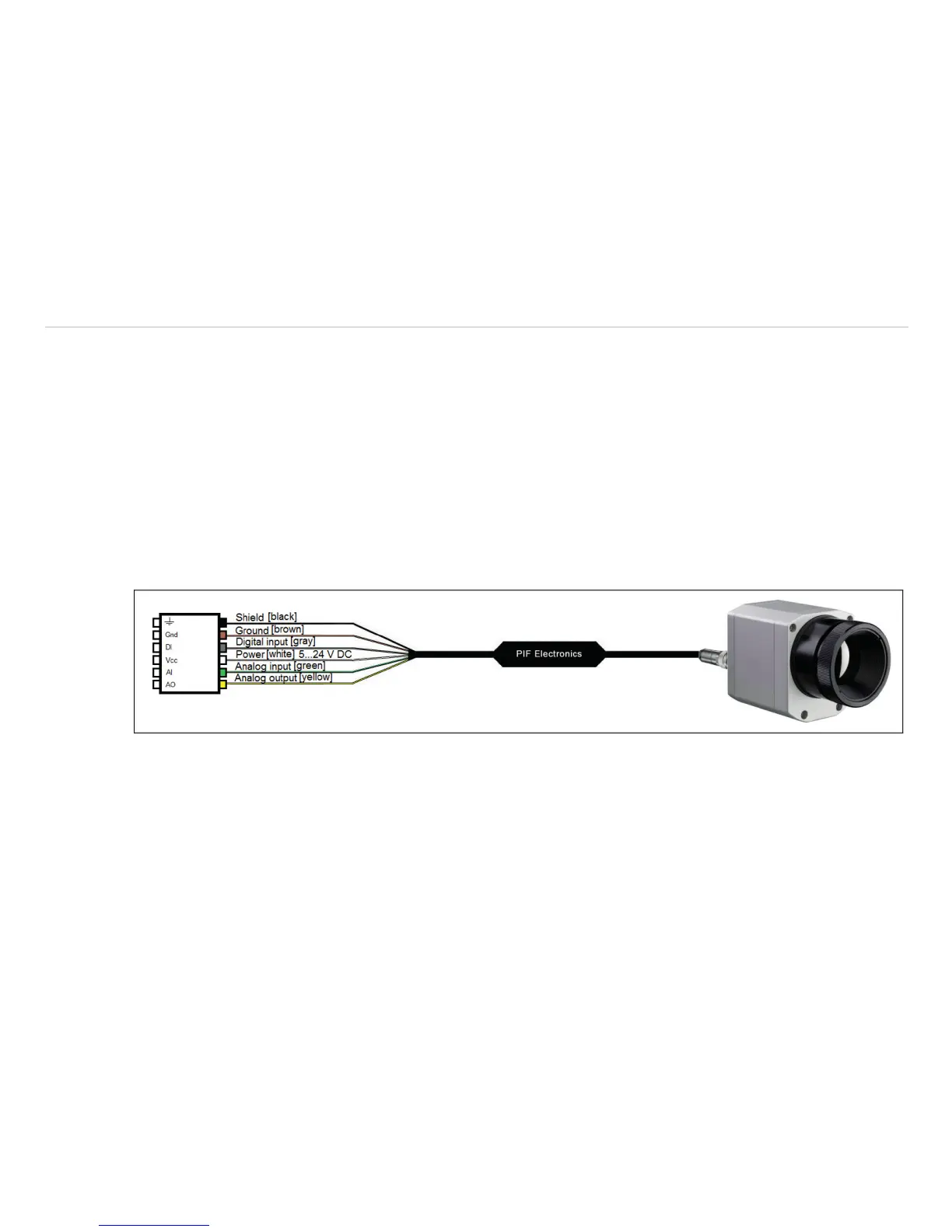
The imager is equipped with a process interface (cable with integrated electronics and terminal block), which can be
programmed via the software as an Analog Input (AI) and Digital Input (DI) in order to control the camera or as an Ana-
log Output (AO) in order to control the process. The signal level is always 0 - 10 V.
The process interface can be activated choosing the following options:
Analog Input (AI) Emissivity, Ambient temperature, Reference temperature, Uncommitted value, Flag Control,
Triggered Snapshots, Triggered Recording, Triggered Linescanner, Triggered event grabber,
Reset Peak-/Valley-Hold
Analog Output (AO) Main measure area, Measure area, Internal temperature, Flag Status, Alarm, Frame sync,
Fail-safe, External Communication
Digital Input (DI) Flag Control, Triggered Snapshots, Triggered Recording, Triggered Linescanner, Triggered
event grabber, Reset Peak-/Valley-Hold
Fig. 39 Configuration Process Interface (PIF)
Frame synchronization: In this function, a needle pulse is output for synchronization with fast processes at the
beginning of each frame.


 To Next Page