6.10 Event Grabber
Batch processes are easy to handle thanks to the event grabber. In the case of fast-paced recurring process-
es, a snapshot is created when an alarm condition occurs, in order to be able to analyze critical areas.
The settings can be found under the menu Tools, Configuration and Event grabber.
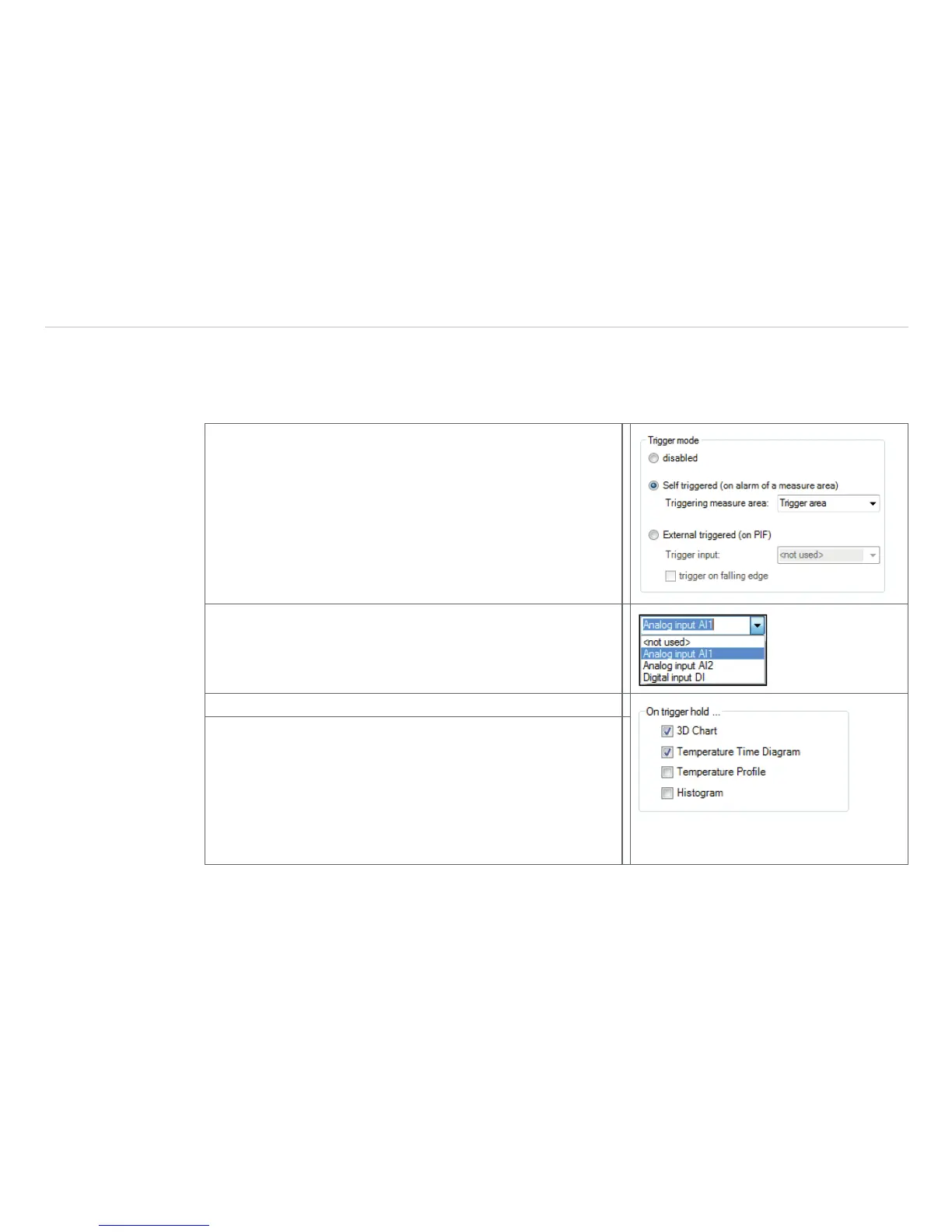
In the case of Self-triggered (on alarm of a mea-
sure area), the event is triggered by the set application
alarm. At first the Triggering measure area has to be
selected at which the set alarm condition is to be triggered.
At External triggered (on PIF), the event is triggered by the
process interface (PIF). For this, a Trigger input must first
be selected. The available inputs depend on the PIF which is
used.
At External triggered (on PIF), the event is triggered
by the process interface (PIF). For this, a Trigger input
must first be selected. The available inputs depend on the PIF
which is used.
On trigger hold, the following items can be selected:
- 3D Chart: The 3D diagram is held in case of an alarm
condition.
- Temperature Time Diagram: The Temperature Time
Diagram is held in case of an alarm condition.
- Temperatur Profile: The Temperature Time Diagram is
- held in case of an alarm condition.
- Histogram: The Histogram is held in case of an alarm
condition.



 To Next Page