Introduction
Version 3.4 TX3 Touch Screen Installation Manual 11 (93)
LT-996 Copyright 2015
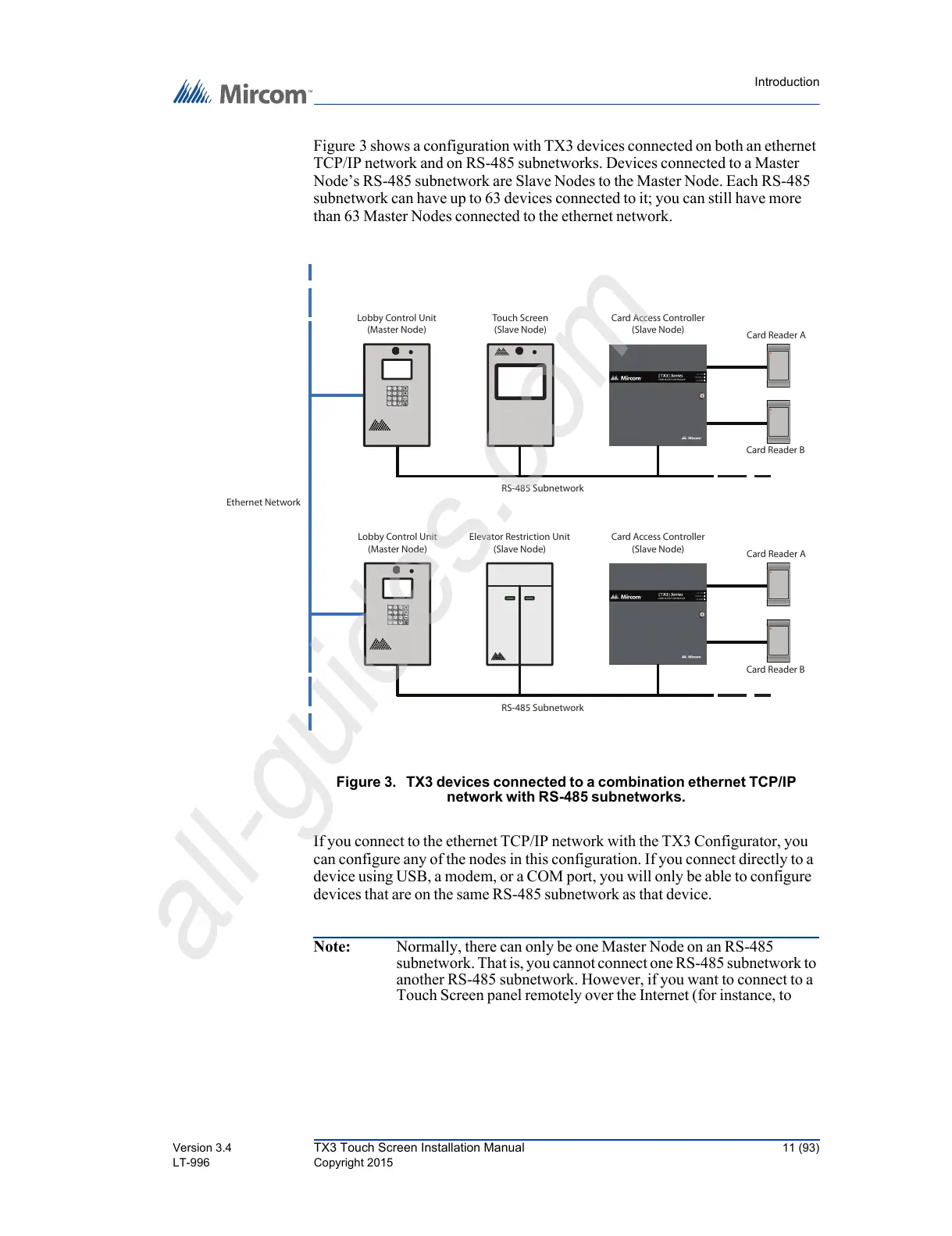
Figure 3 shows a configuration with TX3 devices connected on both an ethernet
TCP/IP network and on RS-485 subnetworks. Devices connected to a Master
Node’s RS-485 subnetwork are Slave Nodes to the Master Node. Each RS-485
subnetwork can have up to 63 devices connected to it; you can still have more
than 63 Master Nodes connected to the ethernet network.
Figure 3. TX3 devices connected to a combination ethernet TCP/IP
network with RS-485 subnetworks.
If you connect to the ethernet TCP/IP network with the TX3 Configurator, you
can configure any of the nodes in this configuration. If you connect directly to a
device using USB, a modem, or a COM port, you will only be able to configure
devices that are on the same RS-485 subnetwork as that device.
Note: Normally, there can only be one Master Node on an RS-485
subnetwork. That is, you cannot connect one RS-485 subnetwork to
another RS-485 subnetwork. However, if you want to connect to a
Touch Screen panel remotely over the Internet (for instance, to
RS-485 Subnetwork
Touch Screen
(Slave Node)
Card Reader B
Card Reader A
Card Access Controller
(Slave Node)
Card Reader B
Card Reader A
Card Access Controller
(Slave Node)
RS-485 Subnetwork
Ethernet Network
Lobby Control Unit
(Master Node)
2
ABC
3
DEF
1
5
JKL
6
MNO
4
GHI
8
TUV
9
WXYZ
7
PQRS
0
*
#
Lobby Control Unit
(Master Node)
2
ABC
3
DEF
1
5
JKL
6
MNO
4
GHI
8
TUV
9
WXYZ
7
PQRS
0
*
#
Elevator Restriction Unit
(Slave Node)



 To Next Page