Touch Screen System and Setup
Version 3.4 TX3 Touch Screen Installation Manual 63 (93)
LT-996 Copyright 2015
3.6.2 Maximum Power Supply Wire Distances
The distance from the Touch screen to the power supply is a function of the wire
gauge and the resistance generated by the cable by the power draw.
Do not exceed the maximum distances from the Touch screen to the power
supply as indicated in Table 1.
Table 1: Maximum Power Supply Wire Distances
3.6.3 Wiring the External Power Supply
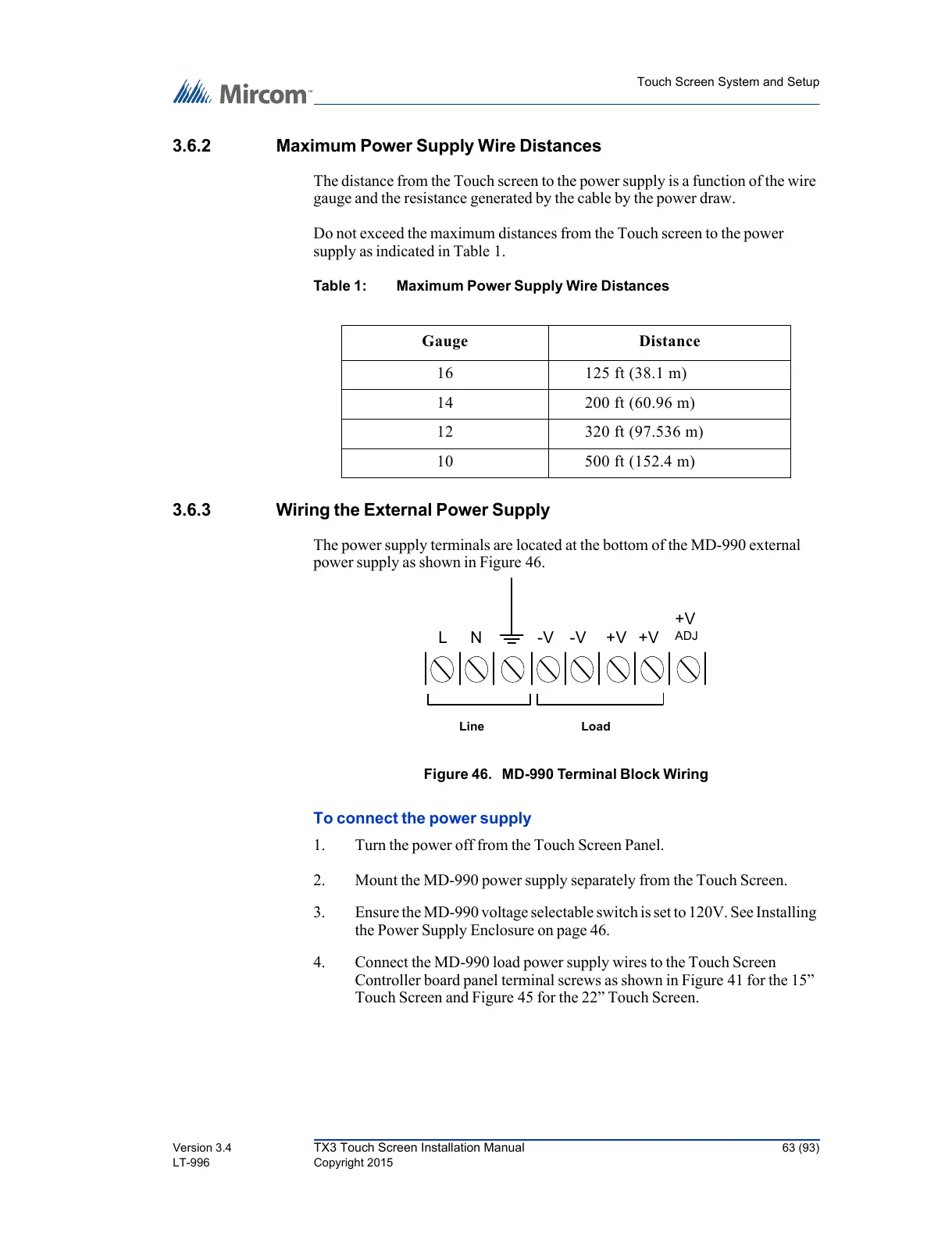
The power supply terminals are located at the bottom of the MD-990 external
power supply as shown in Figure 46.
Figure 46. MD-990 Terminal Block Wiring
To connect the power supply
1. Turn the power off from the Touch Screen Panel.
2. Mount the MD-990 power supply separately from the Touch Screen.
3. Ensure the MD-990 voltage selectable switch is set to 120V. See Installing
the Power Supply Enclosure on page 46.
4. Connect the MD-990 load power supply wires to the Touch Screen
Controller board panel terminal screws as shown in Figure 41 for the 15”
Touch Screen and Figure 45 for the 22” Touch Screen.
Gauge Distance
16 125 ft (38.1 m)
14 200 ft (60.96 m)
12 320 ft (97.536 m)
10 500 ft (152.4 m)



 To Next Page