66 (93) TX3 Touch Screen Installation Manual Version 3.4
Copyright 2015 LT-996
Touch Screen System and Setup
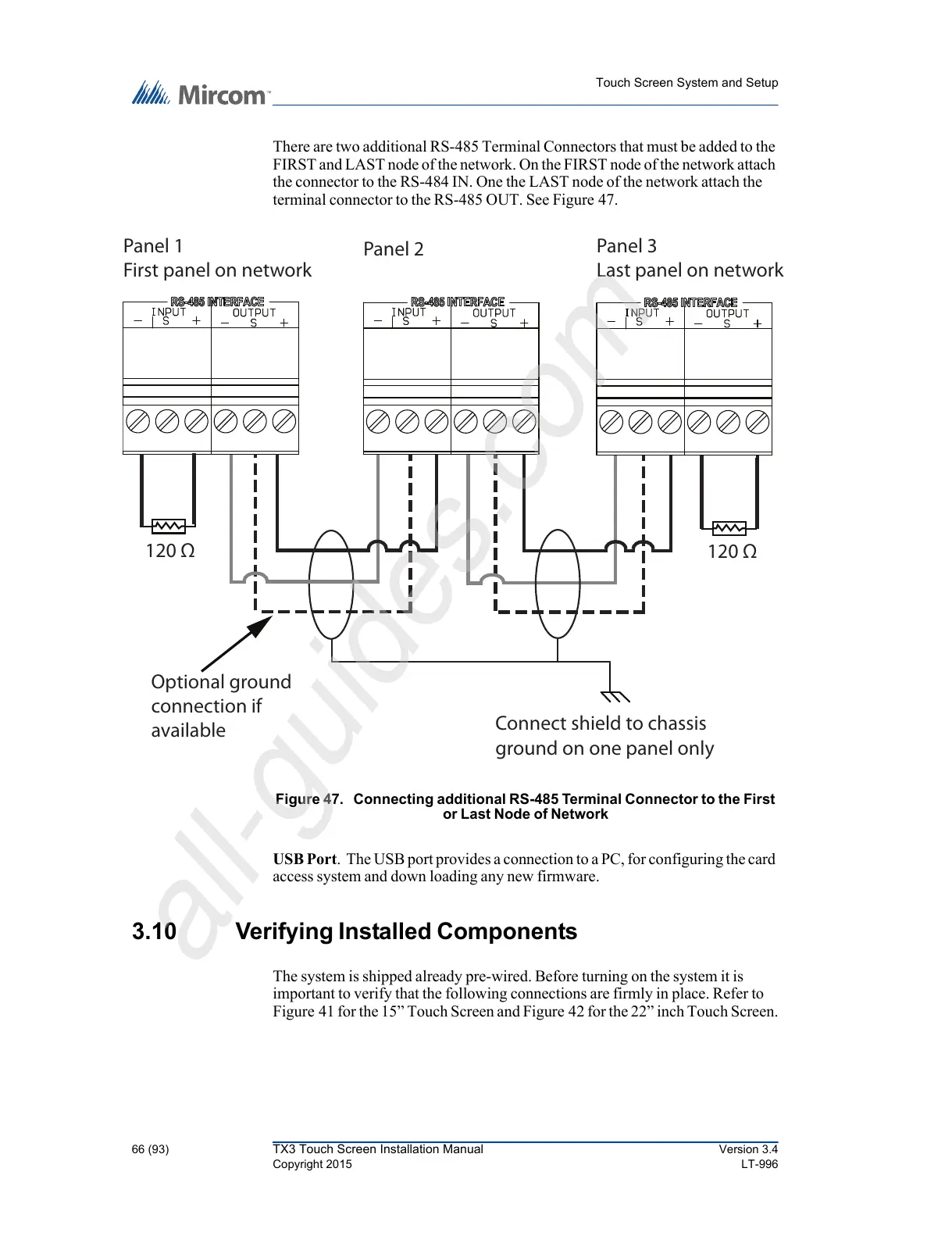
There are two additional RS-485 Terminal Connectors that must be added to the
FIRST and LAST node of the network. On the FIRST node of the network attach
the connector to the RS-484 IN. One the LAST node of the network attach the
terminal connector to the RS-485 OUT. See Figure 47.
Figure 47. Connecting additional RS-485 Terminal Connector to the First
or Last Node of Network
USB Port. The USB port provides a connection to a PC, for configuring the card
access system and down loading any new firmware.
3.10 Verifying Installed Components
The system is shipped already pre-wired. Before turning on the system it is
important to verify that the following connections are firmly in place. Refer to
Figure 41 for the 15” Touch Screen and Figure 42 for the 22” inch Touch Screen.
Panel 1
First panel on network
Panel 3
Last panel on networ



 To Next Page