Introduction
Version 3.4 TX3 Touch Screen Installation Manual 9 (93)
LT-996 Copyright 2015
The TX3 Configurator software can connect to any of these network
configurations. How you connect to the network (that is, through TCP/IP, USB,
a modem, or the COM port) determines what devices you can configure on the
system. The different network configurations are explained in the rest of this
section.
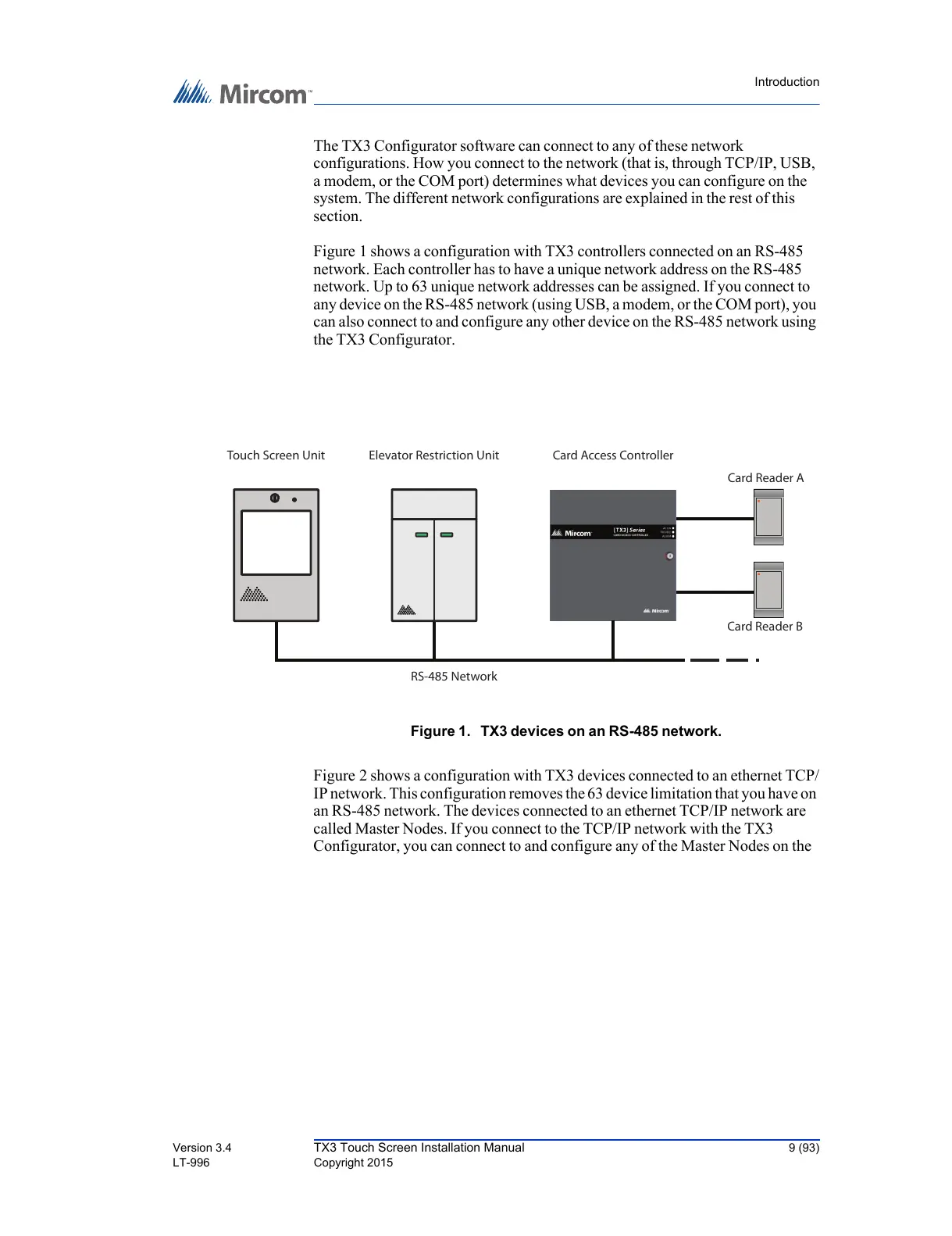
Figure 1 shows a configuration with TX3 controllers connected on an RS-485
network. Each controller has to have a unique network address on the RS-485
network. Up to 63 unique network addresses can be assigned. If you connect to
any device on the RS-485 network (using USB, a modem, or the COM port), you
can also connect to and configure any other device on the RS-485 network using
the TX3 Configurator.
Figure 1. TX3 devices on an RS-485 network.
Figure 2 shows a configuration with TX3 devices connected to an ethernet TCP/
IP network. This configuration removes the 63 device limitation that you have on
an RS-485 network. The devices connected to an ethernet TCP/IP network are
called Master Nodes. If you connect to the TCP/IP network with the TX3
Configurator, you can connect to and configure any of the Master Nodes on the
RS-485 Network
Card Reader B
Card Reader A
Card Access Controller



 To Next Page