Chapter Five: Ethernet Interface
Setup and Configuration
Step 2: Setup Network for Communication
through Ethernet
50
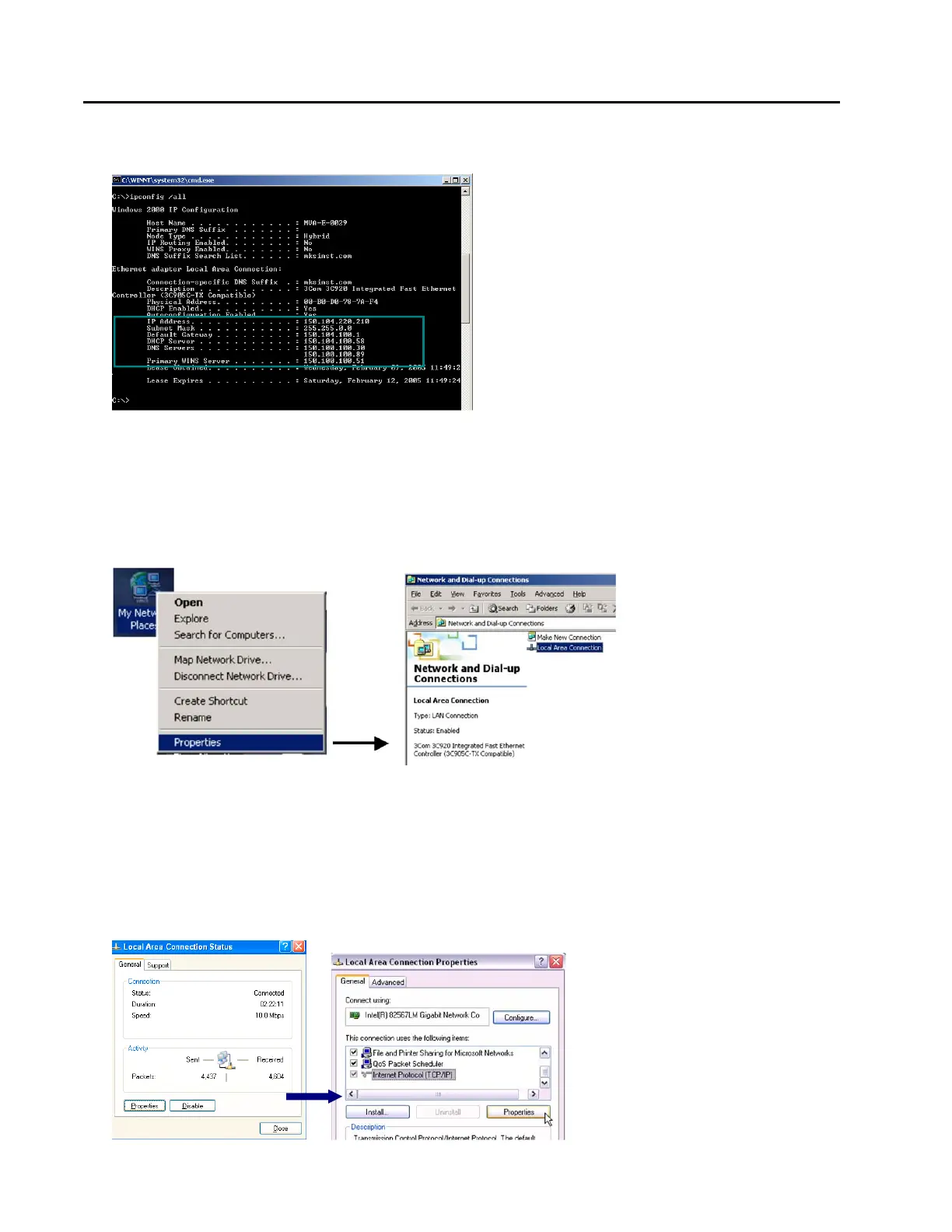
4. At the command prompt, enter the command “ipconfig /all” (as shown below) then press Enter.
The data inside the highlighted area (lower section, between IP Address and Primary WINS Server) are
what is needed for the steps below.
5. Open the Local Area Connection by doing one of the following options:
Option 5.1:
Select My Network Places (On Desktop typically). Right-Click on the icon, then select Properties.
In the “Network and Dial-Up Connections” window, Double-click on “Local Area Connection.” Not all
Local Area Connections have the same name, yours may have a different name.
Option 5.2:
From your computer’s “Start” menu, select “Settings” Network and Dialup Connections Local Area
Connections
6. Select Properties. In the Properties window select Internet Protocol (TCP/IP), then select Properties



 To Next Page