6. LC100-D ADDITIONAL MENU
6.1 General
In addition to the regular menus described in the main User Guide, LC100-D has an additional menu for the
following purposes:
LC100-M5, LC100-M6 and LC100-M7 module addressing
CAN bus traffic analysis
Elevator selection (if LC100-D is connected to CAN2 bus)
Load sensor calibration and settings
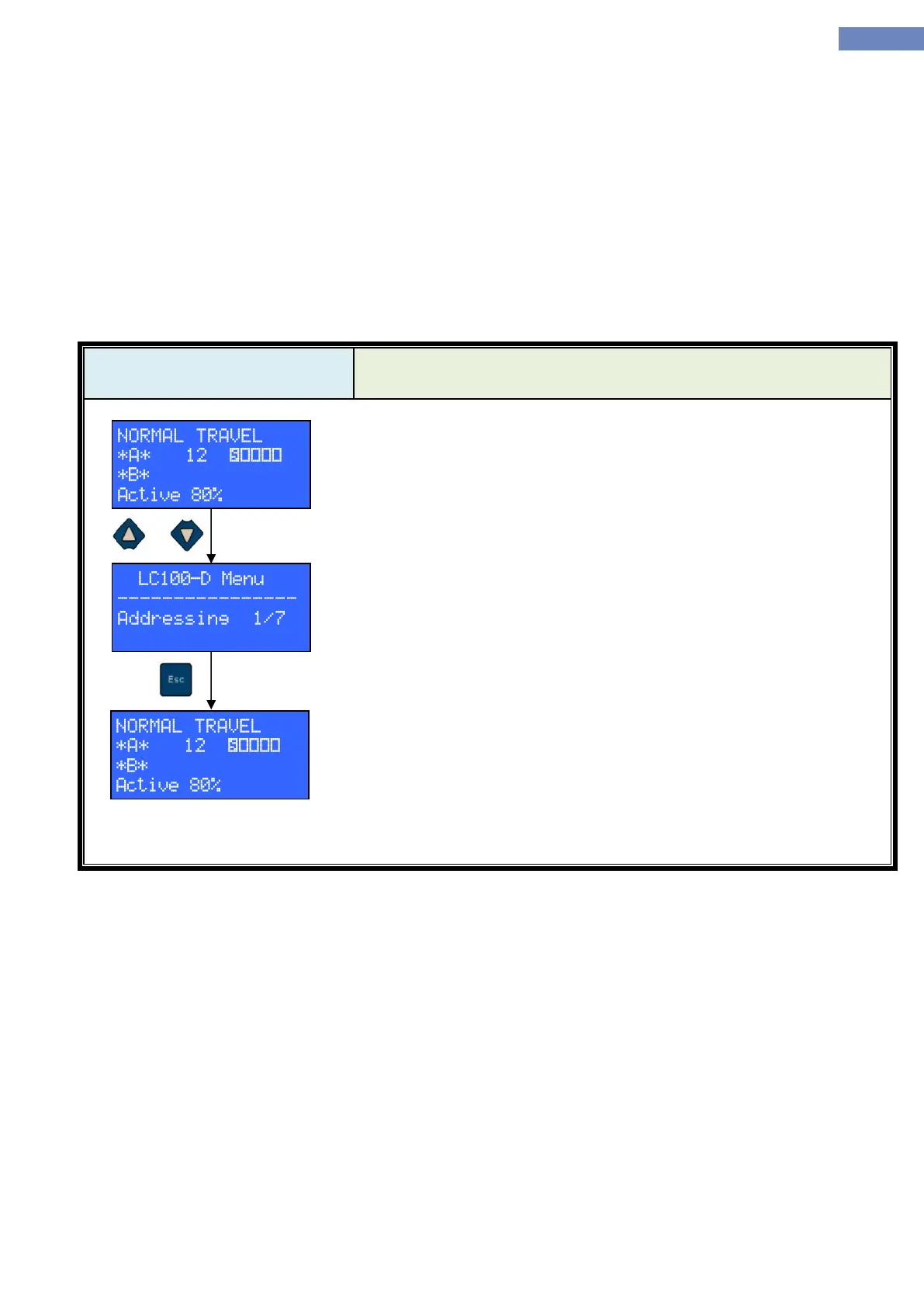
LC100-D additional menu can be accessed by pressing UP and
DOWN keys simultaneously. Keys don’t have to be pressed at the exactly
same moment, it’s sufficient that both are held pressed at the same time.
To return from the additional menu, press ESC.
Upon exiting from additional menu, LC100-D returns to the state it was in
before entering.
There are two situations, other than the one described, in which LC100-D is going to enter the additional menu:
When LC100-D is connected to the CAN2 bus, elevator selection menu will be brought up automatically.
When LC100-D is connected to a CAN bus where no LC100-C is present, the additional menu root will be
brought up automatically. This behavior is useful for addressing signalization modules without connecting
them to an elevator or analyzing CAN traffic on a bus that has no LC100-C connected to it e.g. standalone
signalization module.


 To Next Page