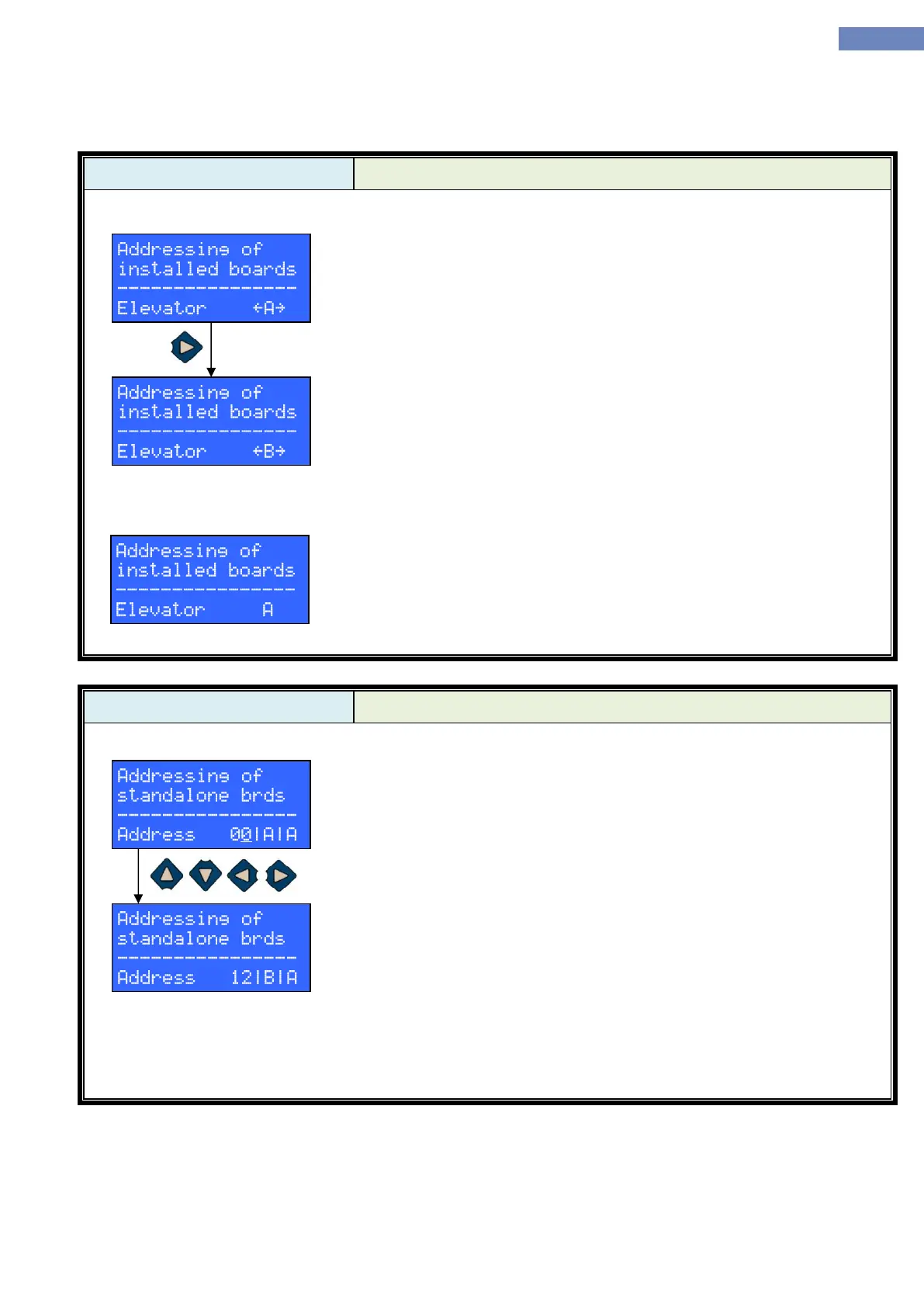
First addressing mode is used for signalization modules that are
already installed and connected to a LC100-C module. Signalization
modules are addressed for one elevator at a time. Therefore, it’s first
necessary to select an elevator whose signalization modules are to be
addressed. Picture on the left depicts LC100-D screen for elevator A.
If there are multiple elevators connected to the CAN2 bus, LC100-D
will draw arrows next to selected elevator designator, indicating that it’s
possible to select other elevators using LEFT and RIGHT keys. If there is
only one elevator, no arrows will be drawn.
With the elevator chosen, the next step is to drive that elevator to a
stop whose signalization module is to be addressed. Then, by pressing call
pushbutton the signalization module whose pushbutton has been pressed is
assigned to the selected elevator in the current stop. If the selected elevator
has front and rear doors, each press of the call pushbutton will alternate
between door A and door B.
By pressing and holding RESET key for more than 3 seconds, all
signalization modules will be reverted to the default address (stop 0 i.e. cab
indicator).
After exiting the menu all of the signalization modules will save their
assigned addresses, so no further action from the user is required.
Second addressing mode is used when, for any one reason, the first
mode is impossible to use or is considered impractical e.g. the elevator
cannot drive at the moment or the signalization modules aren’t connected to
an elevator at all. First step is to select an address which is to be assigned to
a signalization module, by pressing UP, DOWN, LEFT and RIGHT keys
accordingly. Number next to address represents stop number, first letter
represents elevator selection (A, B, C or D) and the third letter represents
door selection (A or B). When the address is set, pressing a call pushbutton
on a signalization module will assign the selected address to that module.
Signalization modules automatically save their new address when call
pushbutton is pressed, so no further action from the user is required.
By pressing and holding RESET key for more than 3 seconds, all
signalization modules will be reverted to the default address (stop 0 i.e. cab
indicator).
Image on the left shows LC100-D screen when stop 12, elevator B and
landing door A is selected.


 To Next Page