3.2.1 Statistics
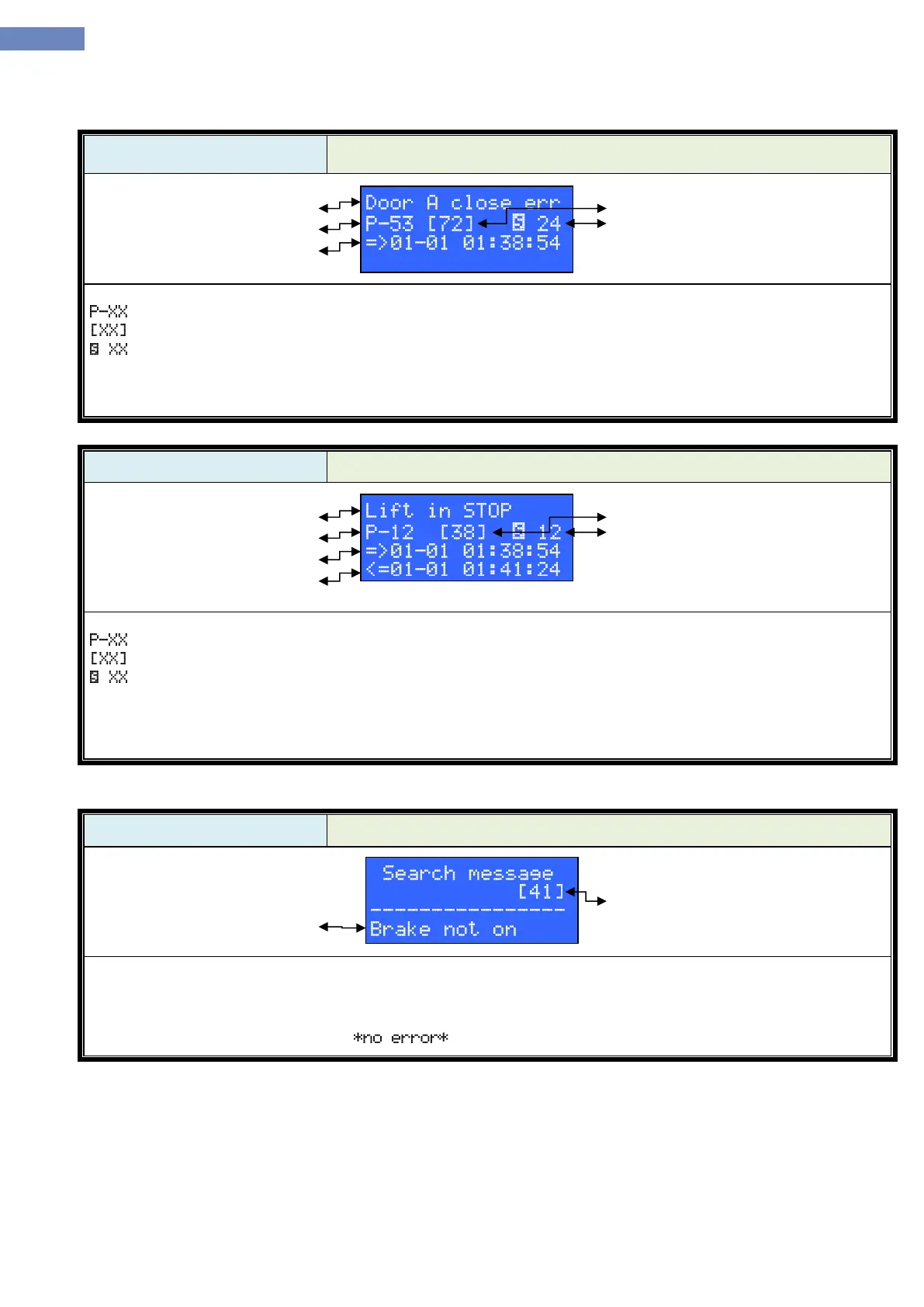
Active error
Number of error
Time when error apeared
Active errors menu displays active errors. In the first row error is displayed.
Means number of error. The last error is the one with number 0, the one before is number 1 and so on.
Means message ID.
Means floor in which error occurred.
Third row shows date and time when error happened.
If there are more active errors, pushing the button left or right it is possible to see other errors.
Active error
Number of error
Time when error apeared
Time when error ended
All errors menu displays all errors. In the first row error is displayed.
Means number of error. The last error is the one with number 0, the one before is number 1 and so on.
Means message ID.
Means floor in which error occurred.
Third row shows date and time when error happened.
Fourth row shows date and time when error ended.
If there are more errors, pushing the button left or right it is possible to see other errors.
In the error analysis menu it is possible to filter errors.
After entering the menu select the error which is wanted to filter by pressing the buttons left or right. After choosing
the error and pressing the „Enter“ button error is filtered.
If there are no errors filtered massage apears.


 To Next Page