3. Managment with LC100-D terminal
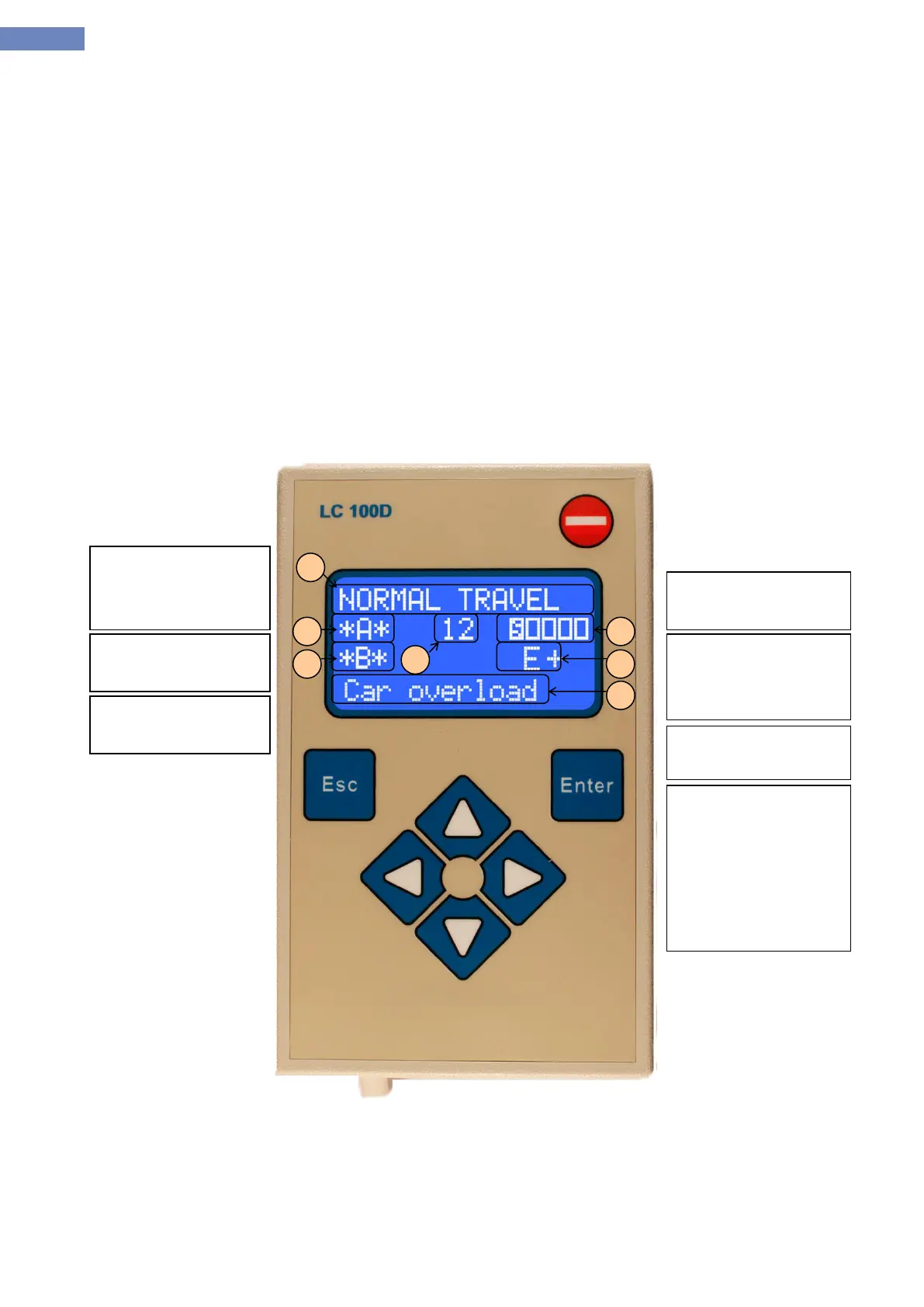
Parameter setting, diagnostics and monitoring the system LC100 is enabled by using supervision
and control terminal LC100-D. Supervisory-control terminal consists of four line LCD screen and the keyboard of the
four buttons to scroll through the menus, pressing the Enter key to enter the menu and confirm the parameter, the
Escape key to exit the menu and reset button as shown in Figure 3.1. LC100-D terminal can be
connected anywhere on the CAN bus communication. After switching to the bus terminal is shows basic display status
of elevators and after pressing the enter key it goes to the main menu.
3.1 Basic view
The main display on the LC100-D terminal contains basic status of the system. Display status is divided into 6
parts:
1. The basic state
status
5. Safety circuit
Status which turns
in to drive status.
7. Allowing the
ladning calls
status:
E:+ landing calla
sre allowed
E:- landing calls
are not allowed


 To Next Page