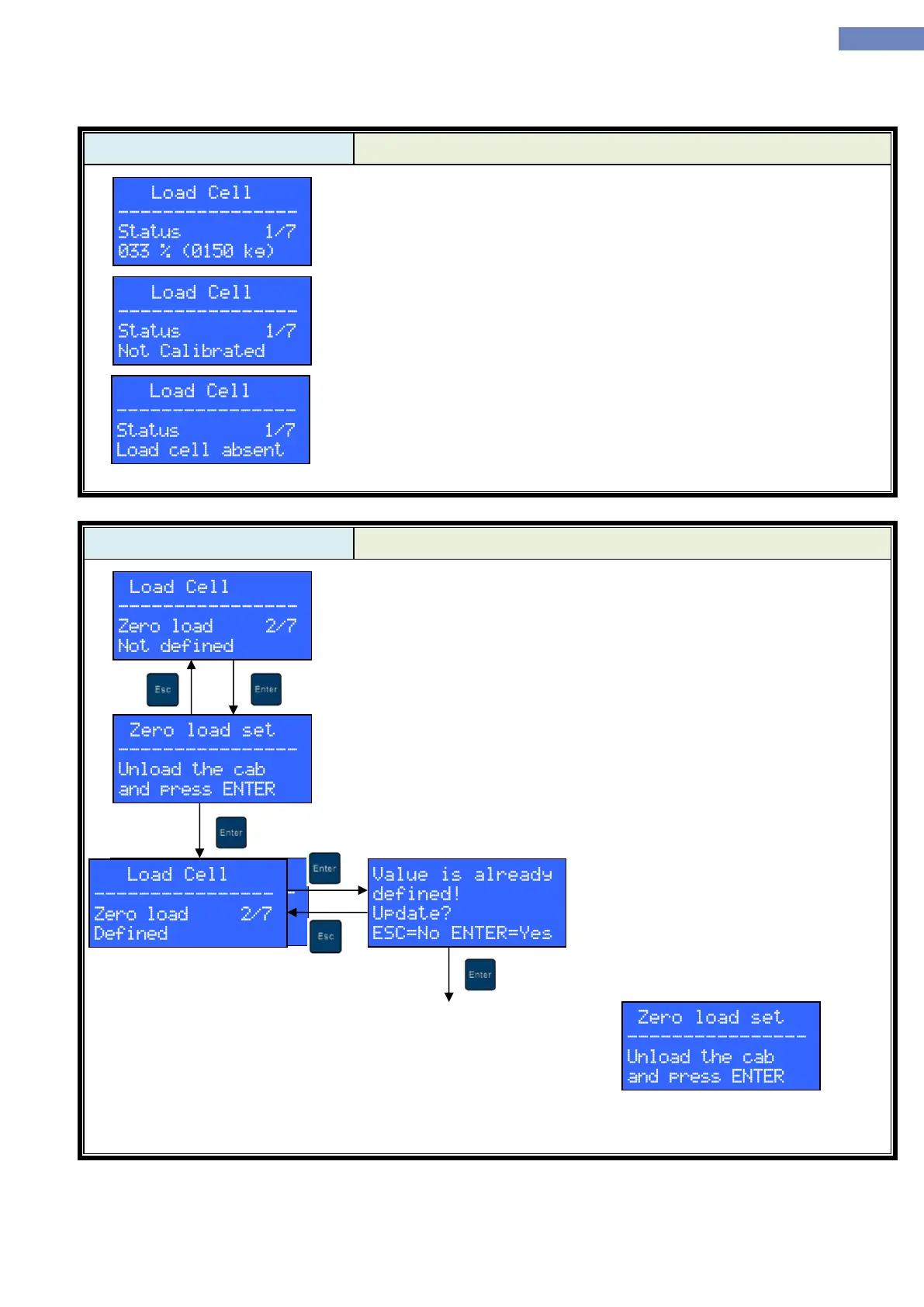
The status screen displays current cab load in kilograms and in
percentage of rated capacity.
If load measurement system isn’t calibrated, message “Not Calibrated”
is displayed.
If the load measurement system isn’t operational, message “Load cell
absent” is displayed. There are multiple possible reasons for this state:
Module LC100-V isn’t connected to LC100-K
Module LC100-V faulty
Module LC100-K isn’t connected to the elevator
Module LC100-K faulty
Zero load menu is used to calibrate load measuring system to an
empty cab. If zero load calibration is not already done, “Not defined”
message is displayed. Zero load calibration procedure can be started by
pressing ENTER key.
The cab should be unloaded now and ENTER key should be pressed
to commence with zero load calibration.
After key press, LC100-D will display the outcome of the zero load
calibration (“Successful” or “Communication error”).
After successful zero load calibration, LC100-D will return to the load
cell menu and display “Defined” as the zero load status.
If zero load value is set and user tries to redefine it, a warning will
be displayed. Pressing the ENTER button dismisses the warning and
proceeds with the calibration process.


 To Next Page