67
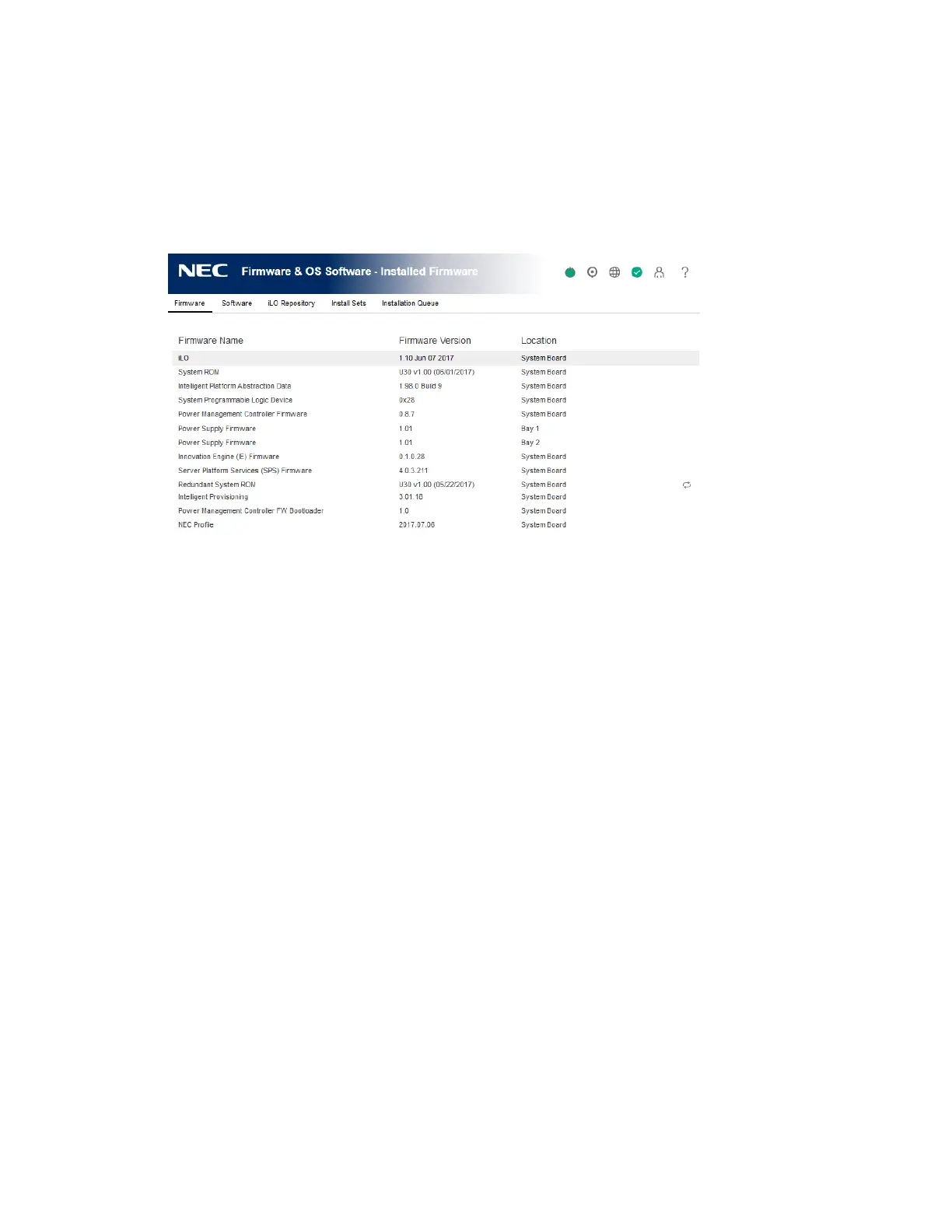
Viewing installed firmware information
Procedure
1. Click Firmware & OS Software in the navigation tree.
The Installed Firmware page displays firmware information for various server components.
If the server is powered off, the information on this page is current as of the last power off.
Firmware information is updated only when the server is powered on and POST is complete.
Firmware types
The firmware types listed on the Installed Firmware page vary based on the server model and
configuration.
For most servers, the system ROM and iLO firmware are listed. Other possible firmware options
include the following:
• Power Management Controller
• Server Platform Services Firmware
• Smart Array
• Intelligent Platform Abstraction Data
• Smart Storage Battery
• TPM or TM firmware
• SAS Programmable Logic Device
• System Programmable Logic Device
• EXPRESSBUILDER
• Networking adapters
• NVMe Backplane firmware
• Innovation Engine (IE) firmware
• Drive firmware
• Power Supply firmware




 To Next Page