NMC-WOLLARD 2021Truax Blvd., Eau Claire, WI 54703, Phone (715) 835-3151, Fax (715) 835-6625
M100 Tow Tractor Manual No. 46052
PAGE 26
CHAPTER 5 MANUFACTURER’S INFORMATION
19
NexSysLink
®
2" Stand-Alone CAN Display Operation Manual SAE J1939
© 2011 Beede Electrical Instrument Co., Inc.
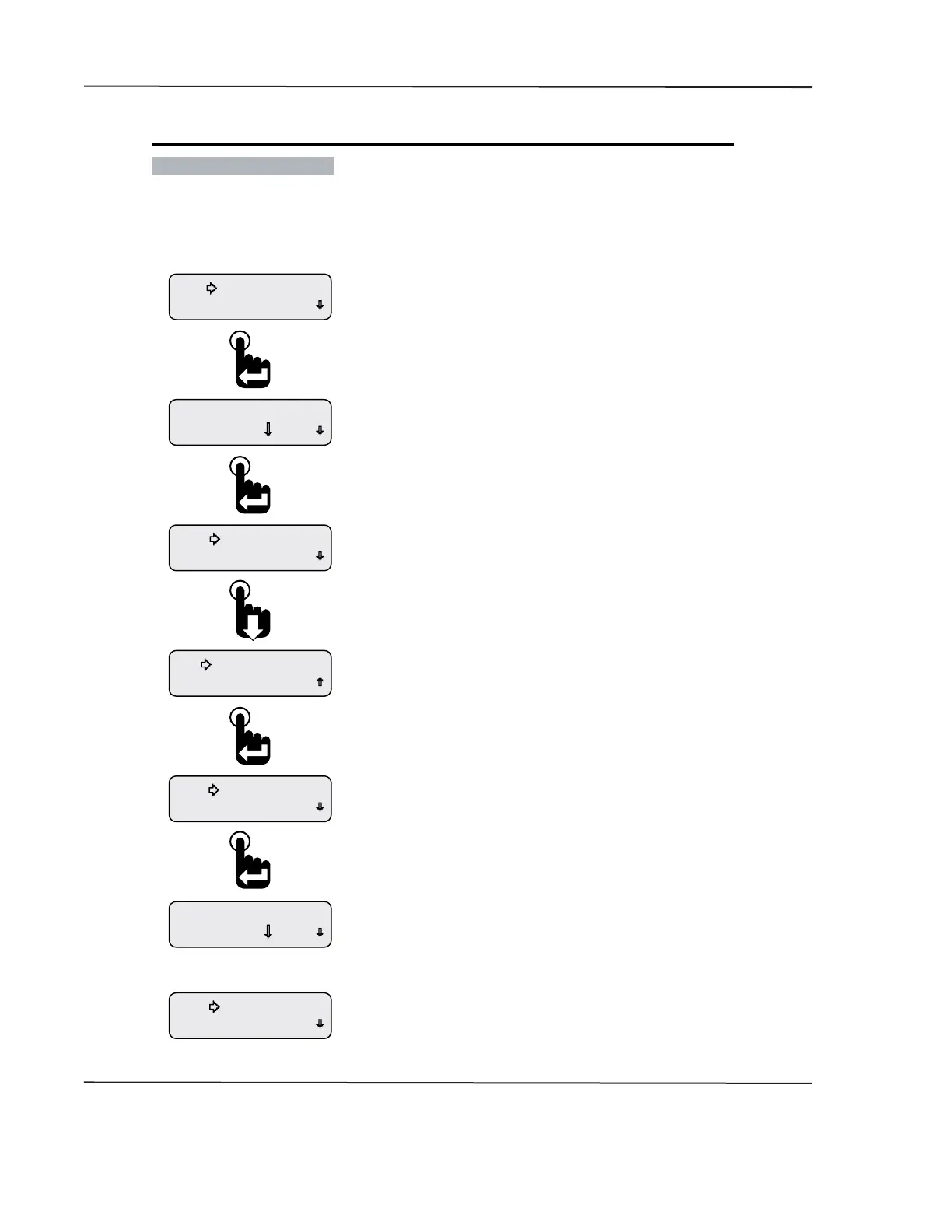
• Deleting Alarms
The Edit Alarms function is also used to delete existing alarms�
Figure 1-18: Deleting an Alarm
Return
Add Alarm
Change? 10.0 V
A1 Baery Volts
Confirm Delete
No Change
Delete Alarm
Delete Alarm
Edit Alarm
Change? 10.0 V
A1 Alternator Volts
Return
Edit Alarms
Or
If No Change is selected above, the previously displayed
Alarm conguration screen appears�
If Conrm Delete is selected, the next congured alarm appears�
If no other alarms were congured, the Add Alarm and Return
menu options appear�
After selecting Delete Alarm, users must either cancel the delete
request by selecting No Change or conrm the deletion by selecting
Conrm Delete�
With the selection arrow cursor next to the Delete Alarm option,
press the Enter switch�
After choosing the displayed alarm to delete, the selection arrow
cursor appears next to the Edit Alarm option�
Press the Down switch to place the selection arrow cursor next to the
Delete Alarm option then press the Enter switch�
Pressing the Enter switch displays the rst previously congured
CAN parameter for alarm notication, A1�
The prompt “Change?” appears in the lower left corner of the display�
To delete the displayed alarm conguration, press the Enter switch
to accept the prompt to change the alarm� Otherwise, press the
down switch until the desired alarm to delete appears on the
display then press the Enter switch to accept the change prompt�
From the Alarms Menu place the selection arrow cursor
next to the Edit Alarms option, Main Menu-Alarms-Edit Alarms,
then press the Enter switch to begin editing alarms�
CAN DISPLAY MANUAL
NOVEMBER 02, 2015



 To Next Page