www.nordsonefd.com info@nordsonefd.com 800-556-3484 Sales and service of Nordson EFD dispensing systems are available worldwide.
EV Series Automated Dispensing Systems
102
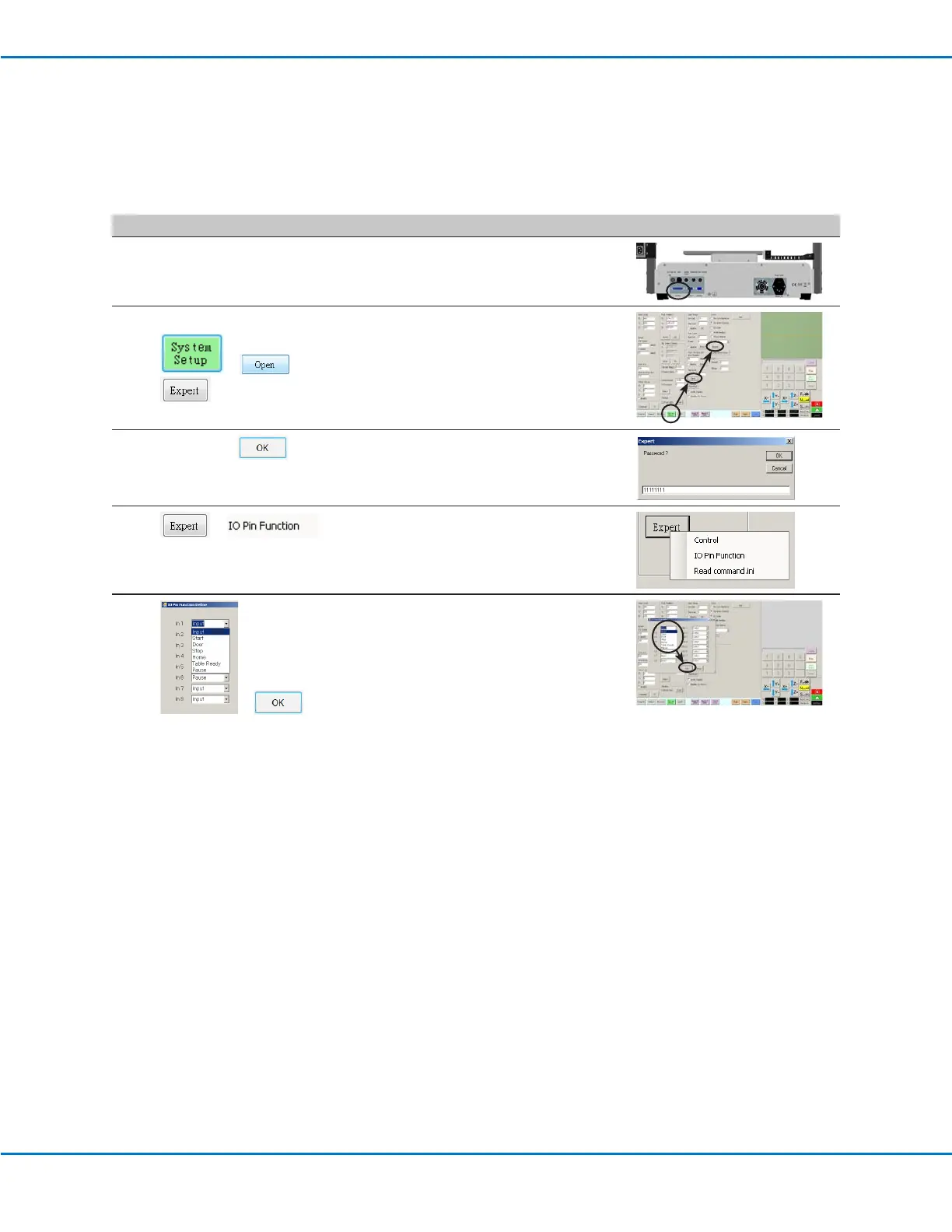
To Reconfigure Inputs / Outputs
PREREQUISITES
The system is properly set up. Refer to “Setting Up and Calibrating the System (Required)” on page 37.
# Click Step Reference Image
1
• Connect the signal wiring to the I/O
Port on the back of the robot.
2
> >
• Click SYSTEM SETUP > OPEN >
EXPERT.
3
11111111 >
• Enter 11111111, then click OK.
4
>
• Click EXPERT, then click IO PIN
FUNCTION.
5
>
• Click the input or output to congure,
then select the conguration from the
drop-down menu. Refer to “IO Pin
Function Congurations” on page 101
for a description of the conguration
selections.
• Click OK.
Appendix F, I/O Pin Function Setup (continued)



 To Next Page