www.nordsonefd.com info@nordsonefd.com 800-556-3484 Sales and service of Nordson EFD dispensing systems are available worldwide.
EV Series Automated Dispensing Systems
54
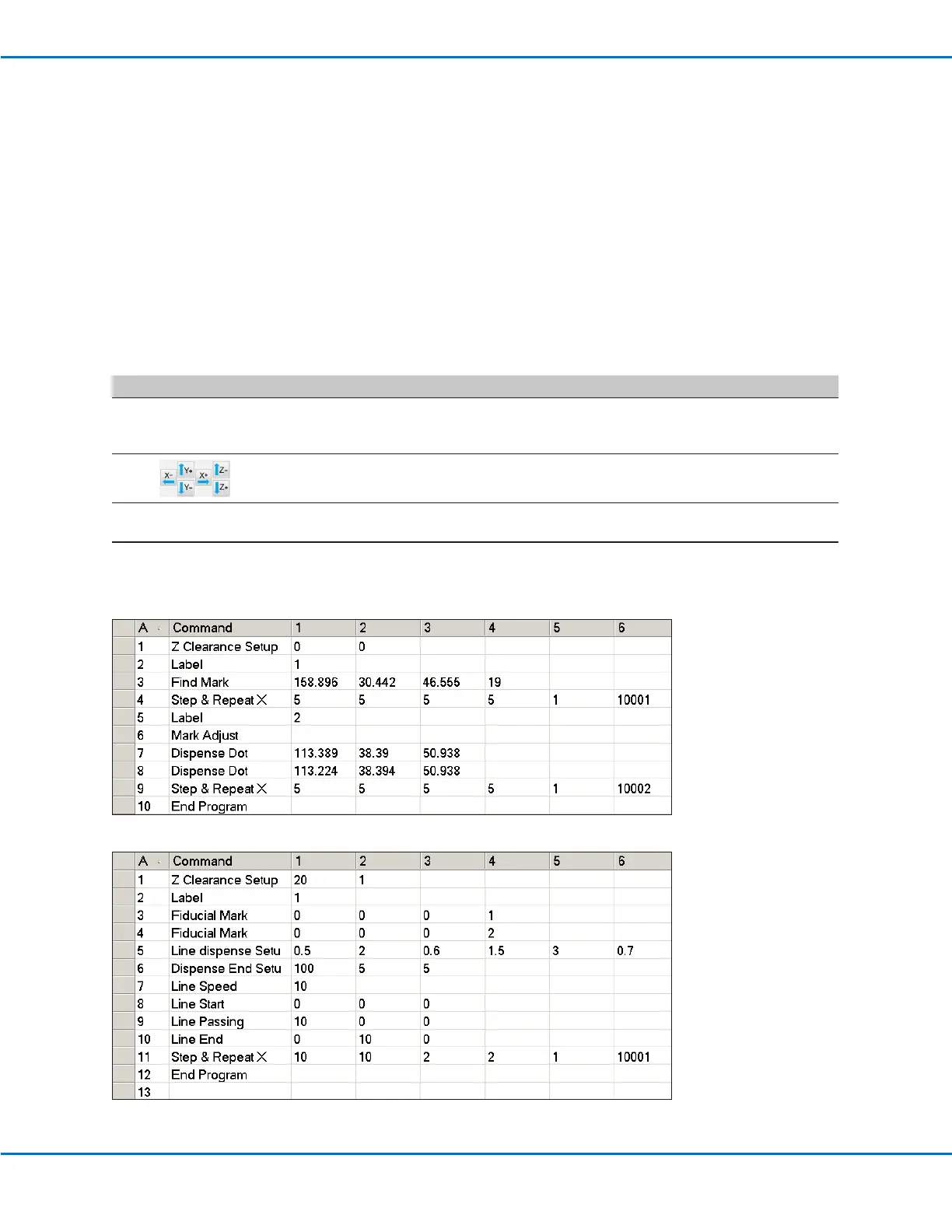
How to Use Marks or Fiducial Marks in a Program
Use the Mark command in a program as follows:
• To conrm the presence or absence of a workpiece.
• To conrm that the correct workpiece is present.
• To check the XY position of a workpiece.
Use two Fiducial Marks in a program as follows:
• To move the dispensing tip to a specic target area on the workpiece.
• To check the XY orientation of a workpiece. The system automatically adjusts the program to compensate for
any changes in orientation.
PREREQUISITES
The system is properly set up. Refer to “Setting Up and Calibrating the System (Required)” on page 37.
The system is in the CCD Mode.
# Click Step
1
• Determine whether you need to create one mark or two and then create the
marks. Refer to ”How to Create a Mark” on page 53 for the procedure for
creating marks.
2
• Enter a Find Mark command or two Find Fiducial Mark commands near the
beginning of a program.
3
• If the program includes a Step & Repeat command, use the Mark Adjust or
Fiducial Mark Adjust commands.
4
• Refer to the sample program below as a guideline.



 To Next Page