www.nordsonefd.com info@nordsonefd.com 800-556-3484 Sales and service of Nordson EFD dispensing systems are available worldwide.
EV Series Automated Dispensing Systems
43
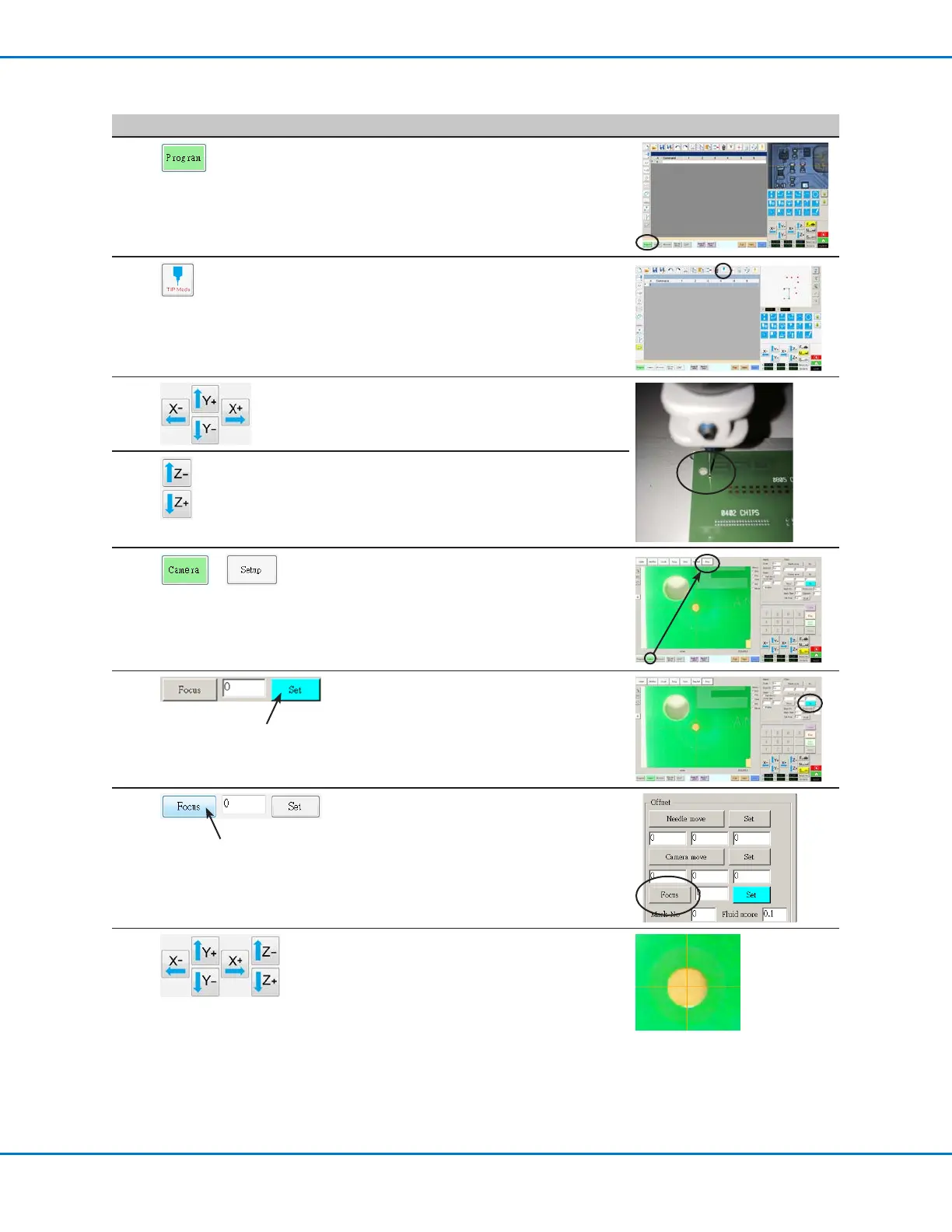
Setting the Tip-to-Workpiece Offset (Z Clearance) Using the Camera Focus
# Click Step Reference Image
1
• Click the PROGRAM tab.
2
• Click the CCD Mode icon to change to the
Tip MODE.
3
• Jog the tip to a good reference point on the
workpiece.
4
• Jog the tip down until it is as close to the
workpiece as possible without touching the
surface.
5
>
• Click CAMERA > SETUP to return to the
Offset elds.
6
• Click SET next to Focus.
NOTE: The Set button should be bright
blue.
7
• Click FOCUS next to Set.
8
• Jog the camera until the camera crosshairs
are centered over the dispense dot you
created earlier.
• Jog the Zaxis until the image of the
dispense dot is clear.



 To Next Page