www.nordsonefd.com info@nordsonefd.com 800-556-3484 Sales and service of Nordson EFD dispensing systems are available worldwide.
EV Series Automated Dispensing Systems
42
# Click Step Reference Image
8
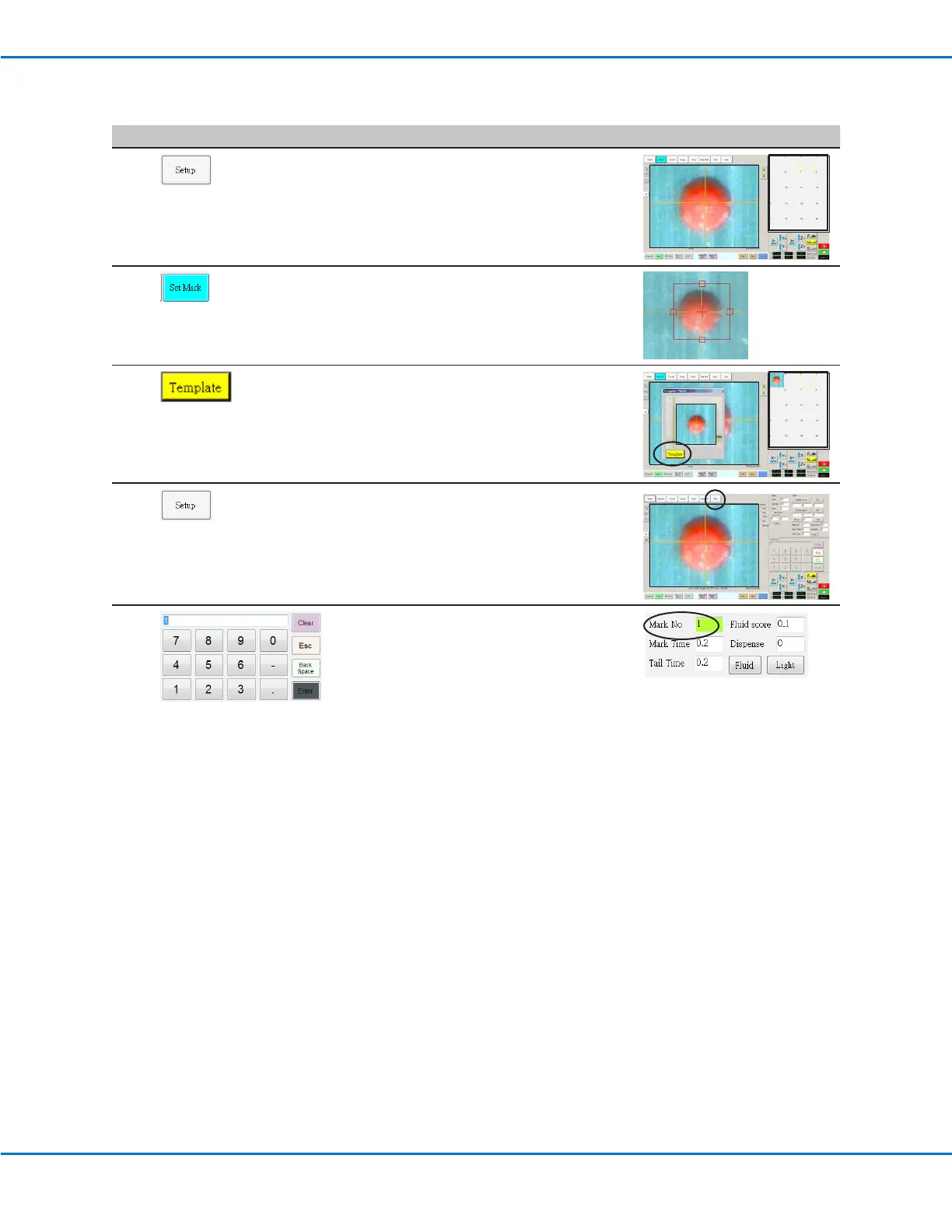
• Click SETUP again to close the Setup elds
and show the Mark Library in the Secondary
View screen.
9
• Click SET MARK. A red box appears. Click
and hold the center of the red box, drag it
over the dispense dot, and then click and
drag the four box handles such that they
outline the dot.
10
• Click a socket in the Mark Library to save the
mark as a Mark No., then click TEMPLATE
when the Template Match window appears.
NOTE: Be sure to remember the Mark No.
11
• Click SETUP to go back to the Camera
window Offset elds.
12
• Use the keypad to enter the Mark number in
the Mark No eld under focus.
NOTES:
- Make sure you click ENTER on the keypad
to enter the Mark number.
- Mark Time sets the time allowed for the
system to nd the mark.
Setting the Camera-to-Tip Offset (continued)



 To Next Page