EasyManua.ls Logo

Nordson EFD E2V - Operating Features (continued); EV Front Panel Description; EV Back Panel Description

Nordson EFD E2V
103 pages
Print Icon
To Next Page IconTo Next Page
To Previous Page IconTo Previous Page
Loading...
www.nordsonefd.com info@nordsonefd.com 800-556-3484 Sales and service of Nordson EFD dispensing systems are available worldwide.
EV Series Automated Dispensing Systems
14
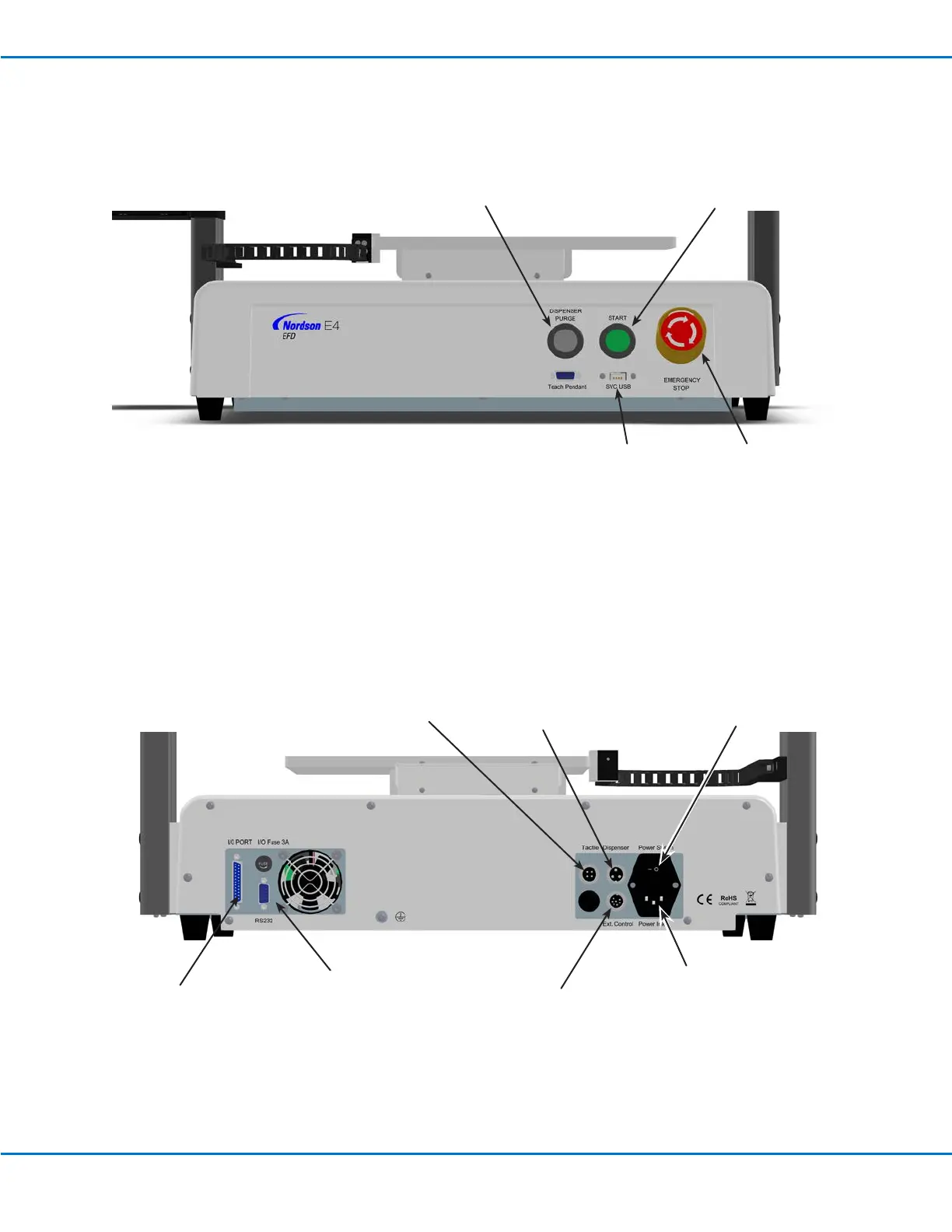
START button
DISPENSER
PURGE button
Power
Switch
EV Back Panel
Dispenser port
(for dispenser /
controller initiation)
I/O PORT (for
input/output
connections)
RS232 port
(connects to the
DispenseMotion
controller)
Ext. Control
port (for the I/O
safety plug)
Operating Features (continued)
EV Front Panel
Tactile port (for
the tip detector,
if present)
EMERGENCY STOP
button
SVC USB port (for
software upgrades)
Power Inlet

Table of Contents

Related product manuals