www.nordsonefd.com info@nordsonefd.com 800-556-3484 Sales and service of Nordson EFD dispensing systems are available worldwide.
EV Series Automated Dispensing Systems
22
Concepts
Before creating any programs, make sure you understand the concepts explained in this section.
About Programs and Commands
A program is a set of commands stored as a le. Each command is stored in the le as a numbered address.
Commands can be subdivided into the following command types:
• A setup command sets a program-level parameter, such as an XYZ coordinate or the Z clearance height.
• A dispense command is tied to an XYZ coordinate and automatically sends a signal to the dispensing system to
execute the dispense command.
When the robot executes a program, it steps through each address in sequence and executes the command
contained in that address. If an address contains a setup command, the system registers that command. If an
address contains a dispense command, the robot moves the X, Y, and Z axes to the location specied for that
command and then performs the dispense command.
Dispense commands are the building blocks of patterns. To program a dispense command, the dispensing tip is
jogged to the desired XYZ location and then a dispense command is registered for that location. This action is
repeated until the desired dispensing pattern is complete. Several examples are provided below.
Setup commands dictate how dispense commands will be executed. Nordson EFD recommends inserting setup
commands at the beginning of a program. The following setup commands are the most commonly used: Dispense
End Setup, Point Dispense Setup, Line Dispense Setup, Line Speed, Z Clearance, Retract Setup, and Adjust
Position.
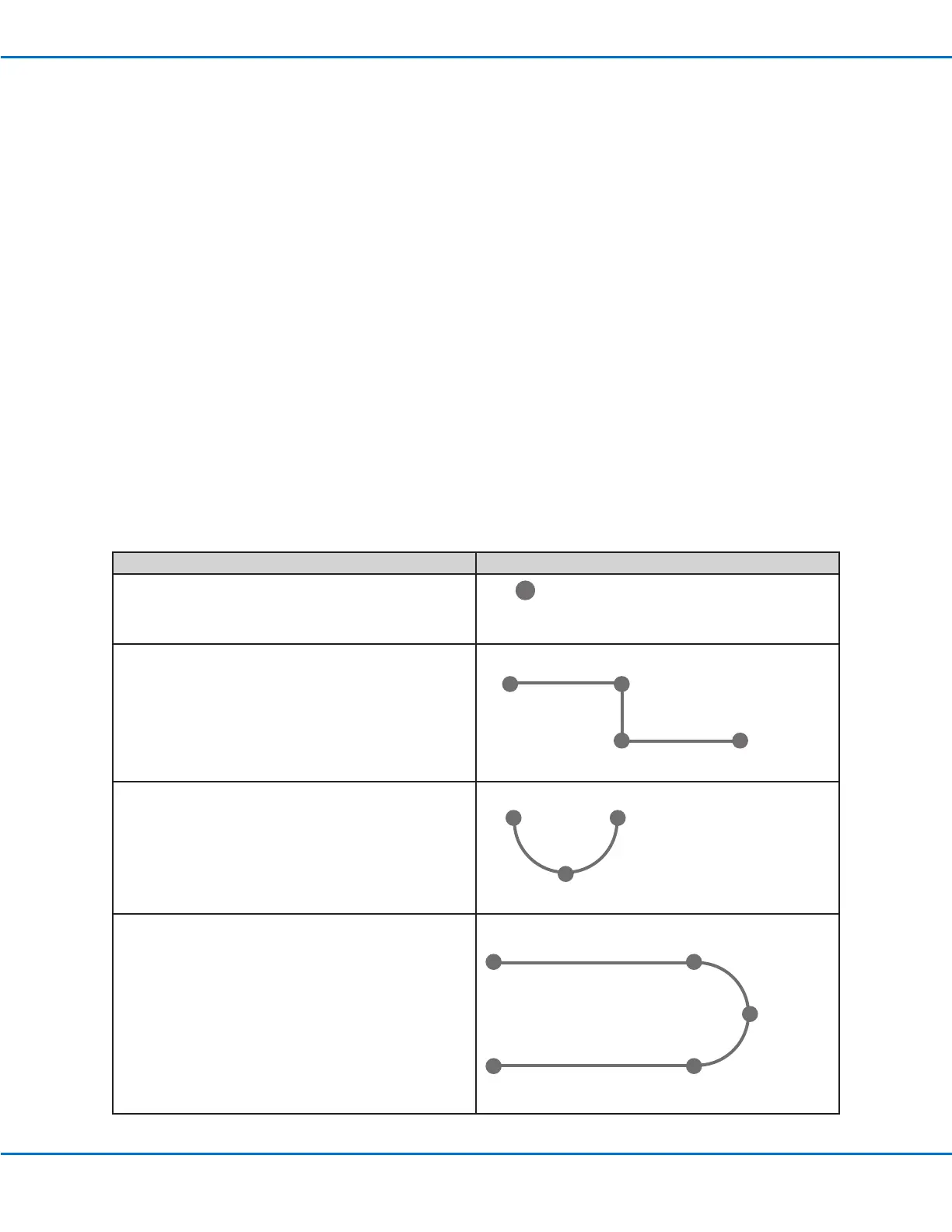
Dispense Command Examples
Commands Resulting Pattern
To program the robot to dispense a dot of uid, an XYZ
location is registered as a DISPENSE DOT command.
DISPENSE DOT
To program the robot to dispense a bead of uid along
a linear path, the XYZ location of the start of the line is
registered as a LINE START command. The locations
where the tip changes direction are registered as LINE
PASSING commands. The location where the bead of
uid ends is registered as a LINE END command.
Line Start
Line EndLine Passing
Line Passing
To dispense a bead of uid in an arc, the XYZ location
of the start of the bead is registered as a LINE START
command. The high point of the arc is registered as an
ARC POINT command. The end of the arc is registered
as a LINE END command.
Arc Point
Line Start Line End
Lines and arcs can also be combined to dispense a
bead of uid along a complex path.
Line Start
Line End
Arc Point
Line Passing
Line Passing



 To Next Page