www.nordsonefd.com info@nordsonefd.com 800-556-3484 Sales and service of Nordson EFD dispensing systems are available worldwide.
EV Series Automated Dispensing Systems
89
Appendix C, QR Code Scanning Setup
Programs can be executed using a QR code scan. For the system to execute a program using a QR code, the
following must occur:
• A QR code for the workpiece must be present on the robot xture plate surface (for example, on the workpiece
itself or on the workpiece xture).
• QR code scanning must be enabled and each QR code must be associated with a program. Refer to the
procedure below.
NOTE: Bar codes are not supported.
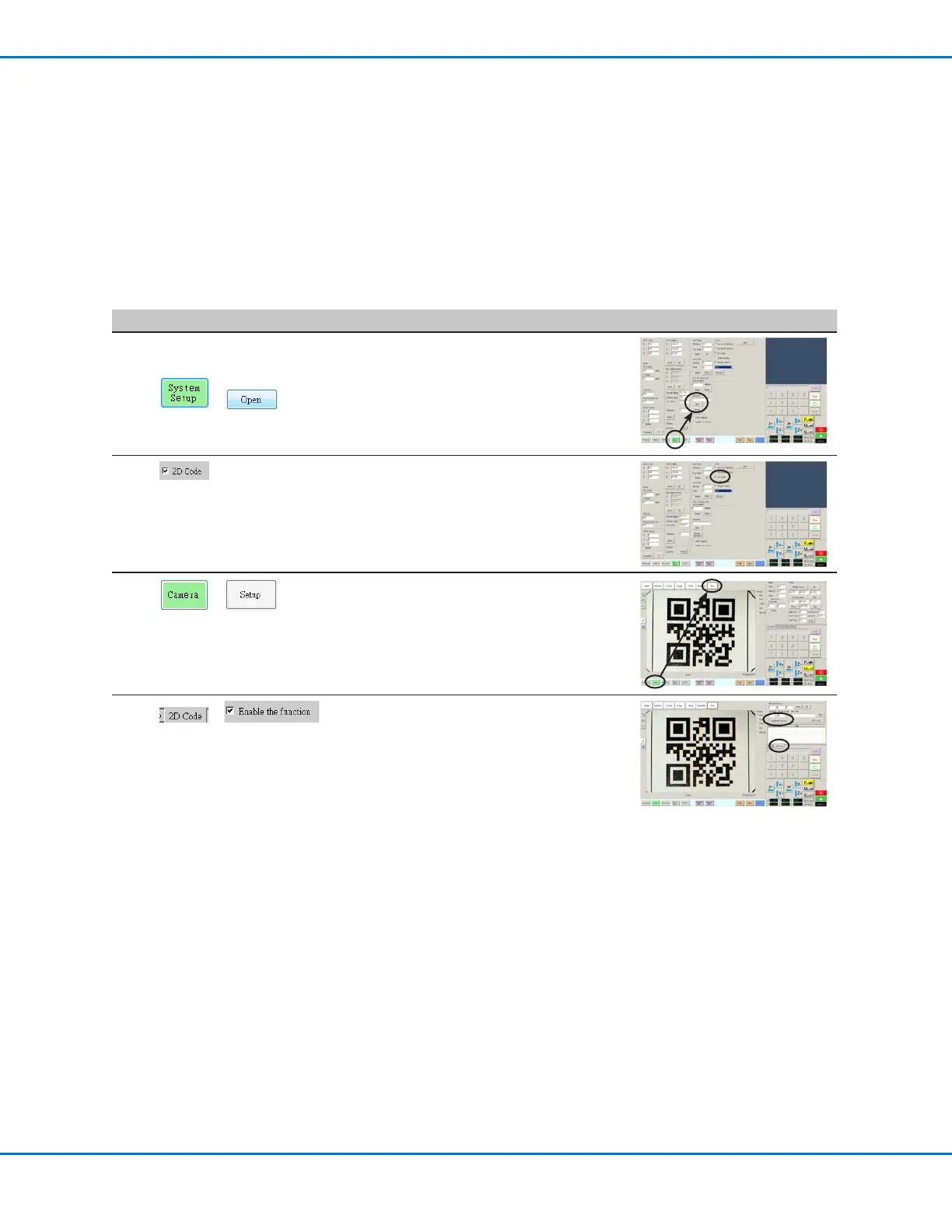
To Enable QR Code Scanning
# Click Step Reference Image
1
>
• Click the SYSTEM SETUP tab, then click
OPEN.
2
• Check 2D CODE to enable QR code
scanning.
3
>
• Click the CAMERA tab and then click SETUP
at the top of the Camera screen.
The camera setup elds appear.
4
>
• Click the 2D CODE tab to open the code
setup elds, then check ENABLE THE
FUNCTION.



 To Next Page