www.nordsonefd.com info@nordsonefd.com 800-556-3484 Sales and service of Nordson EFD dispensing systems are available worldwide.
EV Series Automated Dispensing Systems
21
Power On the System
After the system is fully installed, including the dispensing system
components, switch on the system to verify the installation.
1. Make sure the following installation tasks are complete:
• All applicable system components are installed (refer to
“Installation” on page 16).
• Input/output safety plug is installed (if applicable).
• EMERGENCY STOP button on the front panel of the
robot is not depressed.
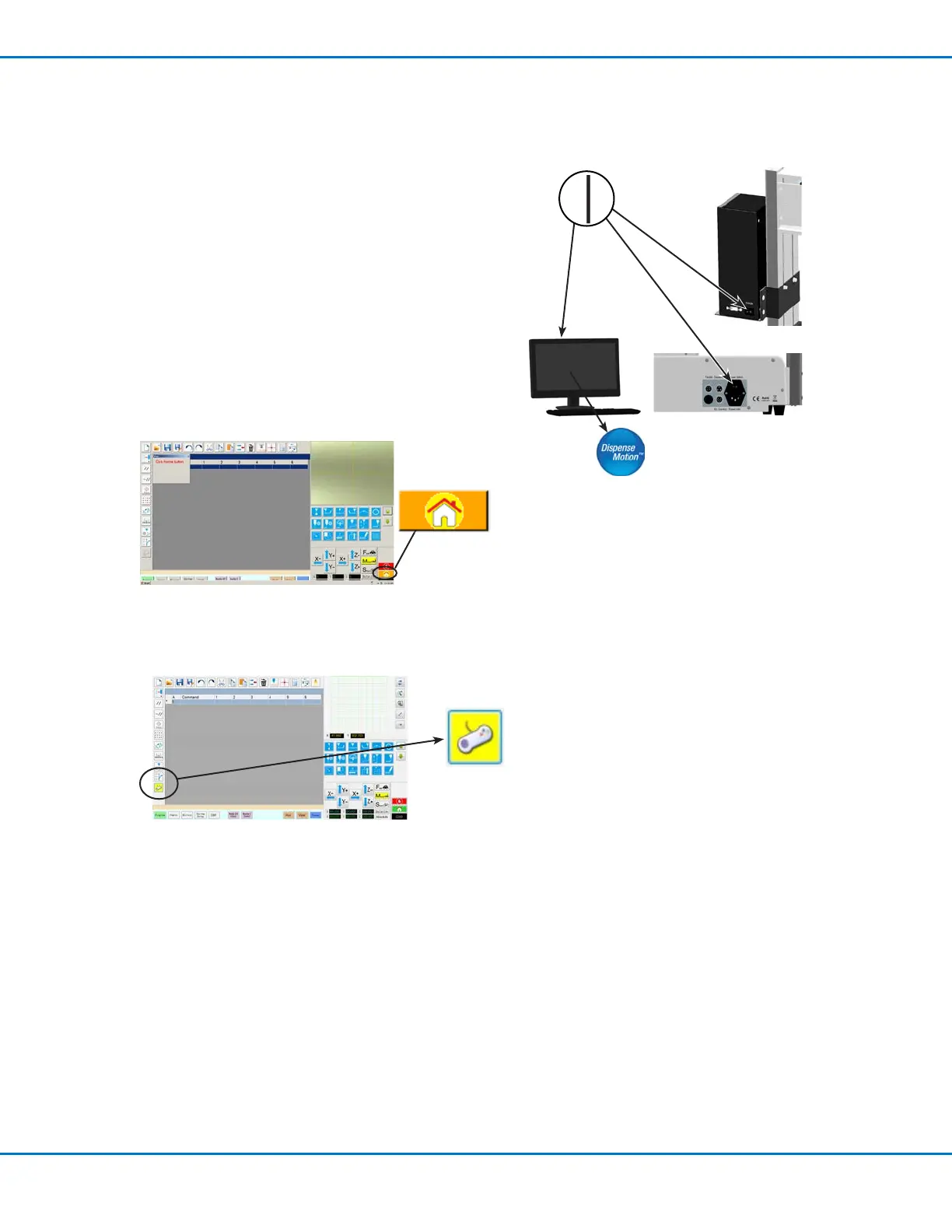
2. Switch on the DispenseMotion controller, monitor, and
robot.
3. Double-click the DispenseMotion icon to open the
dispensing software.
4. Click HOME.
The robot moves the camera to the home position (0,0,0)
and the system is ready.
5. If you connected the joystick and want to use it, click the JOYSTICK
icon to enable it. The icon turns yellow when the joystick is enabled.
For more information on using the joystick, refer to “Joystick” on page
15.
6. Enable the dispensing system, including the valve controller. Refer to
the dispensing equipment manuals as needed.
7. Refer to the following sections to set up the system and to create
programs for your applications:
• “Concepts” on page 22
• “Overview of the DispenseMotion Software” on page 25
• “Setup” on page 34
• “Programming” on page 48



 To Next Page