www.nordsonefd.com info@nordsonefd.com 800-556-3484 Sales and service of Nordson EFD dispensing systems are available worldwide.
EV Series Automated Dispensing Systems
35
Setting System Parameters (continued)
Item Screen Capture Description
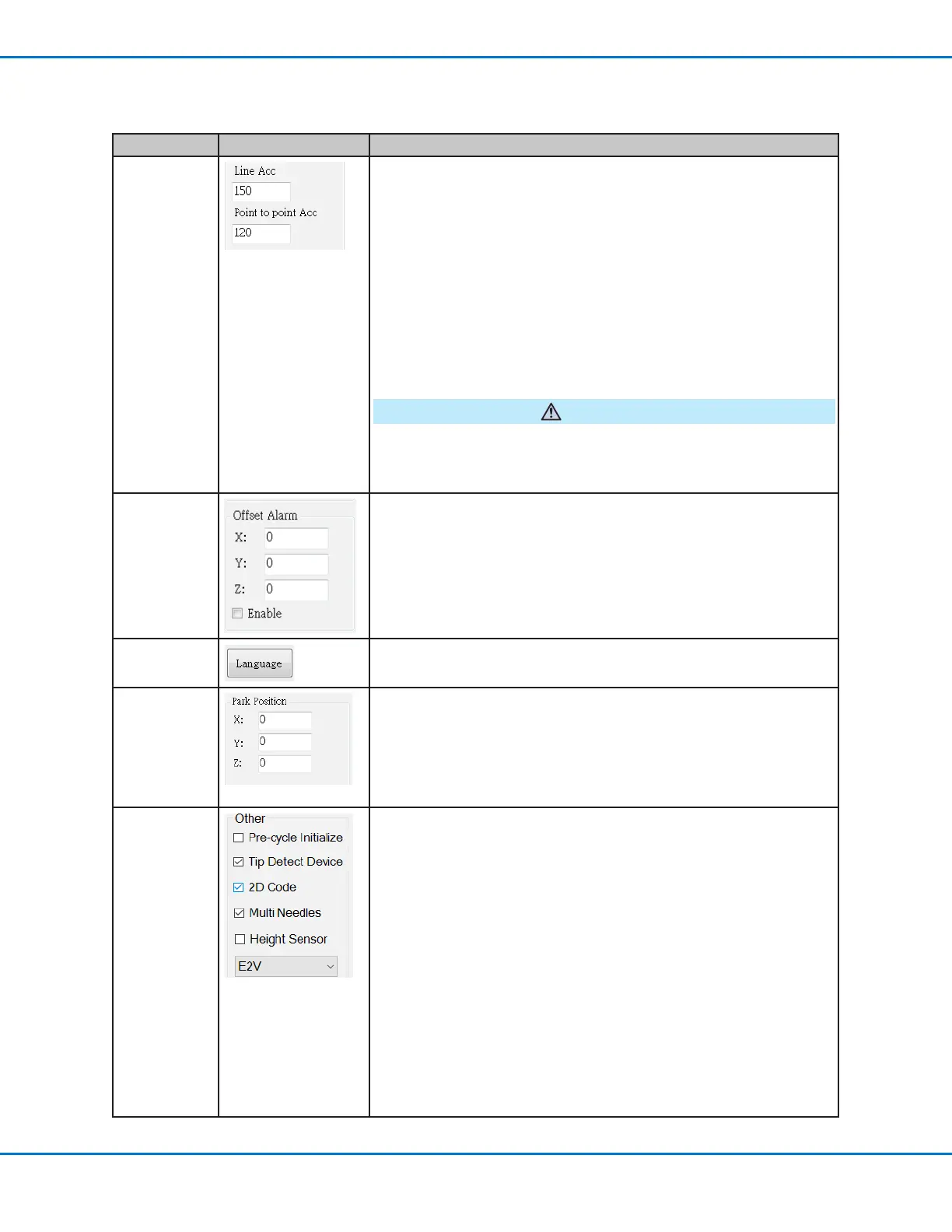
Line Acc
Point to point
Acc
Sets the rate of acceleration for line dispensing (Line Acc) or from point
to point (Point to point Acc):
• Line Acc is the dispensing speed within a line command, between
the start- to mid-points, the start- to end-points, and the mid- to mid-
points or mid- to end-points.
• Point to point Acc is the robot movement speed between two
dispense points.
Default: 200
Range: 20–500
NOTE: The higher the acceleration, the faster a program runs. However,
higher acceleration settings can also compromise pattern quality.
CAUTION
The robot automatically adjusts its speed depending on the complexity
of the pattern. Forcing the robot to run at higher speeds can compromise
accuracy and may disrupt system operation.
Offset Alarm Sets how much deviation the system allows for offsets. The default
settings are shown in the screen capture.
EXAMPLE: If Offset Alarm is enabled and the result of an automatic
offset performed by clicking Needle Z Detect or Needle XY Adjust is
outside the XYZ values specied for Offset Alarm, the system displays
an alarm.
Language
Sets the user interface language. Any change takes effect upon system
restart.
Park Position
Sets the position to which the dispensing tip moves to (1) purge uid or
(2) when the Park Position command occurs in a program.
Other
• Pre-cycle Initialize: If selected, the robot always moves to the home
position (0,0,0) before the start of a dispense cycle.
• Tip Detect Device: If the system includes a tip detector, check this
box.
• 2D Code: Check this box to enable or disable QR code scanning
capability. Refer to “Appendix C, QR Code Scanning Setup” on page
89 to set up QR code scanning.
• Multi Needles: To dispense using more than one dispenser (up to 5
dispensers possible), check this box. Refer to “Appendix D, Multi-
Needle Setup and Use” on page 92 to set up a multi-dispenser
system.
• Height Sensor: If the system includes the optional height sensor,
check this box. Refer to “Appendix E, Height Sensor Setup and Use”
on page 97 for all information related to the height sensor.
• Model drop-down menu: Sets the dispensing software conguration;
this setting must match the system conguration (model).



 To Next Page