DOC-00500 Rev. F 7–5
Eden500V/350V/350 User Guide
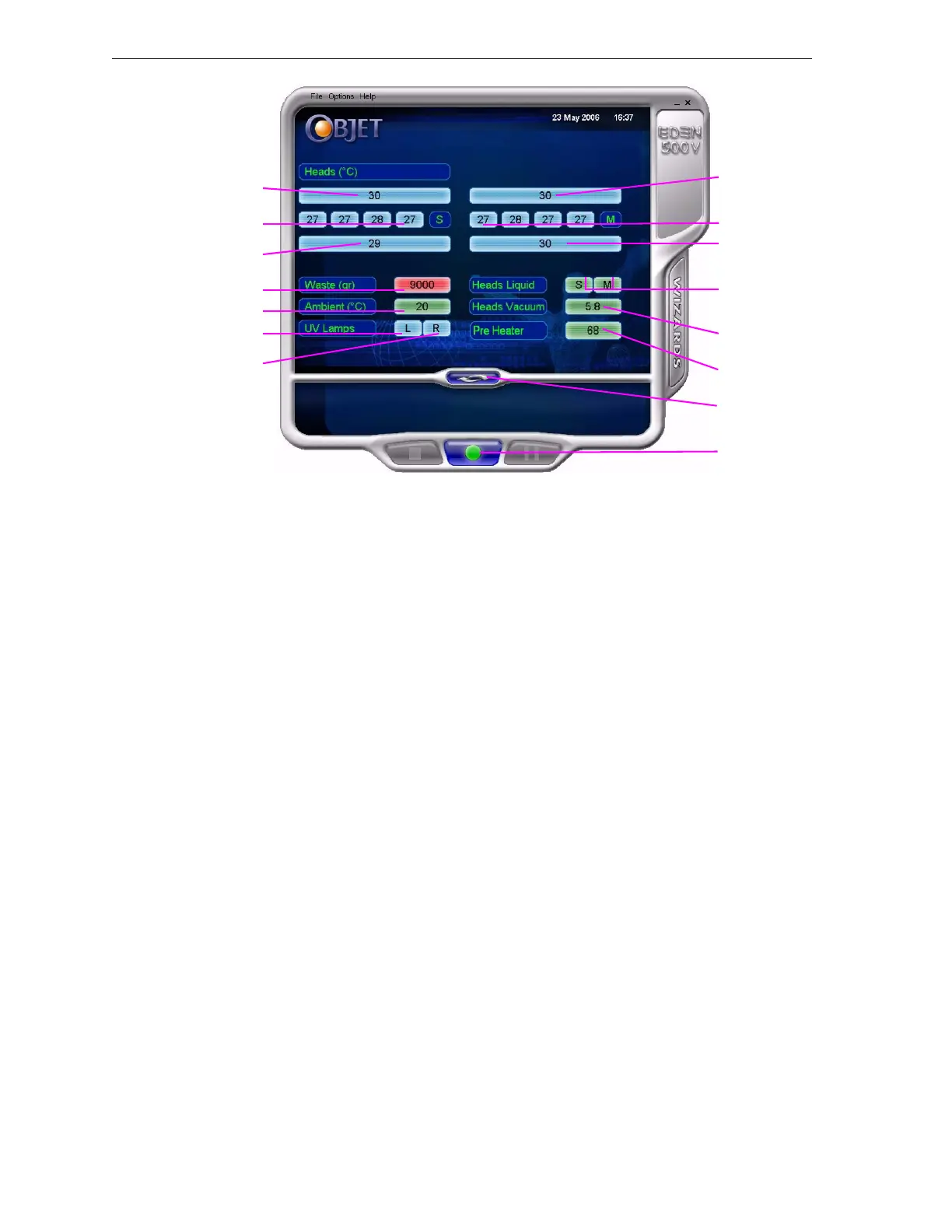
Figure 7-4: Eden printer indicators
Printer
Interface
Color Key
Thebackgroundcolorsintheprinterindicatorfieldstellyouataglance
whetherornotthevalueoritemissuitableorreadyforprinting.
• Green—suitable/readyforprinting
Forexample,infigure 7‐4:
Ambient—Theambienttemperatureoftheprintingchamberis
withintheacceptablerange.
HeadsLiquid—Thelevelofmodelandsupportmaterialintheprint‐
blockreservoirisOK.
HeadsVacuum—Thevacuumlevelinthesystemiswithinthe
acceptablerange.
Pre‐Heater—Themodelandsupportresinsneedtobeheatedbefore
beingsuppliedtotheprintblock.Thetemperaturehasreachedthe
acceptablerange.
• Red—notsuitableforprinting(orindicatesawarning)
Forexample,infigure 7‐4:
Waste—Theweightofthewastecontaineris9000grams,morethan
allowedwhenbeginningaprintjob.(See“ReplacingtheWaste
Container”onpage 47.)
• Blue—notreadyforprinting
Forexample,infigure 7‐4:
UVlamps—TheUVlampsarenoton(ornotoperatingatfullpower).
Heads(°C)—Theheadshavenotreachedthetemperaturerequired
forprintingmodels.
Block temp.
in front of
support heads
Block temp.
behind
support heads
Waste weight
Display
toggle button
Printer set to
online mode
(green)
Temp. of each
support head
Chamber temp.
Left UV lamp
Right UV lamp
Block temp.
behind
model heads
Temp. of each
model head
Block temp.
in front of
model heads
Support/Model
material in print-
block reservoir
System
vacuum level
Pre-heating of
support & model
material



 To Next Page