DOC-00500 Rev. F 5–3
Eden500V/350V/350 User Guide
Preparing Models for Production
Toproducemodels,youmustopenoneormorefilesinObjetStudioand
positiontheobjectsonthebuildtray.Youcanplaceobjectsonthebuildtray
intwoways:
• byinsertingindividualstlorslcfiles
• bypastingobjectsthatyoucopiedtotheWindowsclipboard
Ifyouknowwhattypeofmodelmaterialwillbeusedtoproducethe
models,makesureitisselectedfromthematerialdrop‐downmenu.
Figure 5-3: Model material selection toolbar
Note: It is not necessary to select the model material now, but it is
recommended—each type of material has unique characteristics
that may affect the valid positioning of objects on the build tray.
Opening STL
& SLC Files
To place an object on the build tray:
1. OpentheInsertdialogbox—
• FromtheObjectmenu,selectInsert.
or—
• Onthetoolbar,clicktheInsertModelicon .
or—
• Right‐clickonthebuildtray,andselectInsert.
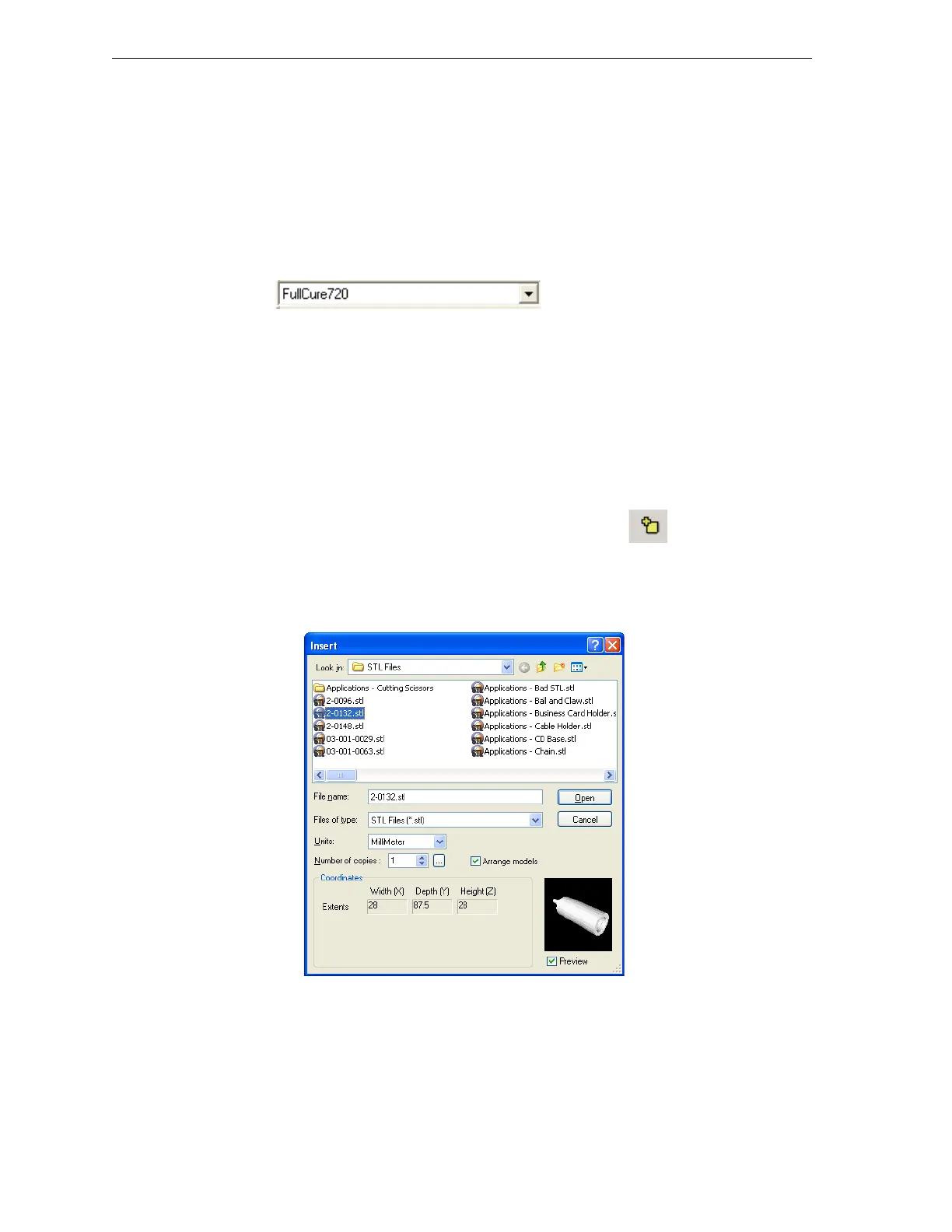
TheInsertdialogboxappears.
Figure 5-4: Insert dialog box
2. IntheLookinfield,displaytheappropriatefolder.
3. IntheFilesoftypefield,selectthefiletypestodisplay(stl,slc).
4. Selectthedesiredfile,andmakesurethatitappearsintheFilename
field.



 To Next Page